

 EnglishEN
 ItalianoIT
 DeutschDE
 EspañolES
 PortuguêsPT
 РусскийRU
Le guide de téléchargement de fichiers KESS3 tuning constitue la référence incontournable en matière de procédure de travail pour les techniciens automobiles et les spécialistes de la performance tuners qui lisent et écrivent des données d’ECU à l’aide du matériel KESS3 d’Alientech. Un téléchargement de fichier KESS3, officiellement appelé opération de lecture/écriture de l’ECU, transfère des données de calibrage entre l’outil et l’unité de contrôle du moteur du véhicule. Le KESS3 prend en charge trois modes de fonctionnement : OBD, Bench et Boot. Chaque mode correspond à un type différent de scénario d’accès à l’ECU. Le logiciel Alientech Suite gère automatiquement le recalcul lors de chaque écriture, et la fonction de récupération intégrée restaure le fichier d’ECU d’origine si une écriture est interrompue. Maîtriser ces principes fondamentaux avant d’intervenir sur un véhicule est ce qui fait la différence entre un travail soigné et un remplacement coûteux de l’ECU.
Comment choisir le module de commande KESS3 mode adapté à votre projet d'ECU tuning
KESS3 prend en charge trois modes distincts.: OBD, Bench et Boot. Les protocoles pour chaque mode s'achètent séparément ; votre liste de protocoles actifs détermine donc directement les véhicules que vous pouvez prendre en charge. Choisir un mode inadapté fait perdre du temps et, dans le pire des cas, entraîne des écritures incomplètes.
OBD mode Se connecte via le port de diagnostic du véhicule. Il s'agit de l'option la plus rapide pour les véhicules de série standard dont l'ECU est accessible via la prise OBD-II sans avoir à démonter aucun composant. La plupart des voitures particulières courantes équipées d'ECU Bosch, Continental, Delphi et Marelli entrent dans cette catégorie pour les modifications de routine de niveau 1 et 2 sur les remap.

Banc mode nécessite un accès physique à l'ECU. Vous devez démonter l'unité du véhicule et la connecter directement à sa carte électronique à l'aide d'un faisceau de câbles de banc. Ce modèle mode est indispensable lorsque l'accès OBD est bloqué par le constructeur, lorsque vous devez lire des zones de mémoire protégées ou lorsque l'état du câblage du véhicule rend la communication OBD peu fiable.
Botte mode va encore plus loin. Il accède à l'ECU au niveau du processeur, en contournant entièrement les couches de communication standard. Le démarrage mode est nécessaire pour les calculateurs verrouillés, les unités de commande de nouvelle génération dotées de fonctionnalités avancées security, ainsi que dans les situations où le mode Bench mode ne permet pas d’effectuer une lecture complète. Il présente la plus grande complexité technique et le risque le plus élevé en cas d’instabilité de la tension ou de la connexion.
| Mode | Point de connexion | Meilleur cas d'utilisation | Niveau de risque |
|---|---|---|---|
| OBD | Port de diagnostic | Modèles remap standard sur les calculateurs accessibles | Bas |
| Banc | Carte électronique d'ECU | ECU protégés ou partiellement verrouillés | Moyen |
| Botte | Broches du processeur | ECU verrouillées ou de dernière génération | Haut |
Astuce de pro : Procurez-vous les protocoles de diagnostic pour les modes que vous utilisez le plus souvent avant de prendre rendez-vous. L'absence d'un protocole de démarrage sur un calculateur verrouillé implique de refuser le véhicule ou de retarder l'intervention de plusieurs jours.
Bonnes pratiques pour la préparation et la gestion des fichiers d'ECU KESS3 avant le téléchargement
C'est lors de la préparation des fichiers que surviennent la plupart des erreurs de téléchargement. Une structure de fichiers désorganisée peut entraîner l'écriture d'un fichier modifié dans le mauvais véhicule ou, pire encore, la réécriture d'une version obsolète dans un calculateur que le concessionnaire a entre-temps mis à jour.
Créer des dossiers dédiés par véhicule, en utilisant un format de nommage cohérent. La structure “ Registration_CustomerName_Vehicle ” s'avère efficace dans la pratique. Un dossier nommé « AB21XYZ_Smith_VW_Golf8_GTI » contient toutes les données lues, tous les fichiers modifiés et toutes les notes de travail relatives à ce véhicule spécifique. Ce format permet de savoir immédiatement quel fichier correspond à quelle voiture sans avoir à ouvrir quoi que ce soit.
La sauvegarde des données d'origine de l'ECU original est indispensable. Ces données constituent votre point de référence pour la restauration. Enregistrez-les dans le dossier du véhicule avant d'envoyer tout fichier pour modification. Ne les écrasez jamais.
Étapes clés de préparation avant chaque téléchargement :
- Confirmez que l'identifiant de l'ECU correspond à la fiche du véhicule. Une divergence signifie que vous travaillez avec le mauvais fichier.
- Enregistrez le fichier de lecture original en y incluant un horodatage dans le nom du fichier.
- Vérifiez que le fichier modifié provient bien de la lecture « original » correspondante, et non d'une carte de bases générique.
- Vérifiez que le logiciel tuning a bien appliqué les corrections de la version checksum avant de charger le fichier dans Alientech Suite.
- Confirmez que la version du protocole dans Alientech Suite correspond à la révision matérielle de l'ECU.
Les mises à jour de l'ECU effectuées par le concessionnaire présentent un risque particulier. Si un véhicule s'est rendu chez un concessionnaire depuis votre dernière lecture, la version logicielle de l'ECU a peut-être changé. L'écriture de votre fichier modifié, issu de l'ancienne lecture, sur un ECU mis à jour par le concessionnaire risque d'entraîner une incompatibilité entre les données d'étalonnage et le nouveau logiciel de base. Considérez chaque véhicule ayant fait l'objet d'une visite chez le concessionnaire comme un nouveau projet. Effectuez une nouvelle lecture, créez une nouvelle tâche et envoyez un ticket d'assistance à votre fournisseur de fichiers tuning afin d'obtenir un calibrage mis à jour.
Guide étape par étape pour importer un fichier tuning avec KESS3
Un téléversement propre suit une séquence fixe. S'en écarter introduit un risque à chaque étape.
- Connecter le matériel. Raccordez le KESS3 au véhicule à l'aide du câble adapté au modèle mode que vous avez choisi. Pour les interventions OBD, branchez-le sur le port de diagnostic. Pour les interventions sur banc d'essai ou dans le coffre, raccordez le faisceau au calculateur avant de mettre l'appareil sous tension.
- Vérifier la tension. Une connexion stable et la tension correcte sont requises avant que toute opération de lecture ou d'écriture ne commence. Utilisez une alimentation externe pour les travaux sur banc et en mode démarrage afin de maintenir la tension au-dessus de 12,5 V tout au long de l'opération.
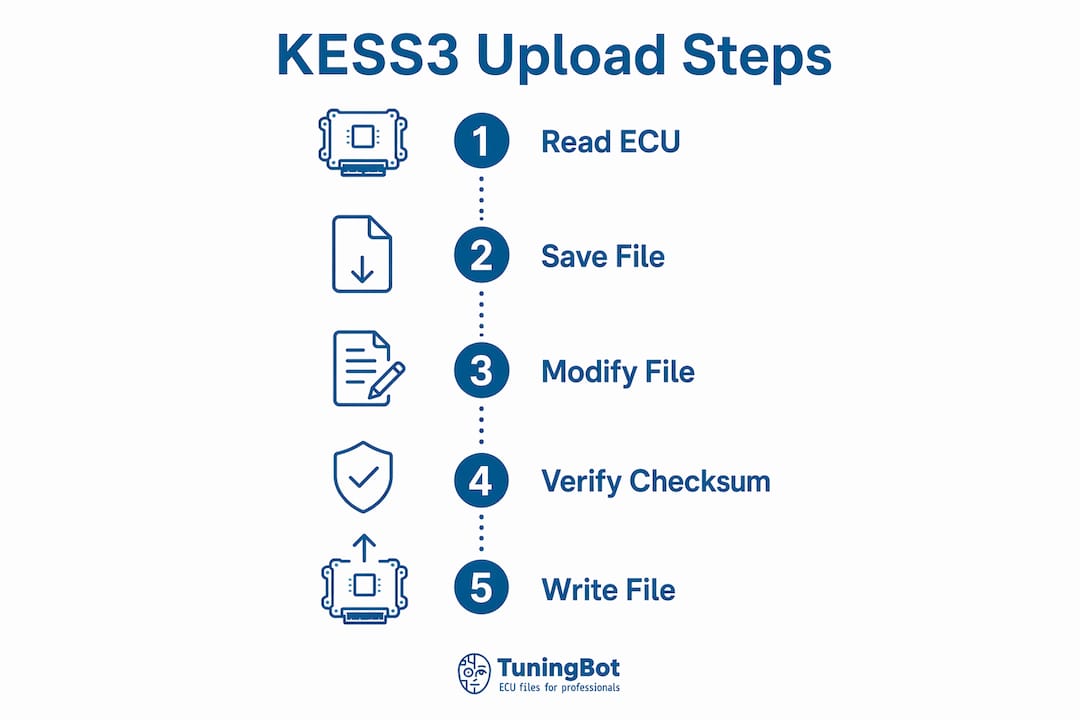
- Lisez l'ECU. Ouvrez Alientech Suite, sélectionnez le véhicule et l'ECU, puis lancez la lecture. Le logiciel enregistre l'identifiant de l'ECU et stocke le fichier binaire. Confirmez que la taille du fichier et l'identifiant de l'ECU correspondent à vos dossiers avant de continuer.
- Créer un emploi dans le service de fichiers. Téléchargez le fichier original en le parcourant via le TuningBot Tune Your File workflow. TuningBot supprime les frictions habituelles des travaux KESS3 : pas de barrière d'enregistrement, pas de crédits prépayés, tarification publique via le Liste des prix TuningBot, et vérification du service par le Couverture des services ECU avant de mettre le véhicule à la casse.
- Chargez le fichier modifié. Une fois que vous avez reçu le fichier calibré, importez-le dans Alientech Suite. Alientech Suite recalcule automatiquement les valeurs checksum pendant le processus d'écriture. Cela empêche les données corrompues d'atteindre l'ECU.
- Commencer l'écriture. Confirmez que le véhicule est dans le bon état (contact mis, moteur éteint pour la plupart des opérations OBD). Lancez l'écriture et n'interrompez ni l'alimentation ni la communication.
- Vérifier l'écriture. Une fois l'écriture terminée, effectuez une lecture de vérification. Comparez le résultat de cette lecture avec le fichier modifié afin de vous assurer que les données écrites correspondent bien à celles prévues.
Astuce de pro : Surveillez le journal d'état de la suite Alientech pendant l'écriture. Tout délai d'attente de communication ou avertissement de chute de tension doit vous inciter à interrompre l'opération et à effectuer un diagnostic avant de poursuivre. Le non-respect de ces avertissements est la principale cause d'écritures incomplètes.
La fonction de récupération rétablit le fichier ECU original si une opération d'écriture est interrompue. Cette fonction ne fonctionne que si la lecture du fichier original a été correctement enregistrée dans la tâche. Tester le processus de récupération sur un ECU de banc d'essai avant votre première tâche en conditions réelles vous permet de gagner en confiance et de vérifier que votre configuration est correcte.
Le KESS3 offre également des vitesses de transfert USB jusqu'à 10 fois plus rapides que la génération précédente. Des transferts plus rapides réduisent la période pendant laquelle une interruption de connexion peut provoquer une écriture partielle.
Quelle est la différence entre le KESS3 Master et le Slave modes ?
Les rôles « Master » et « Slave » ne gèrent pas les modes comme l'OBD ou le Bench. Ils définissent les autorisations d'édition de l'outil et sa place dans le flux de travail au sein d'une entreprise tuning.
Le KESS3 Master mode lit et écrit des fichiers non cryptés. Le tuner reçoit les données binaires brutes, les modifie à l'aide d'un logiciel d'étalonnage tel qu'ECM Titanium ou WinOLS, puis écrit directement le fichier modifié. Le Master mode offre une autonomie totale sur le processus de calibrage. Il convient aux ateliers disposant en interne d’une expertise tuning et des licences logicielles nécessaires pour permettre l’édition indépendante des fichiers.
L'outil KESS3 Slave mode lit et écrit des fichiers cryptés. L'outil Slave ne permet pas de modifier le fichier localement. Le fichier crypté est donc envoyé à un partenaire Master de confiance ou à un service de fichiers tuning en ligne pour être « modifié ». Le fichier chiffré « modifié » est renvoyé et réécrit dans l'ECU. Ce flux de travail convient aux ateliers spécialisés dans l'accès aux véhicules et le service client plutôt que dans le développement de calibrages.
Avantages et inconvénients du Master mode :
- Avantage : Contrôle total sur les données d'étalonnage et les modifications de fichiers
- Avantage : Aucune dépendance envers des partenaires externes pour le traitement des fichiers
- Inconvénient : nécessite un investissement dans un logiciel d'étalonnage et une expertise en tuning
- Inconvénient : responsabilité accrue en cas d'erreurs d'étalonnage
Avantages et inconvénients du Slave mode :
- Avantage : Coût d'entrée inférieur et flux de travail plus simple
- Avantage : accès à des réglages effectués par des experts via les partenaires Master ou des services tels que TuningBot
- Inconvénient : Le délai de traitement dépend de la disponibilité du partenaire principal
- Inconvénient : Aucun accès direct au binaire brut pour des modifications personnalisées
Le choix stratégique entre « Master » et « Slave » dépend du cœur de métier de votre atelier. Un atelier à fort volume traitant de nombreux véhicules par jour tirera parti de la rapidité et de la simplicité du « Slave mode ». Un atelier spécialisé tuning développant des calibrages sur mesure pour le sport automobile ou des véhicules modifiés a besoin de l'accès complet à l'édition offert par le Master mode. Pour plus de détails sur la manière dont ces distinctions s'appliquent aux différentes plateformes d'outils, le Guide d'achat des outils tuning sur TuningBot traite ce sujet en détail.
Défis courants de téléchargement KESS3 et comment les résoudre
Les échecs de téléchargement suivent des schémas prévisibles. Les détecter à temps permet d'éviter d'endommager l'ECU.
Causes fréquentes d'échec des téléchargements :
- Protocole incorrect sélectionné pour la version matérielle de l'ECU
- Fichier modifié créé à partir d'une lecture original obsolète ou non correspondante
- Chute de tension pendant l'écriture causée par une batterie de véhicule faible ou l'absence d'alimentation externe
- Interruption de communication due à un connecteur OBD desserré ou à un faisceau de banc endommagé
- Erreurs de checksum dans le fichier modifié qui n'ont pas été corrigées avant le téléchargement
Validation du checksum Il s'agit de la première étape de diagnostic lorsqu'une écriture échoue ou que l'ECU présente un comportement inattendu après un réglage. Alientech Suite recalcule automatiquement les checksum, mais si le fichier modifié comportait déjà des erreurs checksum provenant du logiciel de calibrage, ces erreurs peuvent persister. Vérifiez toujours le fichier à l'aide d'un outil checksum avant de le charger dans Alientech Suite.
Étapes de dépannage pour les erreurs courantes :
- Vérifiez à nouveau l'identifiant de l'ECU dans la base de données du protocole avant de réessayer toute opération d'écriture
- Vérifiez que la version du fichier modifié correspond exactement à la version lue « original ».
- Utilisez une alimentation externe pour toutes les opérations « Bench » et « Boot ».
- Vérifiez que tous les connecteurs et broches du faisceau de câbles ne présentent ni traces de corrosion ni dommages avant de les rebrancher.
- Exécuter immédiatement la fonction de récupération si une opération d'écriture est interrompue avant d'être terminée
Les calculateurs mis à jour par le concessionnaire constituent un cas particulier de défaillance. Si la version logicielle du calculateur a été modifiée chez le concessionnaire, votre fichier modifié existant n'est plus compatible. La marche à suivre consiste à effectuer une nouvelle lecture, à la soumettre en tant que nouvelle tâche et à attendre la mise à jour du calibrage. L'écriture d'un fichier incompatible sur un calculateur mis à jour par un concessionnaire est la cause la plus fréquente de défaillances des calculateurs dans les ateliers professionnels.
Points clés à retenir
Pour que le téléchargement de fichiers KESS3 se déroule sans encombre, il est nécessaire de sélectionner correctement le mode, de respecter une gestion rigoureuse des fichiers et de procéder à la validation checksum à chaque étape stage du processus.
| Point | Détails |
|---|---|
| Le choix du mode détermine le risque | L'OBD convient aux interventions standard ; les méthodes « Bench » et « Boot » nécessitent un accès physique au calculateur et présentent un risque plus élevé. |
| La dénomination des fichiers permet d'éviter les erreurs | Utilisez la structure de dossiers « Registration_CustomerName_Vehicle » pour séparer les fichiers de lecture et les fichiers modifiés. |
| Le recalcul du checksum s'effectue automatiquement | Alientech Suite recalcule les checksum à chaque écriture, mais vérifie le fichier « modifié » avant de le charger. |
| La fonction de récupération nécessite une préparation préalable | Enregistrez la valeur original lue correctement dans la tâche avant chaque écriture, afin que la fonction de récupération puisse la restaurer si nécessaire. |
| Le choix entre « Master » et « Slave » relève d'une décision stratégique | Choisissez Master pour les travaux d'étalonnage internes ; choisissez Slave pour l'accès aux véhicules de série avec des services de fichiers externes. |
Ce que nous avons appris des flux de téléchargement KESS3 au fil des ans
L'erreur la plus fréquente que nous voyons dans les ateliers professionnels est de traiter le KESS3 comme un appareil prêt à l'emploi. Ce n'est pas le cas. Le matériel est fiable, mais le flux de travail qui l'entoure détermine si une intervention réussit ou échoue.
La rigueur dans le respect des procédures prime sur les capacités matérielles. Un technicien qui suit systématiquement la séquence « lecture, vérification, modification, écriture, vérification » commettra bien moins d’erreurs que celui qui, sous la pression du temps, saute des étapes. La fonction de récupération est certes très utile, mais elle ne remplace pas le fait d’effectuer correctement le travail dès le départ. Nous recommandons de tester la récupération sur un calculateur de banc au moins une fois avant de s'y fier lors d'une intervention en conditions réelles.
La plupart des ateliers qui se lancent sur le marché sous-estiment l’importance du choix entre « Master » et « Slave ». L’Slave mode ne constitue pas une limitation. Pour un atelier privilégiant le débit plutôt que le développement de méthodes d’étalonnage, l’Slave mode, associé à un service de fichiers fiable tel que TuningBot, permet d’obtenir des délais d’exécution plus courts et des taux d’erreur plus faibles que si l’on tentait d’effectuer des modifications en interne sans disposer de l’expertise nécessaire. Le service de fichiers de réglage en ligne flux de travail importe autant que la configuration de l'outil.
Une dernière remarque : les mises à jour de l'ECU effectuées par les concessionnaires prennent les garages au dépourvu plus souvent que tout autre problème. Prenez l'habitude de demander à chaque client si le véhicule est passé chez un concessionnaire depuis la dernière révision. Cette simple question permet d'éviter la plupart des pannes liées à une incompatibilité de version.
— Équipe technique de TuningBot
Le rôle de TuningBot dans votre flux de travail KESS3 tuning
Les flux de travail professionnels KESS3 reposent sur des fichiers de calibration rapides et précis, fournis sans friction administrative. TuningBot est conçu spécifiquement pour ce point du flux de travail KESS3: lire les données du calculateur à l'aide de KESS3, télécharger directement le fichier original, obtenir un calibrage validé par un ingénieur, puis le réécrire en suivant un processus de vérification contrôlé.
Contrairement aux services de fichiers axés sur le crédit ou contrôlés par les concessionnaires, TuningBot offre aux ateliers un accès direct de la lecture KESS3 au fichier calibré. Vous pouvez vérifier le Liste des prix de TuningBot public, télécharger via Reprogrammer le fichier, vérifiez les familles d'ECU prises en charge dans le Couverture des services ECU, et examiner les disponibles Services de l'ECU avant que le travail ne soit validé.
TuningBot prend directement en charge Alientech KESS3, ainsi qu’AutoTuner, Magic Motorsport, CMD, Dimsport et PCMFlash. Les services proposés comprennent les Stages 1, 2 et 3, la désactivation du FAP, de l'EGR et de l'AdBlue/SCR, la suppression des codes d'erreur (DTC), la désactivation de l'IMMO, ainsi que la correction des modules DSG/TCU tuning et checksum, et bien plus encore. Pour les ateliers utilisant des outils Slave KESS3, TuningBot s’avère particulièrement utile car il donne accès à une assistance professionnelle en matière de calibrage sans obliger l’atelier à disposer en interne de toutes les capacités nécessaires au développement de cartographies.
L'avantage pratique est simple : le KESS3 gère l'opération de lecture/écriture, tandis que TuningBot gère la couche de calibration. Cette séparation permet à un atelier d'augmenter le volume de travail en toute sécurité, de maîtriser le temps d'immobilisation en atelier et d'éviter le coût de la détention de crédits ou de l'attente de l'approbation du revendeur avant qu'un fichier ne puisse être traité.
FAQ
Quels sont les trois modes de fonctionnement de KESS3 ?
KESS3 prend en charge les modes OBD, Bench et Boot modes. Le mode OBD se connecte via le port de diagnostic, le mode Bench nécessite un accès direct à l'ECU, tandis que le mode Boot fonctionne au niveau du processeur pour les ECUs verrouillés ou de dernière génération.
Comment fonctionne le recalcul du rapport checksum lors des envois vers KESS3 ?
Alientech Suite recalcule automatiquement les valeurs checksum à chaque opération d'écriture. Cela empêche les données d'étalonnage corrompues d'atteindre l'ECU et de provoquer des dysfonctionnements.
Que se passe-t-il si une écriture KESS3 est interrompue ?
La fonction de récupération rétablit le fichier ECU original si une opération d'écriture est interrompue. Pour que la récupération fonctionne, la lecture du fichier original doit avoir été correctement enregistrée dans la tâche avant le début de l'écriture.
Dans quels cas un atelier devrait-il privilégier le modèle Slave mode plutôt que le modèle Master mode ?
L'outil Slave mode est destiné aux ateliers qui privilégient l'accès aux véhicules et le débit plutôt que le développement en interne de procédures d'étalonnage. Les outils Slave envoient des fichiers cryptés à un partenaire Master ou à un service de fichiers pour modification, ce qui réduit le besoin d'expertise en matière de logiciels d'étalonnage.
Pourquoi une mise à jour de l'ECU du concessionnaire nécessite-t-elle une nouvelle lecture ?
Une mise à jour effectuée par un concessionnaire modifie la version de base du logiciel de l'ECU. L'écriture d'un fichier modifié, créé à partir de la version précédente, sur l'ECU mis à jour entraîne une incompatibilité de calibrage susceptible d'endommager l'ECU ou de provoquer des problèmes de conduite.
Recommandé
Lié : keep your KESS3 current with the Master / Renouvellement annuel des Slave, and add ECM Titanium Full (bundle price with a Master) for in-house map editing between file service orders.