

 EnglishEN
 ItalianoIT
 DeutschDE
 EspañolES
 PortuguêsPT
 FrançaisFR

A fleet ECU tuning file is never one file. It is a set of files, one per ECU and software version in the fleet, each tied to a specific vehicle, a known original and a recorded result. Workshops that treat a fleet job as “the same tune, repeated” run into mismatched software versions, missing originals and units nobody can trace later. Workshops that treat it as a controlled file library avoid those problems. We provide custom ECU and TCU calibration files for workshops and tuners, and this guide covers the workflow we would apply to fleet work: identification, a version register, per-unit handling, validation and the choice of modifications.
TL;DR
- Group fleet vehicles by ECU hardware number and software version, not by make and model. Two identical-looking trucks can carry different software.
- Keep the original read, the modified file, the checksum status and the write result for every unit in one register, so each vehicle can be restored and audited.
- Order a file per unit from its own original read. Reusing a modified file on a different software version is the most common source of fleet errors.
- Choose calibration changes for duty cycle: ECO calibration, gearbox tuning, start-stop behavior and DTC handling matter more in fleets than peak power.
- Emissions-related changes are for off-road or motorsport applications only where permitted by applicable law.
Оглавление
- What a fleet file set actually contains
- Matching a file to the vehicle
- Building the file register
- The per-unit workflow
- Why a failed or mismatched write matters more in a fleet
- Choosing calibration changes for fleet duty
- Mixed fleets and legacy units
- Ordering fleet files from TuningBot
- ЧАСТО ЗАДАВАЕМЫЕ ВОПРОСЫ
- Источники
What a fleet file set actually contains
In a single-car job the tuner reads one ECU, orders one file and writes it back. In a fleet job the same steps repeat, but the number of variables multiplies. A mixed fleet of delivery vans, tractor units or agricultural machines can include several engine generations, several ECU families (Bosch, Continental, Siemens, Delphi, Marelli, Denso, plus ZF on the transmission side) and different software versions within the same model year.
A usable fleet file set has four parts per vehicle:
- The original read, unmodified, stored with the reading method used (for example, a bench, boot or OBD read with a tool such as Alientech KESS3, AutoTuner, FLEX, CMD or Dimsport, depending on what the ECU supports).
- The modified file returned for that exact original.
- Checksum status, meaning whether checksums were corrected and by which method.
- The write record: date, tool, result, and any DTCs or adaptation resets afterward.
The idea of tracking calibration data across versions and variants is standard practice in OEM calibration engineering. Vector’s calibration data management tool, for example, is described by its maker as tracking changes across versions and revisions, reusing work results and assigning responsibilities. A workshop does not need an OEM toolchain, but the same logic scales down to a spreadsheet or a structured folder tree.
Matching a file to the vehicle
The first discipline is identification. A file is valid for an ECU hardware and software combination, not for a model name. Before ordering, record:
- Vehicle identification: VIN, engine code, model year, transmission type.
- ECU or TCU part number, hardware number and software version, read from the label and confirmed by the tool.
- Reading method and tool, including the tool’s own identification output.
- Any known previous modification, since a unit that was already tuned will not read as stock.
When the fleet includes BMW Group vehicles, a BMW VIN decoder can supply factory records such as engine and production details, which makes it easier to confirm the build you expect before you read the unit. The ECU identification from the tool still decides which file applies.
The principle that a software update must be checked against the target vehicle’s hardware and software configuration is built into the regulatory framework for manufacturer updates. UN Regulation No. 156 requires the manufacturer’s update process to verify compatibility with the target vehicle before an update is issued. That regulation governs OEM software updates, not aftermarket calibration, but it describes the same sensible order of operations a workshop should follow: identify, verify compatibility, then change.
For platform-specific identification, our guide on Simos 18 ECU identification and file checks shows how this looks on one widely used family. Availability of any modification always depends on the ECU family, software version, reading method and technical compatibility, so a fleet cannot be assumed to be uniformly supported.
Grouping units into file classes
Once the identification data is collected, sort vehicles into classes by ECU hardware number plus software version. Each class gets one reference unit that is processed first. This gives you:
- A clear count of how many distinct files the job needs.
- An early signal if a unit reads differently from the others in its supposed class.
- A natural place to validate behavior before touching the rest of the class.
Grouping does not mean sharing a modified file across the class without checking. Every unit still gets its own original read, and the file is ordered against that read.
Building the file register
The register is the part that makes fleet work different from single-car work. It should let anyone in the workshop answer three questions for any vehicle: what is in the ECU now, what was in it before, and how do I return it to that state.
The UN R156 framework asks manufacturers for an auditable register of software versions and integrity-validation data for each relevant software identification before and after updates. A workshop-level equivalent is straightforward.
| Field | Why it matters in a fleet |
|---|---|
| Fleet unit number and VIN | Links the file to a physical vehicle |
| ECU/TCU hardware and software numbers | Defines which file class applies |
| Reading method and tool | Determines how the file must be written back |
| Original file name and checksum/hash | Proves the stock state is preserved |
| Ordered services | Records exactly what was changed |
| Modified file name and version | Prevents two variants being mixed up |
| Checksum correction performed | Confirms the file was written in a valid state |
| Write date, technician, result | Gives accountability and a service history |
| Post-write DTC and adaptation notes | Captures problems for the next visit |
A consistent naming convention does most of the work. Something like fleet unit, ECU family, software number, service code and revision lets a technician identify a file without opening it. Vector describes the same coordination concern in calibration management: traceable revisions, clear roles and parameter permissions keep variants and teams consistent. For a workshop, that translates into one person owning the register and one folder per vehicle that is never edited in place.
The per-unit workflow
The steps below apply to each vehicle. Our own technical guide on how an ECU file is written, covering UDS, checksums and flashing explains the write stage in more depth, and the online tuning file service workflow for workshops covers the ordering side.
1. Check the vehicle and battery state
Fleet vehicles often arrive straight from service. Confirm battery voltage support during the session, note any stored faults, and make sure the vehicle is not mid-way through another update or repair. A failed write on a work vehicle costs the operator downtime, so stable power is part of the job.
2. Read and store the original
Read the ECU or TCU with your compatible tool and save the original immediately in the unit’s folder. Before ordering anything, confirm that the identification data in the read matches the data you recorded from the label and the tool. If the two disagree, the unit does not belong in that file class.
3. Order the file for that original
Upload the original and select the services required. On our service, standard file orders need no mandatory registration, pricing is per file, and most standard files are delivered within approximately 15 to 20 minutes during published operating hours, depending on complexity and workload. Prepaid credits are optional, which suits fleets whose volume varies from month to month. Ordering per unit keeps each file tied to its own original.
4. Verify the returned file against the register
Before writing, check that the returned file’s identification fields match the original you uploaded and that the requested services are what you ordered. Log the file name and version.
5. Write, then confirm
Write with the tool that read the file, following its procedure for that ECU. Checksum handling is part of this stage, and where a checksum correction is needed it is available as a separate service. After writing, clear or read DTCs, observe idle and warm-up behavior, and note any adaptation relearning the platform needs.
6. Close the record
Record the result in the register, including the tool, the date and any faults found. If a unit misbehaves, the stored original lets you return it to stock without guesswork.
Why a failed or mismatched write matters more in a fleet
On a single vehicle, an interrupted write is a bench problem. Across a fleet it can be a pattern. The R156 text is aimed at manufacturers’ over-the-air updates, but its principles transfer: it requires protection of update authenticity and integrity and, for relevant OTA updates, a way to restore a previous version or reach a safe state after a failed or interrupted update. In workshop terms, that means three habits: never write without a verified original, validate the file’s integrity before flashing, and know the recovery route for that ECU before you start.
There is also a coordination risk across controllers. The Uptane deployment guidance recommends a single active Primary in a vehicle because several active Primaries can produce inconsistent ECU updates and interoperability problems. Aftermarket tuning is not an OTA architecture, but the lesson applies when you change both the engine ECU and the TCU on the same vehicle: keep the two files consistent with each other, and record both in the register against the same unit. A gearbox file ordered against a different engine calibration than the one now in the ECU is a variable you introduced yourself.
Common causes of fleet-level problems are practical:
- Software version mismatch between the original read and the file used.
- Modified files copied from one unit to another without a new read.
- Missing or uncorrected checksums after manual edits.
- Unrecorded earlier modifications that change what the original read represents.
- Mixed tool workflows with no note of which method read which unit.
Each of these is a register problem before it is a calibration problem.
Choosing calibration changes for fleet duty
Fleet vehicles are judged on uptime, fuel use and driver consistency rather than peak output. That shifts which services are relevant. Prices below are our published per-file prices, listed on our Прайс-лист на тюнинг ЭБУ.
| Услуга | Fleet relevance | Per-file price |
|---|---|---|
| ECO Tuning (fuel economy and drivability) | Targets consumption and drivability across duty cycles | €49.99 |
| Diesel Stage 1 Tuning | Calibrated performance file for diesel units | €49.99 |
| Petrol Stage 1 Tuning | Calibrated performance file for petrol units | €69.99 |
| Полный тюнинг КПП | Shift behavior on supported automatic and DSG/TCU units | €49.99 |
| Start & Stop Off | Changes start-stop behavior on supported units | €29.99 |
| DTC Off | Handles specific fault codes where applicable | €29.99 |
| Коррекция checksum | Keeps edited files valid for writing | €29.99 |
| Hotstart Fix | Addresses hot-start behavior on supported units | €19.99 |
For operators focused on consumption, our article on what ECU calibration can deliver for fuel economy sets out the realistic scope. We make no blanket promise of a percentage gain, because results depend on the engine, the duty cycle and the condition of the vehicle. Whether a given service is available for a given ECU depends on the ECU family, software version and reading method.
Emissions-related modifications
DPF, EGR, AdBlue/SCR and similar emissions-related modifications are intended only for off-road or motorsport applications where permitted by applicable law. In the United States, 40 CFR 86.1809-12 prohibits defeat devices on new vehicles and authorizes EPA testing for them under normal-use conditions, so road-registered fleet vehicles should be handled with that in mind. Our guide to emissions compliant tuning and U.S. checks covers the compliant side of the work. For wider reading on the calibration approach itself, see our tuning overview.
Mixed fleets and legacy units
Older units complicate the register. A tractor or truck with a previous owner’s modifications may not read as stock, and the file you receive depends on what the original contains. Record this at the identification stage. If you suspect a unit is already modified, note it, keep the read, and treat it as its own class rather than assuming it matches its neighbors.
Agricultural and commercial vehicles add further variety: the same engine can be paired with different ECU generations depending on the machine or emission stage. Treat the ECU number as the authority and the vehicle label as a hint.
Our perspective on fleet files
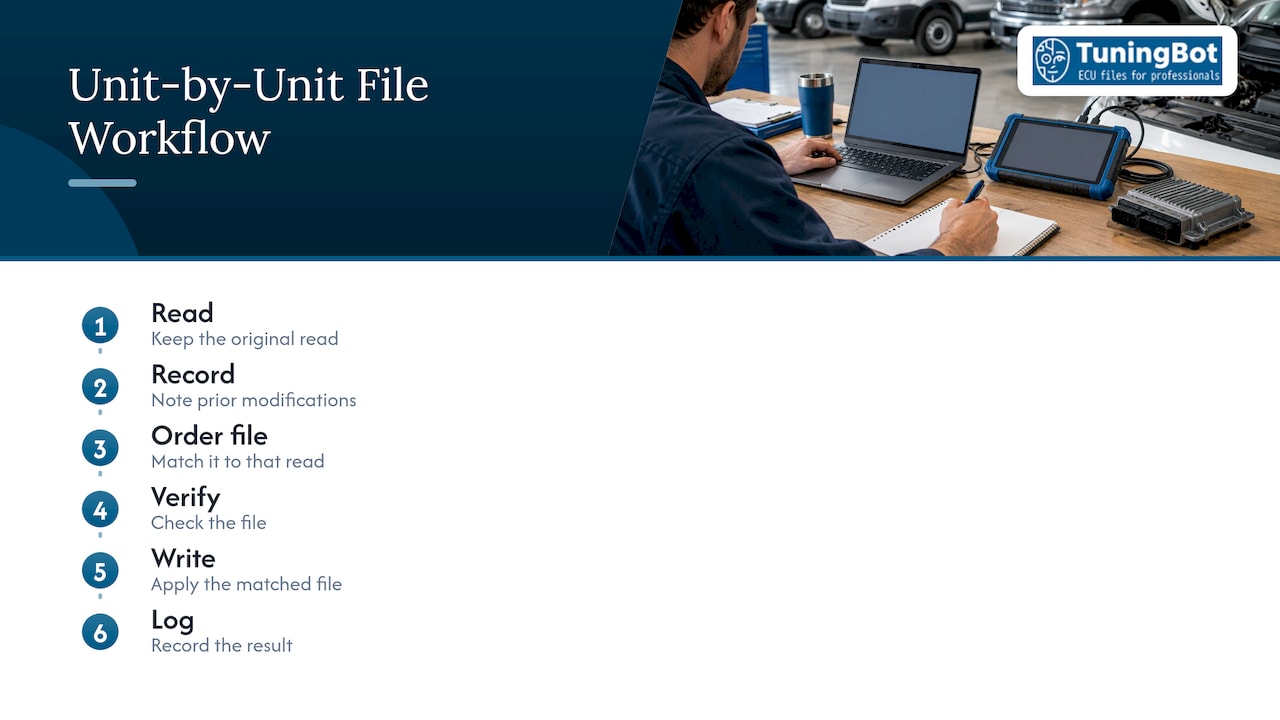
The technical weakness in most fleet jobs is not the calibration itself but the paperwork around it. A file that is correct for one original is wrong for the next one with a different software number, and the only protection is a unit-by-unit habit: read, record, order against that read, verify, write, log.
That is why we deliver each file against the original that was uploaded, offer checksum correction as a separate service, and keep pricing per file with no mandatory registration. A workshop can order unit by unit as vehicles come in, and use optional prepaid credits when volume justifies it. Our calibration engineers work from the ECU family and software version, and our support portal is there for questions that arise on specific units.
Fleet calibration rewards consistency. A clear register and files matched to their originals do more for reliability than any single parameter change.
TuningBot Technical Team
Ordering fleet files from TuningBot
If you have a fleet in the workshop, upload each unit’s original and select the services it needs. Per-file prices start at €19.99 for Hotstart Fix and include Diesel Stage 1 Tuning at €49.99 and Premium Stage 2 at €129.99, all on the published price list. Standard files are typically delivered in about 15 to 20 minutes during operating hours, so a day’s intake of vehicles can be processed as they are read. Start from the TuningBot file service.
ЧАСТО ЗАДАВАЕМЫЕ ВОПРОСЫ
Can one tuning file be used for every vehicle in a fleet?
No. A file is matched to an ECU hardware and software combination, so each software version needs its own file, and each vehicle should be read individually. Identical models can carry different software. Group units into classes by ECU and software number, then order against each original.
What should a fleet file register include?
At minimum: VIN or unit number, ECU and TCU part and software numbers, reading tool and method, the original file, the ordered services, the modified file version, checksum status and the write result. Add post-write DTC notes. This lets you restore any unit to its original state and trace what changed.
Which services make the most sense for fleet vehicles?
Those tied to operating cost and consistency: ECO calibration, gearbox tuning on supported units, start-stop behavior, DTC handling and checksum correction. Availability depends on the ECU family and software version. Emissions-related services are for off-road or motorsport use where permitted by applicable law.
How long does it take to receive a file?
Most standard files are delivered within approximately 15 to 20 minutes during published operating hours, depending on complexity and workload. Ordering as each vehicle is read keeps the workflow moving without a backlog of unprocessed originals.
Источники
- Vector vCDM: calibration data management
- UN Regulation No. 156 text, compatibility and register requirements
- UN Regulation No. 156 text, update integrity and recovery
- Uptane Deployment Best Practices V.1.1.0
- 40 CFR 86.1809-12, prohibition of defeat devices