

 EnglishEN
 DeutschDE
 EspañolES
 PortuguêsPT
 FrançaisFR
 РусскийRU
A torque limiter map is the ceiling the ECU applies to the torque requested by the driver. Raising fuel or boost without checking that ceiling is the most common reason a remap does not respond as expected. The limiter is one stage in a chain: driver wish, limiters, torque-to-fuel or torque-to-air conversion, then the actuators. A limiter edit only works when the stages around it agree with it. This article explains where the limiters sit, how to find them, how to read intervention in a log, and in what order to change things. When you need a calibrated file for a customer vehicle, our ECU tuning file service covers the work from your original read.
TL;DR
- The torque limiter sits between driver wish (the requested torque) and the conversion to injection quantity or air mass. A raised wish map is still capped by any limiter that was left alone.
- On Bosch diesel, the engine limiter and the gearbox limiter are separate. A single-value per-gear limit is easy to miss and often explains torque that stops short of the target.
- Compare requested and actual torque in a WOT log. If actual is flat below request, a limiter is active.
- Change the chain in order: wish, limiter, torque-to-fuel conversion, injection duration, then supporting air and rail calibration. Validate after flashing.
- Raising torque the hardware cannot deliver only moves the cap to a physical limit.
Indice
- Where the limiter sits in the torque chain
- Finding the limiter in a calibration file
- Diagnosing limiter intervention from a log
- Changing limiters without breaking the model
- Validating after the flash
- Our perspective
- Getting the file calibrated
- FAQ
- Fonti
Where the limiter sits in the torque chain
Modern ECUs are torque-structured. The pedal does not command fuel directly. It becomes a torque request, and that request passes through checks before it is converted into something the engine can execute. The ECU torque model guide from ecu-jobs.app describes it the same way: driver wish turns pedal position into requested torque, while limiters, protection functions and transmission permissions decide how much of it is allowed. On many diesel ECUs a torque-to-injection-quantity conversion then links permitted torque to fuel, and raising isolated maps makes the chain inconsistent, so the ECU may limit internally or calculate an implausible load.
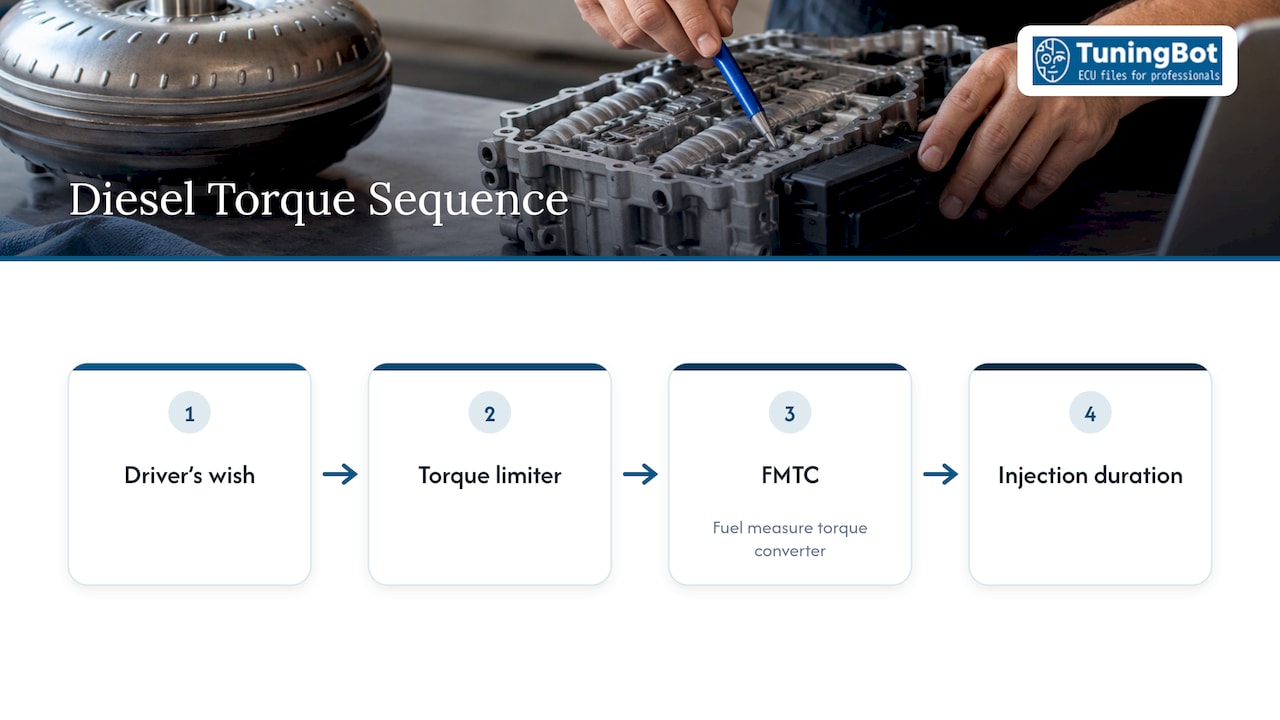
On diesel, a Bosch EDC17 tuning guide lays the fuel loop out as four independent systems in order: driver’s wish, torque limiter, the fuel measure torque converter (FMTC), then injection duration. Editing them in the wrong order can cap your change at the maximum allowed torque, fuel quantity or injection time, or damage the engine. That order is the working sequence for a diesel file, and it is the reason we treat the limiter as part of a set, not as a standalone map.
Gasoline uses a percentage-based chain
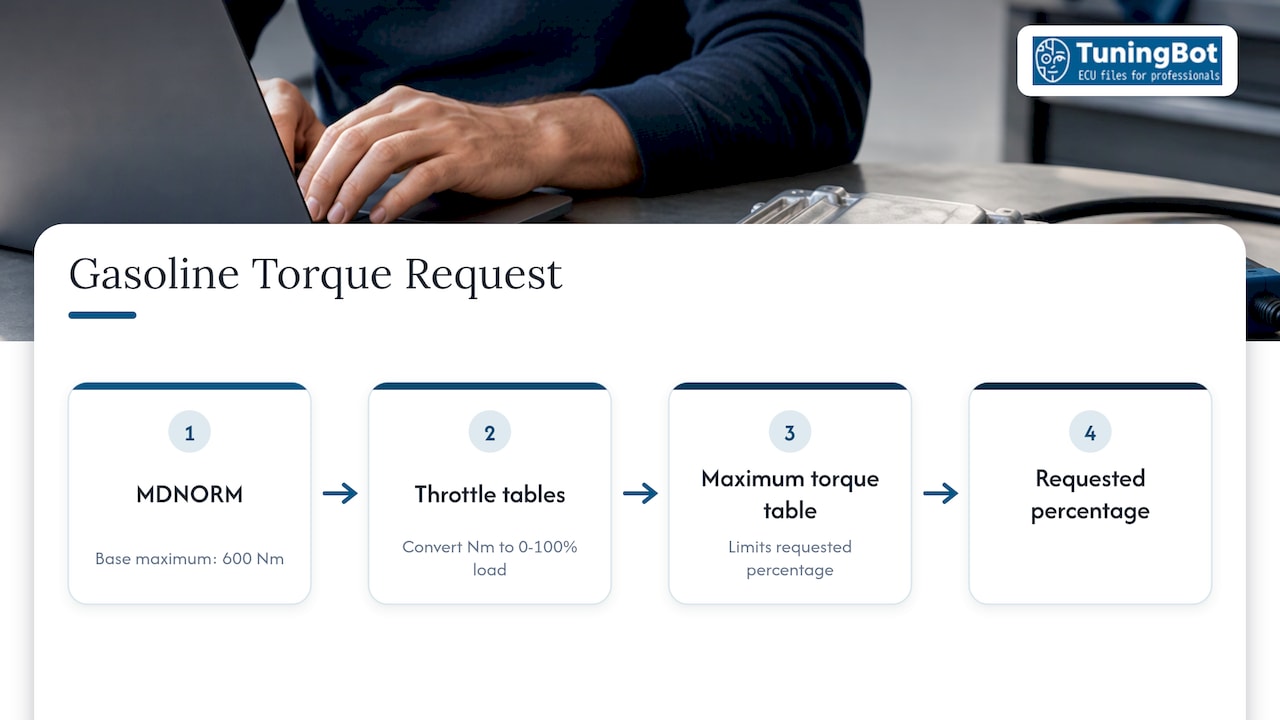
Gasoline Bosch ECUs often express the request as a percentage of a base maximum torque, not directly in Nm. Hondata’s Bosch torque model documentation shows this on a Honda example: the base maximum (MDNORM, 600 Nm there) converts Nm throttle tables into a 0 to 100% load figure, and that percentage is then limited by the maximum torque table to form the requested percentage. The practical consequence is stated plainly there: raising MDNORM without adjusting every other torque table lowers engine output. A single scaling constant can undo a series of otherwise correct edits.
The same principle explains why the torque model matters for reading a gasoline file. Emtron’s documentation on torque modelling describes engine torque calculated from air mass, lambda target, cylinder count, compression ratio and a friction deduction, with driver demand torque calculated separately. Under normal conditions the two converge. When they diverge, the ECU is working from a torque calculation that no longer matches the engine, and any torque reduction request will not produce the effect the calibration expects.
Several limiters, not one
The phrase “torque limiter map” covers more than a single table. A typical file holds:
- an engine mechanical protection limiter, indexed by RPM and often by barometric pressure or another condition;
- gearbox protection limits, which can be per gear and sometimes per gearbox state;
- an economy or secondary limiter on some gasoline families;
- temperature, speed or fault-state limiters that tighten the ceiling under specific conditions.
The lowest active limit wins. Haltech’s torque model article states that torque reduction applied to the engine follows the lowest active limit, which can arrive from an automatic transmission or a traction control module, and is delivered by ignition retard, by cutting a percentage of ignition or injection events, or by a combination. That is a useful model for any platform: you are never editing one ceiling, you are editing the lowest of several.
Finding the limiter in a calibration file
Identification starts with axes and units, not with a map’s name. High Performance Academy’s Bosch EDC map guide is a clear reference for diesel. It describes the EDC16 limiter as CoEng_trqLimAP_MAP and the EDC17 limiter as EngPrt_trqLim, both 4×24 tables with RPM on X, barometric air pressure on Y and torque in Nm on Z. It also notes driver wish tables using pedal percentage on X and RPM on Y with torque in Nm, unlike the relative torque values used in ME and MED gasoline controllers.
Typical signatures
| Map | Typical inputs | Uscita |
|---|---|---|
| Driver wish / torque request | Pedal % × RPM | Nm (or mg/stroke, depending on ECU) |
| Engine torque limiter | RPM × barometric pressure | Maximum Nm |
| Gear-dependent limiter | Gear × RPM | Maximum Nm |
| Speed/gear limitation | Vehicle speed × gear or RPM | Maximum Nm |
| Per-gear single value | Nessuno | One Nm value per gear |
The axis combinations in the last four rows follow the map-size reference in the WinOLS diesel tuning module PDF, which lists common torque limiter dimensions with 6, 8, 10, 13, 14 or 16 entries on one axis. Treat the sizes as a pattern to recognize, not a guarantee: dimensions vary by ECU family and software version.
Scaling and what a flat top tells you
Limiter tables often show a flat plateau with a roll-off at the top of the RPM range. Values commonly sit in a few hundred Nm, with scaling such as ×0.5 for RPM and ×0.1 for Nm on EDC17, according to the Tuners Guild guide linked above. Always confirm the factor before comparing numbers across files. A limiter that reads 4000 raw is 400 Nm at ×0.1, and a mismatch in scaling is a quiet way to produce a nonsense value.
The single-value entries deserve their own pass. The HPA guide flags the per-gear limit Tra_trqInMax_C, often one per gear on automatics, as easy to miss and a common cause of torque not responding as expected. If you raise the engine limiter and the car still stops at the same figure in one gear, check these first. Gearbox torque limits in the ECU are separate from the limits inside the TCU: on vehicles with a separately calibrated transmission controller, an engine-side change does not alter what the TCU permits, so both sides of the torque handshake need to be consistent.
Definitions help, but they do not verify
If you work from a DAMOS-style definition, treat it as an index. RemapDash’s DAMOS explainer is blunt that a definition has no verify function: confirming that the definition’s software version matches the read, spot-checking a handful of known maps and treating checksums as a deliberate step are habits you supply. Limiters are good spot-check candidates because you roughly know what the values should look like. A definition also tells you what a map is called, not why the manufacturer chose those values or how timing, boost and air-fuel interact, so the name is a starting hypothesis.
Before editing, a practical order of work looks like this:
- Confirm the software version in the file against the definition you are using.
- Import the definition and check start addresses, axis sizes, units and conversion factors.
- Locate driver wish, engine limiter, gearbox limiters and the torque-to-fuel conversion, and note duplicates or shadow copies.
- Record stock values for every one of them before the first change.
- Confirm the limiter hierarchy: which limit is lowest in the conditions you care about.
For EDC17 files specifically, our EDC17 tuning guide covers the calibration checks we apply to that family, and our write-up on diesel torque optimization goes through the checks around torque delivery.
Diagnosing limiter intervention from a log
If a car is not delivering the torque the file asks for, the log tells you which layer is responsible. The TBK Labs glossary on torque limiters in datalogs gives a workable test: compare requested torque with actual torque during a wide-open-throttle pull. If actual is consistently capped below request, a limiter is active. Throttle closure events that coincide with high torque output are the second thing to look for, particularly on gasoline.
A short diagnostic routine
- Log pedal position, requested torque, actual torque, RPM, gear and, where available, the limiter-state or torque-reduction channels.
- Do a full-load pull in each gear that matters, not just one. A per-gear limit will show in one gear and not another.
- Look at the shape of the cap. A flat line at one value points to a fixed limit. A cap that varies with RPM or ambient pressure points to a table. A cap that appears with temperature, a fault code or a gear change points to a protection or transmission request.
- Check whether the reduction is applied through ignition retard or injection cuts. Haltech’s article above names both methods, and each leaves a different trace in the log.
Torque limiters also exist to protect hardware. The EcuTek support page on the VW EA888 Mk7 platform explains the Simos 18 torque request through a fast path (ignition, fuel setpoint, lambda control, fuel shut-off) and a slow path (air setpoint, throttle, turbocharger actuator and cam setpoints), and notes that allowing exhaust gas temperature too high can shorten catalyst life. A limiter is therefore not an obstacle to be removed in every case. It encodes a protection assumption, and the log should show you which one you are touching.
Changing limiters without breaking the model
The order matters because each stage reads the output of the one before it.
Diesel: wish, limiter, conversion, duration
- Driver wish. Raise the request where you want more response. Drivers wish is the requesting map, so it should not be reduced to compensate for other effects.
- Torque limiter. Lift the engine limiter, and the gearbox limiters and per-gear values where applicable, to at least the new requested level across the RPM range you are using.
- FMTC. The Tuners Guild guide explains that the FMTC converts approved torque in Nm into fuel mass in mg per cycle and lives in the PhyMod_GenCur folder as PhyMod_trq2qBas, with later aliases FMTC_q2trq and FMTC_trq2qBas. Tuners either extrapolate it linearly, which keeps CAN torque readings accurate but exposes undetected limiters, or decalibrate it. Many use a hybrid of a real Nm request and FMTC decalibration. Choose consciously, because it determines what the dash and diagnostic tools report.
- Injection duration and rail pressure. Longer injector openings need rail pressure that holds, and pre-injection must be corrected so the larger fuel charge mixes with the larger air charge.
- Air management. Boost, EGR behavior and airflow limits must be able to deliver the charge. Otherwise physical limits cap the request.
That last point is the real boundary of a limiter edit. Raising the ceiling lets you request more torque, but the request is only as good as what the hardware and supporting maps can deliver. The physical state of the engine bay matters here too: connectors, boost hoses and sensors you are relying on should be inspected, and cleaning an engine bay safely before inspection makes leaks, loose fittings and damaged wiring easier to spot.
Gasoline: scaling first
On MED17-type files, the community-documented chain runs from driver request, to a percentage of maximum torque, to Nm with friction and thermal losses, to a limit check against a structural cap and an economy limit, then to air mass through the volumetric-efficiency conversion and on to desired boost. In WinOLS 16-bit data, 100% corresponds to 65535, and the map’s maximum-Nm scale factor converts it to physical units. Two practical consequences follow:
- Changing the base maximum torque constant rescales every percentage table. Adjust all dependent tables or leave the constant alone.
- A raised request that exceeds a secondary limit will be clipped silently. Find every limit in the check step, not just the first.
For Simos 18 controllers, our Simos 18 tuning page explains identification and file checks for the family.
Checksums after the edit
Every edit ends with a checksum step. A limiter change that is correct in the map but written with a stale checksum can leave the ECU unable to start or the write rejected. Our professional guide to checksum correction describes what the step involves.
Validating after the flash
A limiter change is only confirmed once logs show the intended behavior across conditions. AutoExplain recommends data logging and validation after flashing, and comparing against stock data before editing, which is why recording stock values in step four above pays off. The validation pass should include:
- full-load pulls in every gear the vehicle will use, comparing requested and actual torque against the stock log;
- cold and warm conditions, since temperature limiters can tighten the ceiling;
- different ambient pressure where the limiter is indexed by barometric pressure;
- checks that no new fault codes, torque-reduction requests or limp-mode entries appear.
Emtron’s engineering documentation makes a point that applies to every platform: torque-model accuracy underpins all protection. If calculated torque does not match reality, requested reductions will not do what the calibration expects, making torque control either too aggressive or insufficient. That is why dyno validation of the torque calculation comes before trusting limiter behavior.
One scope note: modifications that affect emissions-related systems are intended only for off-road or motorsport applications where applicable law permits them.
Our perspective
The limiter is rarely the only reason a file underperforms. In our work with torque-structured ECUs, the useful question is whether every stage in the chain, from driver wish through the limiters to the conversion and the actuators, describes the same torque. A file that raises one table and ignores the others produces a mismatch, and the ECU resolves it by capping.
That is why we approach torque calibration as a set of dependent maps, with checksum correction as the last step and a log-based check after the write. Availability depends on the ECU family, software version and reading method, so we identify the platform first and confirm what can be calibrated on it.
For a workshop, the benefit is a file prepared by calibration engineers, with the limiter hierarchy considered, instead of hours spent chasing a cap in one gear.
TuningBot Technical Team
Getting the file calibrated
If you would rather not rebuild the limiter set yourself on every job, you upload the original ECU or TCU file, select the services and receive a calibrated file ready to write with your compatible tool. No registration is required for standard file orders, and most standard files arrive within about 15 to 20 minutes during published operating hours, depending on complexity and workload. Pricing is per file: Diesel Stage 1 is €49.99, Petrol Stage 1 is €69.99, Premium Stage 2 is €129.99, Full Gearbox Tuning is €49.99 and Checksum Correction is €29.99. The full list is on the listino prezzi ufficiale della rimappatura centralina, and technical assistance is available through our support portal.
FAQ
Is the torque limiter the same as the driver wish map?
No. Driver wish converts pedal position and RPM into a requested torque. The limiter then caps that request. If you raise only the wish map, any limiter you left alone still holds the final torque at its original ceiling.
Why does torque stop at the same value after I raised the engine limiter?
Check the gearbox limiters and the per-gear single values, especially on automatics, where there can be one value per gear. Also check for secondary limits and for a torque-to-fuel conversion that is capping the quantity. The lowest active limit determines the result.
How do I tell whether a limiter is active in a log?
Log requested and actual torque during a full-load pull. If actual stays flat below request, a limiter is acting. The shape of the cap, whether fixed, RPM-dependent or tied to temperature or gear, tells you which type.
Does the transmission have its own torque limit?
Yes. Automatic transmissions send torque limits and torque reduction requests to the ECU, which applies the lowest active limit. Where a TCU is calibrated separately, its permitted torque has to be consistent with the engine file.
Fonti
- Bosch EDC17 tuning guide: maps through physics
- Bosch EDC Map Identification and Definition Guide, High Performance Academy
- Bosch Torque Model, Hondata
- Torque Model, Haltech support
- Torque Modelling Introduction, Emtron Resource Centre