

 EnglishEN
 ItalianoIT
 DeutschDE
 PortuguêsPT
 FrançaisFR
 РусскийRU
Flujo de trabajo de reprogramación de ECU Marelli: herramientas, OBD, modo banco y validación
El proceso de reprogramación de la ECU de Marelli se define como la secuencia estructurada de preparación del hardware, extracción de datos de la ECU, calibración de mapas, actualización de archivos y validación posterior a la actualización, necesaria para ajustar de forma segura los parámetros del motor en vehículos controlados por Marelli. Los profesionales que trabajan con plataformas de FCA como el Fiat 500, Alfa Romeo y Jeep se encuentran con familias de ECU Marelli que incluyen las series 9GF y 12GF, cada una de las cuales requiere herramientas y protocolos específicos. Realizar correctamente este flujo de trabajo desde el primer paso determina si un ajuste proporciona un aumento limpio de la potencia o crea fallos en la conducción. Esta guía cubre todos los aspectos, desde la selección de herramientas hasta la programación OBD y en banco, pasando por la resolución de los problemas más comunes.
Herramientas y software esenciales para la reprogramación de ECUs de Marelli
El proceso de programación de la ECU Marelli comienza con la preparación del conjunto adecuado de hardware y software antes de intervenir en el vehículo. La falta de un solo componente, en particular el cable Security Gateway bypass, detendrá por completo el proceso en las plataformas FCA modernas.

Programación de hardware OBD vs. de banco
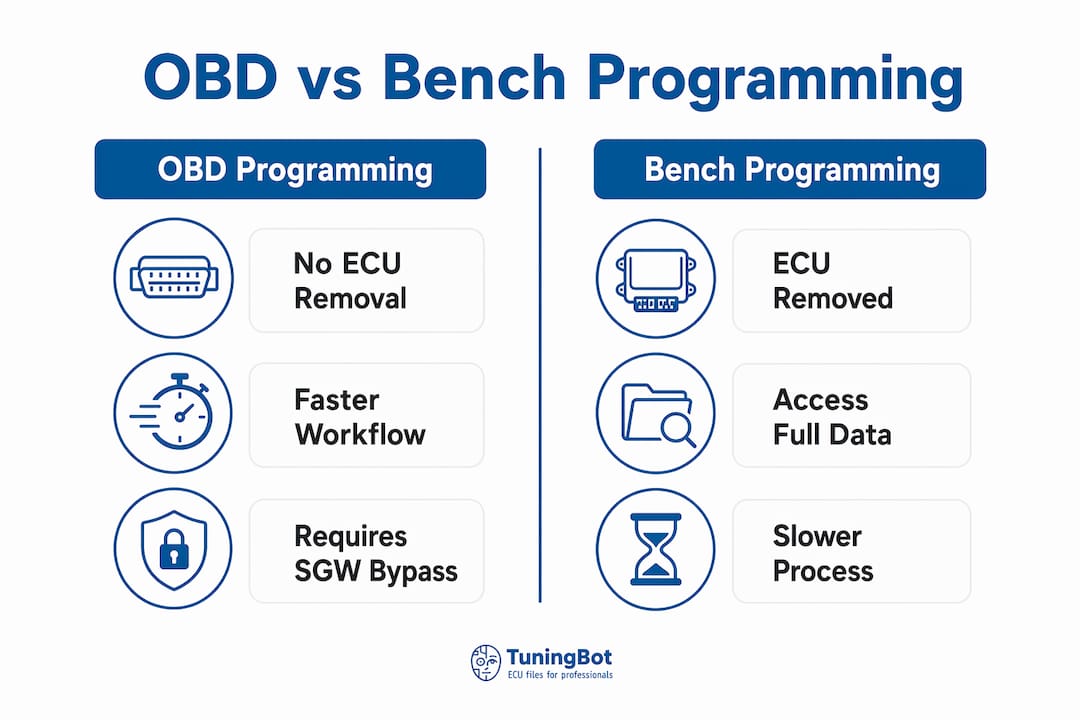
La programación OBD utiliza el puerto de diagnóstico del vehículo (OBD-II) para leer y escribir datos de la ECU sin necesidad de desmontar físicamente la unidad. La programación en banco requiere desmontar la ECU del vehículo y conectarla directamente a su placa de circuitos o a los pines del conector. Bench mode proporciona una conexión estable e ininterrumpida, adecuada para un acceso más profundo a la ECU y a las unidades con bloqueo de seguridad seguridad, mientras que el OBD es más rápido y preferible cuando la modelo de ECU y el vehículo seguridad lo permiten. Para la selección de herramientas y protocolos, consulta el Guía de compra de la herramienta TuningBot.
En el caso de las ECU moderna FCA Marelli, el SGW (Security Gateway) constituye la barrera crítica. El Marelli 12GF soporta OBD programación solo cuando se combina con el cable de derivación SGW MMS03.001, junto con la alineación obligatoria de la ECU posterior a la actualización. Sin este cable, la ECU rechazará todos los intentos de comunicación a través del puerto de diagnóstico. No es un hardware opcional. Es un requisito previo.
Software esencial para calibración Marelli
Las opciones de software de calibración para la ECU remapping de Marelli incluyen tres herramientas principales: IAWDiag para la selección de combinaciones y variantes, Flex (de Magic Motorsport) para operaciones de programación tanto a través de OBD como en banco de pruebas, y TunerPro para la edición de mapas y la visualización de parámetros. Cada herramienta cubre una fase distinta del flujo de trabajo, y la mayoría de los talleres profesionales utilizan las tres.
Los programas de diagnóstico de vehículos, como Alientech KESS3 o AutoTuner, aportan un nivel adicional al permitir el análisis de fallos previo al tuning y la verificación de los códigos de diagnóstico (DTC) tras la actualización del firmware. TuningBot es compatible con servicios de archivos que funcionan con todas estas plataformas, lo que significa que tus mapas modificados se integran directamente en tu cadena de herramientas actual.
| Herramienta | Función | Modo |
|---|---|---|
| IAWDiag | Variante y selección de combinación de la ECU | OBD |
| Flex (Magic Motorsport) | Leer, escribir y flashear archivos de la ECU | OBD y banco |
| TunerPro | Edición de mapas y visualización de parámetros | Desconectado |
| Alientech KESS3 | Diagnóstico y flasheo de archivos | OBD y banco |
| SGW Bypass MMS03.001 | Security Gateway bypass para FCA Marelli | OBD |
Consejo profesional: Siempre verifica que tu licencia Flex incluya la familia específica de ECU Marelli con la que estás trabajando antes de reservar el vehículo. Las brechas de licencia en las variantes 12GF o 9GF son una fuente común de pérdida de tiempo en el taller.
Procedimientos paso a paso para la reprogramación de ECUs Marelli
Una calibración profesional de la ECU Marelli sigue una secuencia definida. Saltarse pasos, sobre todo la comprobación del estado y la copia de seguridad de los stage, es la principal causa de daños en la ECU y de la pérdida irrecuperable de archivos.
Diagnóstico del vehículo antes de la afinación. Conecta tu herramienta de diagnóstico y busca códigos de avería activos y almacenados. Una revisión completa del estado del vehículo Es obligatorio realizar esta comprobación antes de realizar el ajuste, ya que el aumento de la tensión mecánica derivado de los parámetros modificados agravará cualquier avería existente y puede provocar daños graves en el motor. No se deben borrar las averías hasta que se hayan resuelto los problemas mecánicos.
Confirmar la variante de la ECU y la versión del software. Utiliza IAWDiag para identificar la familia de la ECU exacta, el número de hardware y la versión de software. Esto determina qué combinación de Flex se aplica y si se requiere acceso OBD o en banco.
Extrae y realiza una copia de seguridad del mapa de la ECU original. Lee la ECU mediante Flex a través de OBD (con SGW bypass si es necesario) o mediante conexión a banco de pruebas. Guarda el archivo original en al menos dos ubicaciones diferentes antes de realizar cualquier modificación. Esta copia de seguridad te servirá como punto de recuperación si algo sale mal.
Modificar parámetros clave de calibración. Abre el archivo extraído en TunerPro o tu editor de mapas preferido. El proceso de ajuste cubre Tablas de presión boost, avance del tiempo de encendido, límites de gestión del par, mapas de inyección de combustible y rev limiter. Modifica los parámetros de forma gradual y documenta cada cambio.
Aplicar la corrección checksum. Tras la modificación del mapa, Se debe aplicar la corrección checksum correctamente en el archivo modificado antes de realizar el flasheo. Un checksum incorrecto hace que la ECU rechace el archivo o entre en estado de fallo inmediatamente después de la escritura.
Actualiza el archivo modificado. Vuelve a escribir el archivo corregido en la ECU utilizando Flex en OBD o bench mode. Supervisa continuamente el progreso de la actualización. No interrumpas la alimentación ni la comunicación durante esta fase.
Alineación de la ECU post-flash. En las unidades Marelli 12GF y similares, realiza el procedimiento de alineación posterior a la actualización tal y como se especifica en el software Flex. Este paso sincroniza la ECU con el inmovilizador del vehículo y otros módulos de control.
Prueba en carretera y registro de datos. Conduzca el vehículo en condiciones controladas y registre los parámetros clave, entre ellos la presión boost, los valores lambda, la actividad del sensor de detonación y la temperatura del líquido de refrigeración. Compare los datos registrados con los valores de calibración deseados.
Escaneo de diagnóstico final. Vuelva a escanear en busca de códigos de falla después de la prueba en carretera. Solucione cualquier DTC nuevo antes de devolver el vehículo al cliente.
Consejo profesional: Realiza al menos tres aceleraciones a fondo en todo el rango de RPM antes de declarar que una puesta a punto está completa. Los datos de una sola carrera son insuficientes para confirmar un comportamiento de calibración consistente en condiciones ambientales variables.
¿Cuáles son los problemas más habituales y las técnicas de resolución de problemas con la ECU tuning de Marelli?
Incluso los técnicos tuners con experiencia se encuentran con problemas específicos de las plataformas Marelli. Conocer de antemano los patrones de avería reduce considerablemente el tiempo de diagnóstico.
Los problemas más frecuentes se pueden clasificar en cuatro categorías:
- Fallos del SGW bypass. Un cable de derivación SGW defectuoso o incompatible produce errores de comunicación que imitan fallas de la ECU. Fallos en el cable SGW bypass son algunos de los problemas más habituales en el modelo Marelli tuning. Comprueba siempre el cable bypass en un vehículo que se sepa que funciona correctamente antes de dar por hecho que el fallo está en la ECU.
- Errores de comunicación durante el flasheo. Las causas principales son caídas de voltaje, mal contacto en el conector OBD o configuraciones de administración de energía de la computadora portátil que interrumpen la comunicación USB. Utiliza una fuente de alimentación de batería para mantener el voltaje por encima de 13.5V durante todo el proceso de flasheo.
- Actualizaciones de software del concesionario sobrescribiendo mapas personalizados. Las actualizaciones oficiales de software de los concesionarios pueden sobrescribir sin previo aviso el software remapped, lo que obligaría a utilizar el tuner para restaurar la configuración posteriormente. Recomienda a los clientes que te avisen antes de acudir al concesionario para cualquier servicio y programa una revisión tras la visita para detectar y restaurar cualquier calibración que se haya sobrescrito.
- Fallos de conducción por parámetros desalineados. Las tablas de gestión del par que no se ajustan proporcionalmente a los cambios en boost y en la inyección de combustible provocan vacilaciones, cortes de par y eventos de modo de emergencia limp mode. Los límites de par deben ajustarse siempre en paralelo con los mapas de boost y de inyección de combustible, y no de forma independiente.
Los errores de checksum son la causa más fácil de evitar del rechazo de la ECU tras la actualización. Comprueba que tu herramienta de corrección checksum sea compatible con la versión específica del software de Marelli antes de realizar la escritura. Una incompatibilidad entre el algoritmo de corrección y la variante de software de la ECU genera errores que resultan difíciles de distinguir de los fallos de hardware.
Para un desglose detallado de las familias de ECUs compatibles, los servicios y las rutas de compatibilidad, la Cobertura de Servicio de ECU TuningBot la página es la mejor referencia interna.
¿En qué se diferencian la programación OBD y la programación en banco de pruebas en los flujos de trabajo de la ECU tuning de Marelli?
La elección entre la programación OBD y la programación en banco de pruebas no siempre es una cuestión de preferencia. En el caso de muchas variantes de la ECU de Marelli, es la arquitectura seguridad de la ECU la que determina el método.
La programación OBD se realiza a través del puerto de diagnóstico del vehículo sin necesidad de desmontar la ECU. Es más rápida, no requiere desmontaje y reduce el riesgo de dañar los conectores. La limitación es que el acceso OBD depende totalmente de la configuración de seguridad de la ECU. Las unidades modernas de FCA Marelli, como la 12GF, requieren el cable SGW bypass para habilitar la comunicación OBD, y algunas variantes más antiguas o con bloqueos de seguridad simplemente no admiten la escritura OBD en absoluto.
La programación en banco consiste en extraer la ECU del vehículo y conectarla directamente a su interfaz de hardware. Este método ofrece acceso sin restricciones a toda la memoria de la ECU, incluidas las áreas a las que los protocolos OBD no pueden llegar. La programación en banco sigue siendo indispensable para la edición avanzada de mapas y para las ECU con funciones seguridad que desactivan el OBD remapping. La contrapartida es el tiempo: el trabajo en banco añade entre 30 y 60 minutos de desmontaje y montaje al trabajo.
| Característica | Programación OBD | Programación en banco |
|---|---|---|
| Se requiere la extracción de la ECU | No | Sí |
| Profundidad de acceso | Con la autorización de seguridad | Acceso completo a la memoria |
| Velocidad | Más rápido | Más lento |
| Se necesita un SGW bypass (FCA Marelli) | Sí (12GF, 9GF) | No |
| Riesgo de daño en el conector | Bajo | Moderado |
| Apto para unidades de control electrónico (ECU) con bloqueo Security | No | Sí |
La recomendación práctica para la mayoría de los trabajos con Marelli 12GF en plataformas FCA es utilizar el OBD con el cable SGW bypass cuando el vehículo se encuentre en buen estado eléctrico. El Bench mode es la opción adecuada para las ECU con software dañado, bloqueos de seguridad ecurity o cuando falla la comunicación OBD tras la verificación del cable bypass.
Puntos clave
Un flujo de trabajo profesional con la ECU tuning de Marelli requiere el hardware bypass adecuado, un software de calibración verificado, un proceso estructurado de varios pasos y una validación posterior a la actualización para obtener resultados estables y fiables.
| Punto | Detalles |
|---|---|
| El SGW bypass es obligatorio | El Marelli 12GF OBD tuning requiere, sin excepción, el cable MMS03.001 bypass. |
| La revisión médica es previa a todos los tuning | Comprueba y soluciona todas las averías mecánicas antes de ajustar cualquier parámetro de la ECU. |
| La corrección de la suma de verificación es innegociable | Aplica la validación correcta checksum tras cada modificación de mapas para evitar el rechazo de la ECU. |
| OBD o banco de pruebas: depende de la ECU seguridad | Utiliza OBD para la velocidad en unidades compatibles; utiliza banco para ECUs bloqueadas o corruptas. |
| Las actualizaciones del concesionario sobrescriben los mapas personalizados | Programa verificaciones posteriores a la visita del concesionario para detectar y restaurar cualquier calibración sobrescrita. |
Por qué el chequeo de salud es el paso que los profesionales se saltan bajo su propio riesgo
A partir de nuestra experiencia en la calibración de la ECU de Marelli en las distintas plataformas de FCA, el paso que marca la diferencia entre unos resultados satisfactorios y costosas revisiones posteriores es la revisión del estado del vehículo antes de la calibración. No es el software. No es el cable bypass. Es la revisión del estado del vehículo.
La lógica es sencilla: una calibración modificada aumenta la exigencia mecánica. La presión de sobrealimentación aumenta, el avance del encendido se adelanta y el par motor se incrementa. Cualquier punto débil que tenga el motor, ya sea un inyector desgastado, un cojinete del turbo en mal estado o una manguera del intercooler con fugas, queda al descubierto más rápidamente con los nuevos parámetros. El cliente vuelve con una avería que parece un problema de puesta a punto, pero que en realidad es un problema mecánico preexistente que la puesta a punto simplemente ha acelerado.
Mantenerse al día con las actualizaciones del protocolo de la ECU es igual de importante. El acceso OBD al Marelli 12GF a través del SGW bypass es una novedad relativamente reciente, y los usuarios de tuners que no habían actualizado sus licencias Flex ni el firmware del cable bypass se quedaron sin acceso al OBD mode en los primeros vehículos FCA 12GF. Comprobar el Cobertura de Servicio de ECU TuningBot antes de asumir una nueva variante de ECU no es un mantenimiento opcional. Es preparación del flujo de trabajo.
Mi recomendación más sólida para cualquiera que esté construyendo o refinando su proceso de calibración Marelli es tratar el Guía profesional del flujo de trabajo tuning como un documento en constante evolución, no como una referencia puntual. Los protocolos cambian, las variantes de la ECU se amplían y la diferencia entre un tuner que actualiza su proceso y otro que no lo hace se acentúa con cada nuevo lanzamiento de la plataforma FCA.
— Equipo Técnico de TuningBot
Cómo te ayuda TuningBot en tus proyectos con la ECU tuning de Marelli
TuningBot proporciona Archivos profesionales de la ECU tuning, Servicios de corrección checksum, y servicios de calibración diseñados específicamente para talleres y tuners que trabajan con plataformas Marelli.
Whether you are processing Marelli 9GF files for Alfa Romeo applications or working through 12GF calibrations on Fiat 500 platforms, TuningBot delivers modified files, with checksum correction and DTC management available as dedicated services. No prepaid credits and no registration are required to subir un archivo y recibir un resultado calibrado. El Guía del modelo remapping de ECU 2026 abarca las últimas técnicas aplicables a Marelli y al resto de familias principales de ECU compatibles con la plataforma. Para los talleres que procesan varios archivos de Marelli a la semana, el servicio de archivos de TuningBot se integra directamente con Alientech KESS3, Magic Motorsport Flex y flujos de trabajo de AutoTuner.
PREGUNTAS FRECUENTES
¿Cuál es el flujo de trabajo de reprogramación de la ECU de Marelli?
El proceso de puesta a punto de la ECU Marelli consiste en un procedimiento estructurado que incluye el diagnóstico del vehículo, la extracción del mapa original de la ECU, la identificación de los parámetros de calibración, la aplicación de la corrección, la actualización del archivo modificado y la validación de la puesta a punto mediante pruebas en carretera y diagnósticos. Se utilizan tanto la programación OBD como la de banco, dependiendo de la variante de la ECU y de la configuración de la unidad.
¿Necesito un cable SGW bypass para el tuning OBD del Marelli 12GF?
Sí. El Marelli 12GF requiere el cable de derivación SGW MMS03.001 para la programación OBD en vehículos FCA modernos. Sin él, el Security Gateway bloquea toda la comunicación de la ECU a través del puerto de diagnóstico.
¿Qué software se utiliza para la calibración de ECUs Marelli?
Las herramientas de software principales son IAWDiag para la selección de variantes de ECU, Flex de Magic Motorsport para flasheo OBD y en banco, y TunerPro para la edición de mapas. Las plataformas de diagnóstico como Alientech KESS3 y AutoTuner se utilizan para el escaneo de fallas pre-ajuste y post-flasheo.
¿Por qué es importante la corrección checksum tras la «modificación» del mapa?
Tras modificar un mapa de la ECU de Marelli, el valor checksum del archivo ya no se ajusta al algoritmo de validación de la ECU. La programación de un archivo con un valor checksum incorrecto hace que la ECU rechace la escritura o entre en un estado de fallo, lo que puede requerir una recuperación en banco de pruebas para solucionarlo.
¿Puede una actualización de software del concesionario sobrescribir una ECU Marelli remap?
Sí. Las actualizaciones de software del concesionario pueden sobrescribir silenciosamente las calibraciones personalizadas de la ECU. Los tuners deben aconsejar a los clientes que los notifiquen antes de cualquier visita de servicio al concesionario y programar una kiểm tra diagnóstico post-visita para detectar y restaurar cualquier mapa sobrescrito.