

 EnglishEN
 ItalianoIT
 DeutschDE
 EspañolES
 PortuguêsPT
 FrançaisFR
ZF TCU tuning recalibrates transmission-control strategies such as torque acceptance, shift scheduling, torque-converter lockup and pressure control where the specific ZF hardware and software support those changes. The correct workflow depends on the exact 6HP or 8HP variant, OEM application, TCU software, read/write protocol and mechanical condition. A professional file should be matched to the identified unit and validated after programming rather than selected from a generic Stage label.
Primary gains from a properly executed ZF TCU tune:
- Shift behavior: can be recalibrated for faster or smoother changes where the software exposes the relevant strategies.
- Torque coordination: should keep ECU-reported torque, TCU limits and drivetrain capacity coherent.
- Shift scheduling: can be adjusted by mode, load and driver demand on supported applications.
- Converter and pressure control: must remain compatible with temperature, clutch condition and hydraulic limits.
If your shop is ready to proceed, a professional file provider with documented tool compatibility and engineer support is the correct starting point.
ZF TCU Tuning: Key Takeaways
ZF TCU tuning should be based on exact TCU identification, compatible file handling, mechanical condition and box-specific validation. Adaptation or basic-setting procedures are not universal and should be performed only when required by the exact application.
| Точка | Детали |
|---|---|
| Identify the exact TCU first | Confirm transmission family, hardware number, software version and OEM application. |
| Метки этапов не являются стандартами | Specify the requested behavior and engine torque rather than relying on Stage 1/2/3 terminology alone. |
| Preserve the available original | The tool may provide a full, partial, virtual or encrypted read depending on the protocol. |
| Adaptations are application-specific | Reset or relearn only when required by the OEM/tool procedure for that unit. |
| Torque ratings need context | ZF family names do not provide one universal safe tuned-torque limit. |
| TuningBot complements the workshop | The file service does not replace diagnosis, programming or final validation. |
How ZF TCU Tuning Changes Transmission Behavior
ZF TCU tuning changes calibration data used by the transmission controller to manage torque intervention, shift scheduling, pressure control, converter lockup and protection strategies. The exact maps and available features vary by TCU software.
ECU and TCU torque models should remain coherent when engine output changes. A mismatch can cause torque intervention, shift-quality problems or inappropriate pressure requests, but the exact behavior is vehicle- and software-specific.
The specific control elements a calibration engineer modifies typically include:
- Torque request, monitoring and limit strategies where exposed by the specific TCU calibration.
- Pressure and actuator-control strategies, adjusted only within verified hydraulic and mechanical limits.
- Shift schedules (upshift/downshift RPM thresholds in each mode)
- Torque converter lockup strategy (engagement speed, slip window)
- Adaptation and learned-value handling according to the OEM/tool-specific service procedure.
- Launch-control or mode-specific behavior where supported by the OEM software and application.
Understanding the fundamentals of TCU remapping before modifying these tables is important for any technician new to transmission calibration work.
What gains and limits should you expect from ZF gearbox tuning?
ZF TCU tuning changes in shift response, torque intervention and converter behavior can be measurable, but the result depends on the transmission variant, software, engine torque, temperature and calibration. External vendor claims should be treated as platform-specific rather than universal.
More conservative, consistently reproducible gains include:
- Shift response may be changed where the software and hydraulic system support it.
- Pressure strategies may be revised to support the requested torque while controlling slip and temperature.
- Torque limits may be revised when engine torque and transmission capacity justify it.
- Manual-mode and paddle behavior may be recalibrated on supported applications.
- Launch-control behavior may be available on specific software versions and OEM configurations.
Published ZF transmission names are often associated with nominal input-torque classes, but actual capacity varies by subvariant, OEM application, clutch pack, converter, cooling, duty cycle and condition. Do not treat 8HP45/50/70/90 naming as a universal safe tuned-torque limit.
Совет: Before quoting shift-time improvements to a customer, log baseline shift events with a CAN-based data logger or OBD tool, then log post-flash events under identical conditions. Documented before-and-after data protects the shop and gives the customer a concrete deliverable.
Thermal behavior should be monitored under the vehicle’s real duty cycle. Fluid condition, cooler capacity, converter slip and repeated high-load use all affect temperature.
Which ZF transmissions and vehicles are commonly supported?
ZF 6HP and 8HP families are common in professional transmission-calibration work, but exact support must be confirmed from the OEM application and TCU hardware/software ID.
ZF 6HP subcodes commonly tuned:
- 6HP19, 6HP21, 6HP26, 6HP28, 6HP32 — used in BMW 3/5/6/7 Series, Audi A4/A6/A8, Porsche Cayenne, Land Rover, and Jaguar applications
ZF 8HP subcodes commonly tuned:
- 8HP45, 8HP50, 8HP70, 8HP90 — used in BMW 1/2/3/4/5/6/7/8 Series, X3/X5/X6/X7, Audi A4/A5/A6/A7/A8/Q5/Q7, Bentley, Rolls-Royce, Alfa Romeo, Maserati, RAM 1500, Jeep Grand Cherokee, and Dodge Challenger/Charger
ZF TCU tuning compatibility depends on the TCU hardware, software, OEM security architecture and tool protocol. Some applications may require specific unlock, Bench or service procedures; this should be determined from current tool documentation, not from model year alone.
Feature availability such as launch control, gear display or manual-mode behavior depends on OEM coding, TCU software and the available calibration strategy.
How are TCU tune files delivered and flashed?
ZF TCU programming may use OBD, Bench or other service methods depending on the exact unit and tool. No one method is universally preferred or available.
OBDII remote flash workflow
- Identify the TCU and obtain the read type required by the selected protocol; this may be full, partial, virtual or encrypted.
- Upload the original file to your file provider’s platform.
- Receive the calibrated file and confirm compatibility plus the integrity handling required by the exact tool workflow.
- Write the calibrated file to the TCU via OBD.
- Perform only the adaptation/basic-setting procedure required for the exact vehicle and TCU software.
- Conduct a road or dyno verification pass.
The programming and post-write procedure should follow the exact tool protocol and OEM diagnostic requirements for the vehicle.
Server-based self-flash
Some tool ecosystems provide server-based or guided files for supported units. Commercial terms, customization and technical support differ by vendor and should be checked from current documentation.
Pros: fast turnaround, no file upload required. Cons: less vehicle-specific calibration, subscription cost, and limited engineer support if a problem occurs.
Программирование на скамейке
Bench access may be required where the selected protocol does not support in-vehicle programming, where recovery is needed, or where the tool documentation specifies direct access.
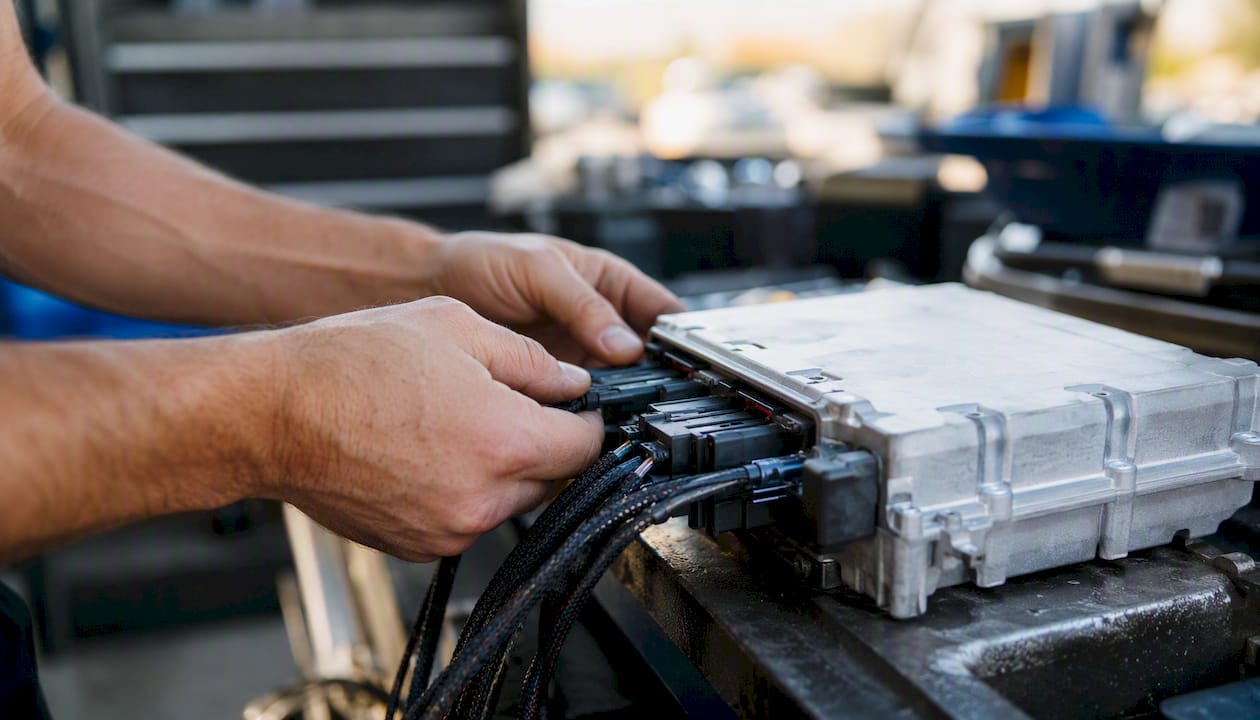
Some professional tools provide direct ZF TCU access on supported variants. Exact clone, backup, read and write capability must be confirmed from the current tool protocol before opening or connecting the unit.
Bench work adds removal, connection and reinstall labor. The required time depends heavily on vehicle access and tool procedure; no universal 1–2 hour estimate applies.
Совет: After any flash method, verify the written file’s checksum against the file you received before starting the vehicle. A mismatched checksum indicates an incomplete write and requires an immediate re-flash before the TCU is powered under load.
What Should a Professional ZF TCU File Workflow Include?
For ZF TCU tuning, a professional delivery should clearly identify the file revision, target TCU and requested changes. Original-file availability, checksum handling, instructions and support terms depend on the tool and provider workflow.
- Calibrated file matched to the exact TCU hardware/software and read type.
- Original or source file preserved by the workshop where the protocol provides it.
- Installation and adaptation instructions covering the flash sequence and required reset steps
- Checksum, signature or integrity handling appropriate to the exact TCU and tool workflow.
- Post-write diagnostic or adaptation instructions where required by the specific application.
- Clear revision and technical-support terms.
Licensing and file portability vary by provider and by Master/Slave workflow. Never assume a file can be reused on another vehicle or TCU solely because the hardware number appears similar.
Stage-based calibrations are standard practice. Stage 1 targets daily drivability with modest torque limit increases and firmer shifts. Stage 2 is calibrated for engines that have already received an ECU tune and need the TCU torque model raised to match. Stage 3 is track-focused, with aggressive shift schedules, maximum clamping pressure, and launch control where supported. Vehicle-specific feature unlocks, such as launch control activation or gear display in D mode, are typically available as add-ons or included in Stage 2 and Stage 3 packages depending on the provider.
What are the risks, and how do you manage them?
ZF TCU tuning changes transmission behavior and can increase mechanical or thermal load. The workshop should assess fluid condition, transmission faults, engine torque and drivetrain condition before programming.
Primary risks:
- Accelerated clutch friction element wear under sustained high-torque use
- Torque converter overheating if the lockup strategy is too aggressive for the vehicle’s cooling capacity
- Warranty voiding on the transmission and, in some cases, adjacent drivetrain components
- Software mismatch errors if the calibrated file is applied to a different TCU hardware or software version than specified
- Drivability regressions if the ECU and TCU torque strategies are not aligned post-tune
U.S. warranty outcomes depend on the warranty terms, the modification and whether it contributed to the claimed failure. A tune does not automatically void an entire vehicle warranty, but related transmission or drivetrain claims may be disputed. Document the work accurately and obtain qualified advice for specific warranty or legal questions.
Public review platforms show mixed customer experiences with smaller tuning shops; checking independent reviews and provider response times before selecting a file source is a practical risk-mitigation step.
Best practices before and after flashing:
- Capture and store the original TCU binary before any modification.
- Verify the vehicle’s transmission fluid condition and level; replace if degraded.
- Confirm TCU hardware and software version match the file specification exactly.
- Flash in a controlled environment; do not interrupt power during the write cycle.
- Perform only the adaptation/basic-setting procedure required for the exact vehicle and TCU software.
- Validate progressively under safe, legal conditions, starting with low load and monitoring DTCs and temperatures.
- Log transmission temperatures during the test to confirm thermal behavior is within range.
- Document the job with before-and-after data and store the original backup file.
Совет: When presenting a TCU tune to a customer, specify the maintenance schedule change it implies: a transmission fluid service interval reduction from the OEM recommendation to every 30,000–40,000 miles under modified calibration is a reasonable starting point for high-torque applications. Put it in writing.
What Does ZF TCU Tuning Cost?
ZF TCU tuning prices vary by vehicle, file provider, access method, software variant and workshop labor. Current pricing should be taken from the actual provider and workshop quote rather than a universal U.S. market table.
| Cost component | What changes the price |
|---|---|
| Calibration file | TCU variant, requested features, provider and revision scope |
| Read/write labor | OBD vs. Bench access, vehicle disassembly and tool workflow |
| Диагностика | Pre-existing faults, adaptation/basic settings and validation time |
| Recovery or cloning | Only where supported and technically required |
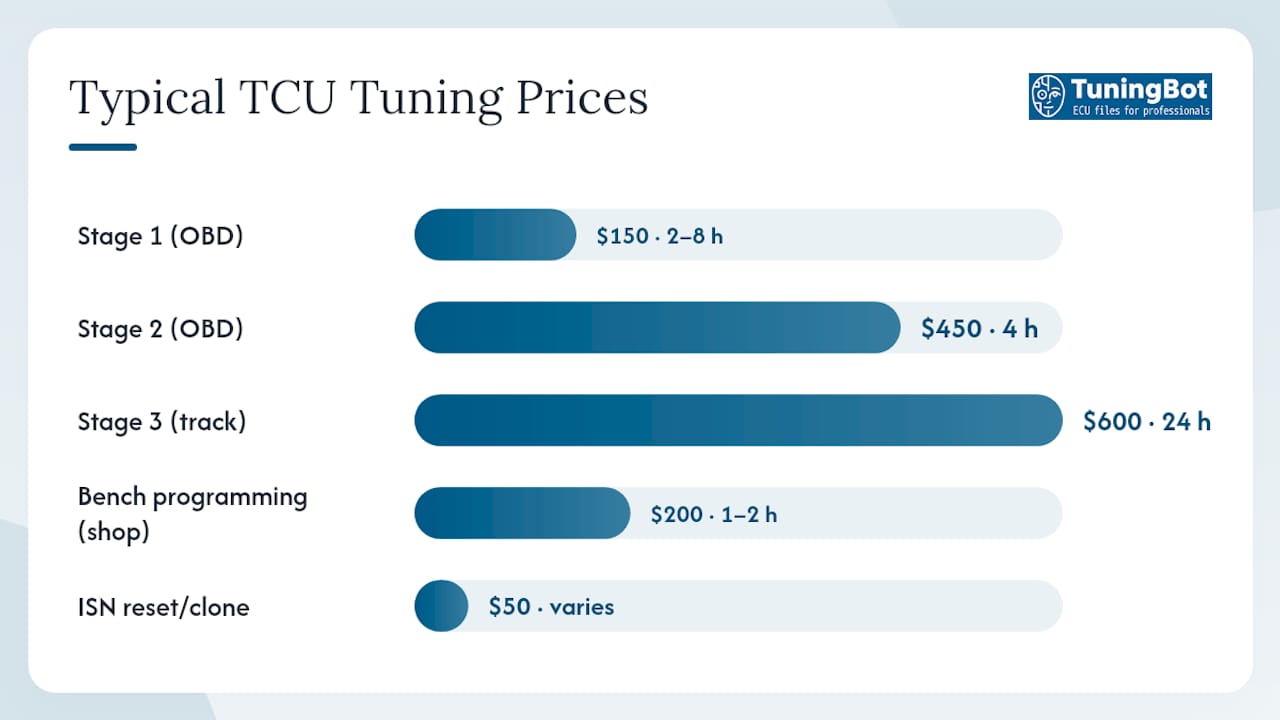
File-service pricing and workshop labor should be quoted separately. Bench removal, diagnostics and validation can materially change total job cost.
Pay-per-file, subscription and tool-linked models create different total costs. The best commercial model depends on actual workshop volume, protocol licenses and support requirements.
How do professional workshops order and integrate TCU files?
A repeatable workflow should preserve identification, the available original file, programming records, DTC status and post-write validation.
- Customer intake: Record the vehicle’s VIN, transmission code, TCU part number, and current software version. Note any existing modifications (ECU tune, hardware upgrades) that affect the torque strategy.
- Pre-flash backup: Connect your flashing tool (KESS3, AutoTuner, CMD Flash, or PCMFlash) and read the original TCU binary. Store the backup file with the job record.
- File order: Upload the original binary to your file provider’s platform with the vehicle details and the target stage or feature request. TuningBot’s platform accepts uploads without pre-registration or prepaid credits, which reduces friction on first-time orders.
- File receipt and verification: Confirm the received file’s checksum matches the provider’s specification. Cross-reference the TCU part number and software version in the file header against the vehicle.
- Flash procedure: Write the calibrated file via OBD or bench interface. Do not interrupt the write cycle. Confirm successful write with the tool’s verification function.
- Adaptation reset: Use the OEM diagnostic tool (ISTA for BMW, ODIS for VAG, or equivalent) to clear learned adaptation values. This step is mandatory; skipping it causes shift quality regressions as the TCU attempts to apply old learned corrections to new base maps.
- Road or dyno verification: Log shift events, transmission temperatures, and torque converter behavior over a structured test cycle. Compare against baseline data if available.
- Documentation: Record the calibrated file version, flash date, tool used, and verification results. Store the original backup and the calibrated file together.
TuningBot’s TCU tuning application guide provides additional examples of common transmission-calibration objectives and workshop considerations.
Совет: Implement version control for your file archive. Name files with the format: VIN_TCU-partno_stage_date. A shop that can retrieve the exact file written to a specific vehicle six months later has a significant quality-control and liability advantage over one that cannot.
For shops building a broader workshop operation around calibration services, the ECU tuning workshop business model guide covers pricing structures, tool investment, and workflow design in detail.
Why professional file quality matters: TuningBot’s technical capabilities
File quality depends on exact identification, calibration suitability and correct integrity handling. A technically successful write does not by itself prove the calibration is appropriate for the vehicle.
For supported jobs, TuningBot can provide calibrated TCU files for workshops using common professional read/write tools.
- Support for all major flash tools: Alientech KESS3, AutoTuner, Magic Motorsport, CMD Flash, Dimsport, and PCMFlash
- Binary-level checksum verification and file integrity workflows on every delivered file
- Stage 1, Stage 2, and Stage 3 calibrations with vehicle-specific torque model alignment
- Original or source file preserved by the workshop where the protocol provides it.
- Technical support for supported file-service workflows; no prepaid credits required.
- No pre-registration or prepaid credits required; upload and order directly
TuningBot’s TCU tuning application documentation covers real-world ZF platform examples with shift and torque change references, giving shops a concrete reference point before ordering.
When both ECU and TCU are modified, their torque models and limits should be reviewed together. A standalone TCU calibration can also be appropriate depending on the objective.
Совет: Check TuningBot’s updated solution list before ordering to confirm your specific TCU hardware version is supported. New integrations are added regularly, and a unit that was unsupported three months ago may now be covered.
The case for treating TCU calibration as a core workshop service
A common workshop mistake is applying a TCU file without first confirming the exact TCU ID, existing faults, engine torque level and required post-write procedure.
Stage labels are not standardized. Define the target behavior—shift schedule, torque limits, converter strategy, launch features or drivability—instead of assuming Stage 1, 2 or 3 has one universal meaning.
Choose OBD, Bench or another service method from the exact tool protocol and recovery requirements. Bench is not automatically safer or more complete than OBD.
Record the TCU ID, original/final file revision, tool, date, DTC status and validation result so the exact job can be reconstructed later.
TuningBot Support for ZF TCU Tuning
TuningBot can provide ZF TCU calibration files where the exact control unit, file type and requested service are covered.
Мастерские могут проверить Объем сервисного обслуживания ECU и TCU, обзор Публичный прайс-лист and browse Услуги ЭБУ перед заказом.
Файлы можно отправлять через Чип-тюнинг файла без предоплатных кредитов.
For broader transmission examples, see Области применения TCU Tuning и, и DSG TCU Tuning Procedure.
The workshop remains responsible for transmission diagnosis, programming conditions, legal compliance and final validation.
Sources and Further Reading
- 117Speed ZF8 tuning page — external vendor reference; performance claims are platform-specific.
- BMW Coding US transmission tuning — external commercial reference for ZF transmission tuning packages.
- ECU Tunes Australia ZF 8HP gearbox tune — external ZF 8HP tuning reference.
- Trustpilot CaracalTech reviews — external review source retained as requested.
- TuningBot TCU Tuning Applications — internal transmission-calibration reference.
- TuningBot DSG TCU Tuning Procedure — internal workshop workflow reference.
ЧАСТО ЗАДАВАЕМЫЕ ВОПРОСЫ
What does a ZF TCU tune do?
ZF TCU tuning changes supported transmission-control strategies such as torque limits, shift scheduling, pressure control and converter lockup. Exact functions depend on the TCU software and OEM application.
Увеличивает ли прошивка TCU мощность?
No. It does not create engine horsepower. It can change how the transmission accepts, transfers and manages the engine’s existing torque.
Does a TCU tune make a noticeable difference?
It can, particularly where shift scheduling, converter behavior or torque intervention are changed. The result depends on the original calibration and requested objective.
How much torque can a ZF 8HP handle?
There is no single safe torque figure for the whole ZF 8HP family. Capacity depends on the exact variant, OEM application, clutch packs, converter, cooling, condition and duty cycle.
What tools do U.S. workshops need for ZF TCU flashing?
Tool requirements depend on the exact TCU and supported protocol. Confirm whether OBD, Bench or another service mode is required in the current tool documentation, and use the OEM-compatible diagnostics specified for post-write procedures.