

 EnglishEN
 ItalianoIT
 DeutschDE
 EspañolES
 PortuguêsPT
 FrançaisFR
eshoptuning xcom alternatives should be compared by exact ECU and TCU coverage, file-format compatibility, revision support, pricing, technical assistance and integration with the workshop’s existing read/write tools. TuningBot is one practical option for professional workshops because it offers direct file upload, public pricing, no prepaid credits and engineer support, while the workshop keeps responsibility for diagnostics, programming and validation.
The shortlist of workable categories when evaluating eshop.tuning-x.com alternatives:
- Professional file services: provide calibrated ECU/TCU files for workshops that already own compatible read/write tools.
- Tool-vendor ecosystems: combine hardware, protocols and account workflows tied to a specific manufacturer or Master/Slave relationship.
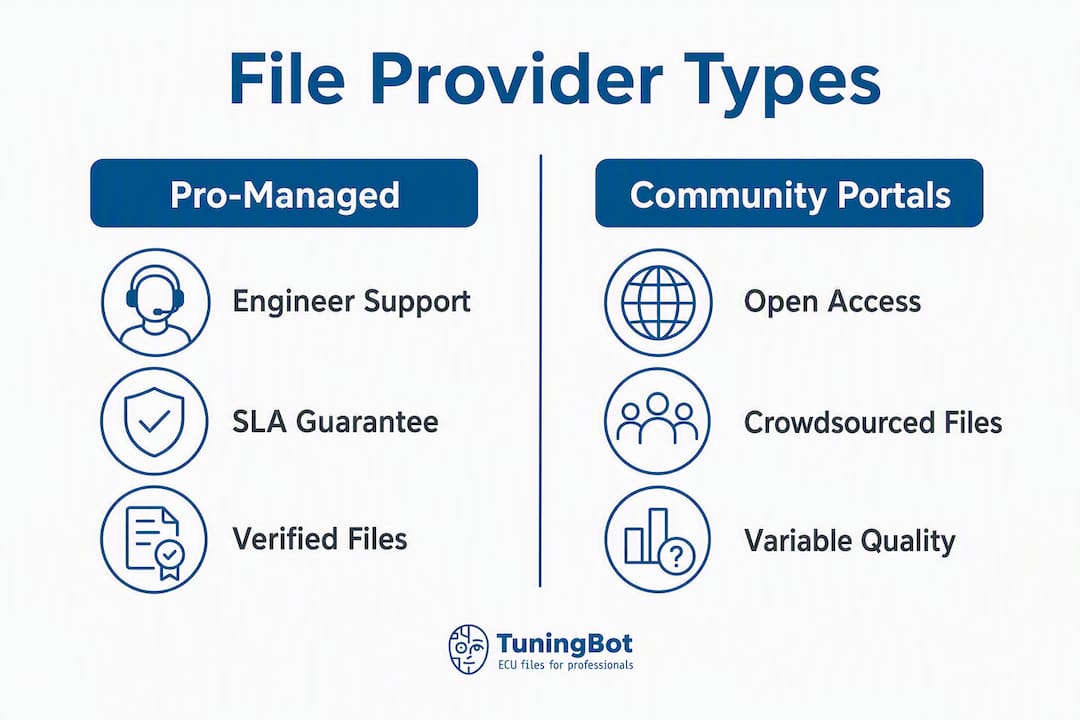
- Community file portals: can be useful for reference or low-risk research but require stronger provenance and validation checks.
- Calibration software ecosystems: such as EpicTuner, TunerPro or similar tools, require in-house calibration capability and should not be compared directly with managed file services.
Which eshoptuning xcom alternatives fit your workshop?
The table below maps each category against the criteria that matter most to a professional calibration workflow.
| Категория | Наилучшее соответствие | Что проверять | Main trade-off |
|---|---|---|---|
| TuningBot / managed file service | Workshops that already own read/write tools | Exact ECU/TCU coverage, revisions, file type and current pricing | Calibration is outsourced rather than developed fully in-house |
| Tool-vendor ecosystem | Shops standardized on one hardware family | Protocol licenses, Master/Slave model, subscriptions and regional support | Greater dependence on one ecosystem |
| Community file portal | Reference, research or non-production use | File provenance, licensing, calibration quality and support | Higher workshop-side validation burden |
| Calibration software | Teams with in-house calibration expertise | Definitions, supported ECUs, logging, test process and licensing | Requires internal engineering capability |
Quick pros/cons by category:
- TuningBot: Per-file pricing means no wasted credits on slow months; engineer access reduces rollback risk. The main consideration is that it is a managed service, not a self-hosted tool.
- Vendor tool stores: Deep compatibility within their own hardware chain, but cross-platform jobs (e.g., a PCMFlash shop needing Dimsport-format files) create friction.
- Community portals: Low cost, but vetting platform reputation and review signals before any purchase is non-negotiable for a professional shop. File provenance is rarely documented.
- Open-source ecosystems: Full local control is the upside; the downside is that internal engineering discipline and documented test procedures are required to maintain quality.
How to choose between eshoptuning xcom alternatives
When comparing eshoptuning xcom alternatives, start with the exact ECU/TCU families, file formats and tools used in your workshop. Then compare commercial terms, revision handling and technical support.
Must-haves:
- Clear technical escalation route and revision process.
- Confirmed compatibility with the exact tool, protocol, file format and Master/Slave configuration.
- Clear file identification and integrity handling appropriate to the selected workflow.
- Current turnaround expectations and urgent-delivery terms.
- Revision, re-delivery and support terms when a file requires correction.
Nice-to-haves:
- Optional workflow integrations where the provider explicitly supports them.
- Support hours appropriate to the workshop’s operating schedule.
- Searchable or clearly documented ECU/TCU service coverage.
Questions to ask any provider before committing:
- Confirm the exact file type produced by your tool; .ori, .mod, .bin, .hex, virtual and encrypted formats are not interchangeable.
- “What checksum or signing method do you use, and can you provide a verification hash with every file?”
- “What is your turnaround SLA for a Bosch EDC17 Stage 2 remap?”
- “Do you have a refund or re-delivery policy if the file fails a bench write?”
- “Who is the engineer contact if I need a map revision?”
Red flags that should stop a decision:
- No named engineer or technical contact, only automated delivery
- No checksum, hash, or signature provided with files
- Opaque or bundled pricing with no per-file breakdown
- No ECU compatibility list or vague “supports all ECUs” claims
- No US contact, no support hours, no response SLA
Совет: Before signing up for any new portal, request a sample file for a common ECU (e.g., Bosch EDC17C46) and verify the checksum against the OEM read. If the provider cannot supply a verifiable artifact for a standard ECU, that is a reliable indicator of how they handle edge cases.
What technical compatibility checks should you run first?

For eshoptuning xcom alternatives, compatibility should be confirmed at control-unit and protocol level before switching providers. A provider’s file is only useful if it matches the exact ECU/TCU, read type, file format and Master/Slave workflow.
File formats and artifacts to verify:
- Confirm the exact file type produced by your tool; .ori, .mod, .bin, .hex, virtual and encrypted formats are not interchangeable.
.binи.hex: standard for bench and boot-mode writes on Bosch and Continental ECUs- MSQ files are relevant to specific standalone/open calibration ecosystems and are not a general ECU-remapping interchange format.
- Definition files such as INI, XDF or XML are relevant to editor-based workflows and must match the exact ECU/application.
Hardware and protocol compatibility to confirm:
- Confirm the access method supported by the tool for the exact ECU/TCU; the file provider does not determine OBD, Bench or Boot support by itself.
- Confirm whether the tool is Master or Slave and whether the delivered file must remain within a linked Master workflow.
- Use the adapters and pinouts specified by the tool manufacturer for the selected protocol.
ECU/TCU brands that need extra verification:
- Bosch families: verify exact hardware/software ID, read type and checksum/integrity handling.
- Continental families: verify exact software version, file type and requested service.
- Marelli families: confirm file structure, read type and supported write method.
- Denso and Delphi: confirm exact protocol and whether the tool provides raw, virtual, partial or encrypted files.
- ZF and other TCUs: verify hardware/software ID, torque model compatibility and tool-specific file workflow.
Совет: Always test a new provider’s file on a bench ECU before deploying to a customer vehicle. A single bench write on a known-good spare ECU catches format mismatches, checksum errors, and protocol incompatibilities before they become a liability.
How should you migrate to a new portal without disrupting your calibration workflow?
Switching providers should be staged and documented. The workshop should preserve known-good originals, test the new workflow on familiar control units and compare file identification, write behavior and support response before moving production jobs.
Practical migration steps:
- Map your current calibration schema. Document every ECU variant you service, the file formats in use, and the checksum method your current provider applies. This baseline is the reference for validating the new provider.
- Run parallel validation on several test ECUs. Order files from the new provider for ECUs you have already tuned successfully. Compare checksums, map offsets, and write results against your known-good baseline.
- Verify file identity and integrity using the method supported by the tool or provider; do not assume signed artifacts are universally available.
- Define rollback procedures. Before going live, document the rollback path: original read file storage location, re-flash procedure, and engineer contact for re-delivery.
- Stage the rollout using familiar, low-risk jobs and documented acceptance checks before increasing volume.
Common migration pitfalls and mitigations:
- Tool incompatibility: A provider may deliver files in a format your hardware does not natively accept. Mitigation: confirm exact format support before ordering.
- Incomplete job data: missing ECU/TCU ID, hardware details or file-type information can cause incorrect file matching.
- Do not manually alter checksum offsets or file structure unless the platform documentation specifically requires it.
Совет: Instrument your staged pilot with a simple pass/fail log: ECU variant, file hash, write method, result, and engineer contact used. Three clean bench passes before moving to a live vehicle is a reasonable minimum threshold.
What do the main provider categories actually look like in practice?

Different eshoptuning xcom alternatives solve different problems. Managed file services supply calibrations, tool vendors supply read/write ecosystems, and calibration applications give the workshop more direct editing control.
TuningBot: pro-managed file service
TuningBot operates as a professional file service with public per-file pricing and no prepaid-credit requirement. Exact service availability should be checked from the control-unit ID, original file and requested calibration.
Лучше всего для: Busy US workshops needing reliable engineer-backed delivery across a wide ECU range without a long-term subscription commitment.
- Pros: Real engineer support, broad ECU coverage, checksum delivery, no credit lock-in, US-accessible
- Cons: Managed service model; not suitable for shops that require full local artifact control
Vendor-linked tool stores (Alientech, Dimsport, Magic Motorsport, PCMFlash)
Tool-vendor ecosystems are built around the manufacturer’s own hardware, protocols, software and account model. They can provide excellent compatibility inside that ecosystem, but they are not equivalent to an independent multi-tool file service.
Лучше всего для: Workshops already standardized on a single hardware brand that want native format compatibility.
- Pros: Deep integration with own hardware; vendor-tested file formats
- Cons: Cross-tool jobs require format conversion; limited coverage outside the vendor’s supported ECU list
Community file portals
Community file portals may contain large libraries, but provenance, calibration quality, licensing and support can vary significantly. They should not be treated as equivalent to a managed professional file service.
Лучше всего для: Low-volume research, enthusiast projects, or reference comparison only. Not recommended as a primary source for professional workshop jobs.
- Pros: Low cost, large file variety
- Cons: No SLA, no checksum standard, no engineer contact, legal/licensing status often unclear
Calibration software and emerging tools
EpicTuner is an emerging cross-platform ECU calibration application, not an open-source replacement for a managed file service. Its public GitHub repository is primarily used for project information and issue tracking. The project is currently described as an Alpha release, with INI compatibility and MSQ support still under development, and the project notes testing on rusEFI, epicEFI, FOME and Speeduino hardware. Keep the EpicTuner GitHub repository as a development reference rather than treating it as production-ready universal ECU tuning software.
Лучше всего для: In-house engineering teams with existing definition schema libraries and the capacity to maintain them.
- Плюсы: cross-platform direction, modern UI goals and INI-oriented interoperability work.
- Ограничения: Alpha status, incomplete feature set and limited documented hardware testing; not a drop-in replacement for KESS3, FLEX or a managed file service.
Совет: For shops evaluating open-source options, check whether the project’s INI or XDF definition library covers your primary ECU variants before committing to the migration. A gap in definitions at the wrong ECU variant is a hard blocker, not a minor inconvenience.
How do you verify a remap file is safe to write?
Before writing a file, confirm ECU/TCU identification, read type, file size, integrity handling, requested service and compatibility with the selected tool. Do not rely on a provider brand name alone.
Step-by-step verification checklist:
- Integrity check: use the checksum, signature or verification process appropriate to the exact ECU and tool.
- File identification: confirm ECU/TCU ID, software version, read type and intended vehicle/job match.
- Digital signatures or hashes should be verified when a provider actually supplies them; they are not universal remap-file requirements.
- Use a bench or spare-unit validation only when technically appropriate and available; it is not mandatory for every file.
- Record original file, final revision, control-unit ID, date, tool and write result.
Secure delivery and storage practices:
- Transfer files over encrypted channels only (HTTPS, SFTP); avoid unencrypted email attachments for production files
- Store original read files and delivered mod files in a version-controlled archive with access controls
- Set file-retention periods according to workshop policy, customer agreements and applicable legal requirements.
Legal and licensing checklist: Confirm with every provider that you hold a commercial usage license for the delivered file, that redistribution to third parties is prohibited without explicit written permission, and that the provider’s terms of service cover professional workshop use. Emission-related modifications (DPF off, EGR off, AdBlue/SCR off) carry additional regulatory considerations under US EPA and CARB rules; confirm compliance obligations with a qualified legal or compliance professional before offering these services commercially.
Совет: Add a one-line verification step to every job card: “File hash confirmed against provider delivery receipt before write.” This single habit creates a defensible audit trail and catches delivery errors before they reach a customer vehicle.
Ключевые выводы
The best eshoptuning xcom alternatives depend on exact ECU/TCU coverage, file compatibility, commercial terms, revision handling and the workshop’s preferred level of in-house calibration control.
| Точка | Детали |
|---|---|
| Compare equivalent services | A file service, flashing-tool ecosystem and calibration editor solve different problems. |
| Verify exact compatibility | Check control-unit ID, file type, protocol and Master/Slave workflow. |
| Test new suppliers gradually | Use familiar jobs and documented acceptance criteria before scaling. |
| Do not demand universal hashes or signatures | Integrity handling depends on the ECU, tool and provider workflow. |
| EpicTuner is still emerging | Its current public repository describes an Alpha project, not a universal production flasher. |
| TuningBot is a managed file service | It complements the workshop’s read/write hardware and does not replace diagnostics or programming. |
Why pro-managed file services usually win for US workshops
A common migration failure is introducing a new supplier without first confirming file format, support process and recovery route for the exact control units the workshop services.
Community portals and calibration applications can be useful in research or in-house engineering workflows, but they require stronger internal validation and do not replace professional support automatically.
At scale, file naming, revision history, technician access and job traceability matter as much as the initial file delivery. The chosen workflow should fit the workshop’s actual operating model.
How TuningBot Fits a Professional Workshop Workflow
TuningBot is an online ECU and TCU calibration file service for workshops that already own compatible read/write hardware.
Перед заказом мастерские могут проверить Объем сервисного обслуживания ECU и TCU, обзор Публичный прайс-лист и просматривайте доступные Услуги ЭБУ.
Файл original можно отправить через Чип-тюнинг файла без предоплатных кредитов.
For workshop process guidance, see Перенастройка ECU для профессионалов.
The workshop remains responsible for vehicle diagnosis, correct file identification, stable programming conditions, legal compliance and post-write validation.
Полезные источники
- EpicTuner public GitHub repository — project status, features and current development notes.
- AutoTuner Tool Guide — Master/Slave, OBD, Bench and Boot workflow reference.
- TuningFiles.com Alternatives — professional file-supplier comparison.
- FirstECUFiles.com Alternatives — ECU and TCU remapping-file service comparison.
ЧАСТО ЗАДАВАЕМЫЕ ВОПРОСЫ
What are the best eshoptuning xcom alternatives?
The best eshoptuning xcom alternatives depend on whether the workshop needs a managed file service, a tool-vendor ecosystem, a community portal or in-house calibration software.
What is the main difference between a managed file service and a community portal?
A managed file service provides a defined commercial workflow and technical support. Community portals typically place more responsibility on the workshop to verify provenance, calibration quality and licensing.
Does TuningBot support Alientech KESS3 and PCMFlash write flows?
TuningBot can provide files for workflows using common professional tools, but compatibility must be confirmed for the exact ECU/TCU, protocol, file type and Master/Slave configuration.
What file formats should I confirm before switching ECU file providers?
Confirm the exact file type produced by your tool and accepted by the provider. Raw, virtual, partial, encrypted and tool-specific files are not interchangeable.
Are DPF-off and EGR-off remap files legal for road use in the United States?
Emissions-system deletion on road vehicles can violate federal and state law. Verify the current rules for the exact vehicle and intended use before offering the service.
How many test ECUs should I validate before fully migrating to a new file portal?
There is no universal number. Introduce the provider gradually using familiar, low-risk jobs and documented acceptance criteria.