

 ItalianoIT
 DeutschDE
 EspañolES
 PortuguêsPT
 FrançaisFR
 РусскийRU

A remote ECU tuning file is a calibration built by an engineer who never touches the vehicle: you read the original software on site, send it with the vehicle data, and write back the modified file with your own tool. The result is only as good as the information you send and the checks you run before the write. This guide covers the workflow, the data a calibration request needs, the pre-write verification, and what to do when a file is rejected or the vehicle sets faults. It is written for workshops and tuners who already own a read/write tool, and it shows where TuningBot fits into that chain.
TL;DR
- Remote tuning is a three-stage loop: read the original on site, upload it with complete vehicle and tool data, write the returned file and validate the car.
- Most rejected or faulty files trace back to an incomplete or mismatched original, a wrong read method or an unhandled checksum, not to the calibration itself.
- A valid checksum proves file integrity only. Hardware, software version, file size and memory area still need to match before you write.
- Our standard files are typically returned in about 15 to 20 minutes during published operating hours, with per-file pricing and no mandatory registration.
- Emissions-related modifications are for applications where they are permitted, such as off-road or competition vehicles.
Table of Contents
- What a remote tuning file actually is
- The remote calibration workflow, step by step
- Pre-write checks that prevent most failures
- Why remote files get rejected or cause faults
- Can a professional reprogram an ECU in house?
- Emissions-related changes: keep them to permitted applications
- Independent access to information and tools
- Our view as a file service
- Order a file for your next job
- FAQ
- Sources
What a remote tuning file actually is
In a remote workflow the calibration work and the vehicle are in different places. The workshop holds the car and the read/write equipment. The calibration engineer holds the original file and edits maps: fuel and boost targets, torque limiters, ignition, gearbox shift and torque request tables, plus any requested function changes. The file travels as a download, and the workshop writes it back.
This differs from a device-based approach where a tuner connects live to a vehicle through a remote session. With a file service the ECU is never connected to the calibrator. That puts the responsibility for the read, the identification and the write squarely in the workshop, which is why the preparation steps below matter more than they appear to.
The tools that make this possible are the professional read/write platforms: OBD, bench and boot mode tools such as Alientech KESS3, AutoTuner, FLEX, CMD and Dimsport. Our service works with files read using these tools. Whether a given ECU family, software version and reading method can be supported always depends on the individual file and technical compatibility, so no service can promise universal coverage.
The remote calibration workflow, step by step
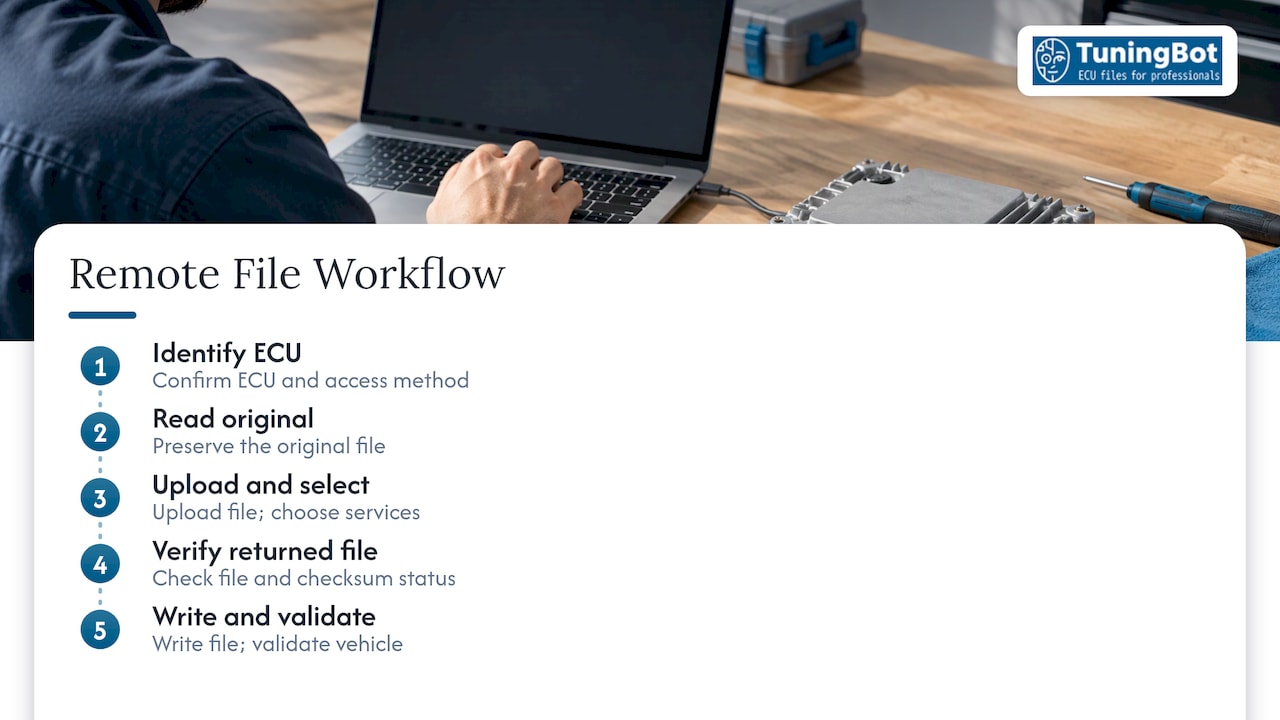
1. Identify the ECU and choose the reading method
Before you read anything, record the ECU manufacturer and family (Bosch EDC17, MED17, Simos, Continental, Delphi, Marelli, Denso and so on), the hardware number, the software number and the software version printed on the label or reported by the tool. Then decide on the access method: OBD, boot, bench or a tool-specific protocol. The method determines which memory areas you capture, and a partial read is the most common reason a file cannot be calibrated.
Family-specific pages on our site go into what to look for. Our Simos 18 identification and file check guide and the Keihin calibration checks guide show how the checks differ between platforms.
2. Read the original and keep it untouched
Save the full original read as soon as it completes, with the tool’s log, and never overwrite it. Every later comparison, rollback and fault investigation depends on that file. If the tool offers a read verification, run it. Store the original with the vehicle’s VIN, mileage and date so it can be matched to the car later.
3. Prepare the calibration request
The request should let an engineer reproduce the situation without guessing. At minimum:
- Make, model, model year, engine code and displacement
- Fuel type, transmission type and drive configuration
- ECU and TCU hardware and software identifiers
- The tool and protocol used for the read, and whether the read was full or partial
- Existing modifications: intake, intercooler, exhaust, downpipe, injectors, turbo, gearbox or clutch changes
- The service you need, for example Stage 1, ECO, gearbox, or a function change
- Known faults, stored DTCs and the vehicle’s current condition
A diesel with a worn injector set or a petrol car with a misfire history will not give the result a healthy one gives, and the calibrator needs to know that before the file is built.
4. Upload and select services
You upload the original and select the services. With us this does not require registration for standard file orders, and prices are per file. A Stage 1 for diesel is €49.99 and for petrol €69.99, Premium Stage 2 is €129.99, ECO Tuning is €49.99 and Full Gearbox Tuning is €49.99, all one-off per file as listed on the price list. Most standard files are delivered within approximately 15 to 20 minutes during published operating hours, depending on complexity and workload.
Select function changes deliberately. Each one is a separate modification with its own side effects: Start & Stop Off (€29.99), Hotstart Fix (€19.99), Torque Monitoring OFF (€29.99), Rev Limit / Hardcut (€59.99), Vmax Off (€29.99) and so on. Listing them in the request, rather than asking for them afterwards, avoids a second write cycle.
5. Verify the returned file before writing
This is the step that separates a clean job from a bricked ECU. The next section covers it in detail.
6. Write, then validate the vehicle
Connect a stable power supply, because voltage drops during programming are a known cause of failed writes. Follow the tool’s procedure for the access method you used, let the write and any verification finish, and cycle the ignition as the tool instructs. Our guide on how an ECU file is written, covering UDS, checksums and flashing explains what happens inside the tool during that process.
After the write, read the DTC memory, clear anything that is a by-product of the flash, start the engine and check idle stability, then complete a road or dyno validation that suits the calibration. Compare logged values (boost, rail pressure, lambda, torque request, shift behavior for TCU files) with what the calibration is meant to achieve. Keep the post-write read with the original so the pair can be compared if a fault appears.
Pre-write checks that prevent most failures
A returned file looks like any other binary. These checks tell you whether it is safe to write.
| Check | What to confirm | Why it matters |
|---|---|---|
| File size | Same as the original read for that read method | A different size or structure suggests the wrong container or a partial file |
| Software family and version | Matches the ECU you read | A similar-looking file is not always suitable for the ECU |
| Hardware compatibility | Hardware number matches the original | A valid checksum does not prove hardware compatibility |
| Memory area | The area you read is the area you will write | Mixed areas cause rejected writes or faults |
| Checksum status | Valid, or corrected by the tool during the write | A stale checksum can cause the ECU to refuse the file or become unusable |
| Requested changes | Services you ordered are present in the file | Calibration review is a separate question from integrity |
This list follows the guidance in KT200 Plus’s documentation, which instructs technicians to compare file size, hardware compatibility, software version, calibration information and checksum status before writing, and notes that a file that appears similar is not always suitable for the ECU.
Understanding checksum status
A checksum is an integrity value the ECU recalculates and compares at start-up or during programming. MTX Electronics’ Tuning Editor documentation explains that if it does not match the ECU may refuse the file, and that writing an edited file with a stale checksum can leave the ECU unusable. The same documentation describes per-block status (valid, invalid, unsupported, unknown) and says that when no checksum plugin recognizes the file, the flashing tool has to recalculate and correct the checksum during programming.
An invalid checksum has two very different causes. EFILive’s knowledge base states that checksums show as invalid either because the file data is corrupt or because software that did not update them modified the file. Correcting checksums on a corrupt file only masks the corruption, and flashing it risks damaging the controller. So the order is: confirm the file is a clean read first, then correct the checksum if the modification caused the mismatch.
Checksum Correction is available from us as a separate service at €29.99 per file, which is useful when your tool does not handle the checksum for a given ECU family. It does not replace the integrity checks above, and availability still depends on the ECU family, software version and reading method.
Why remote files get rejected or cause faults
When a write fails or the car sets faults afterwards, the cause usually falls into one of a few groups.
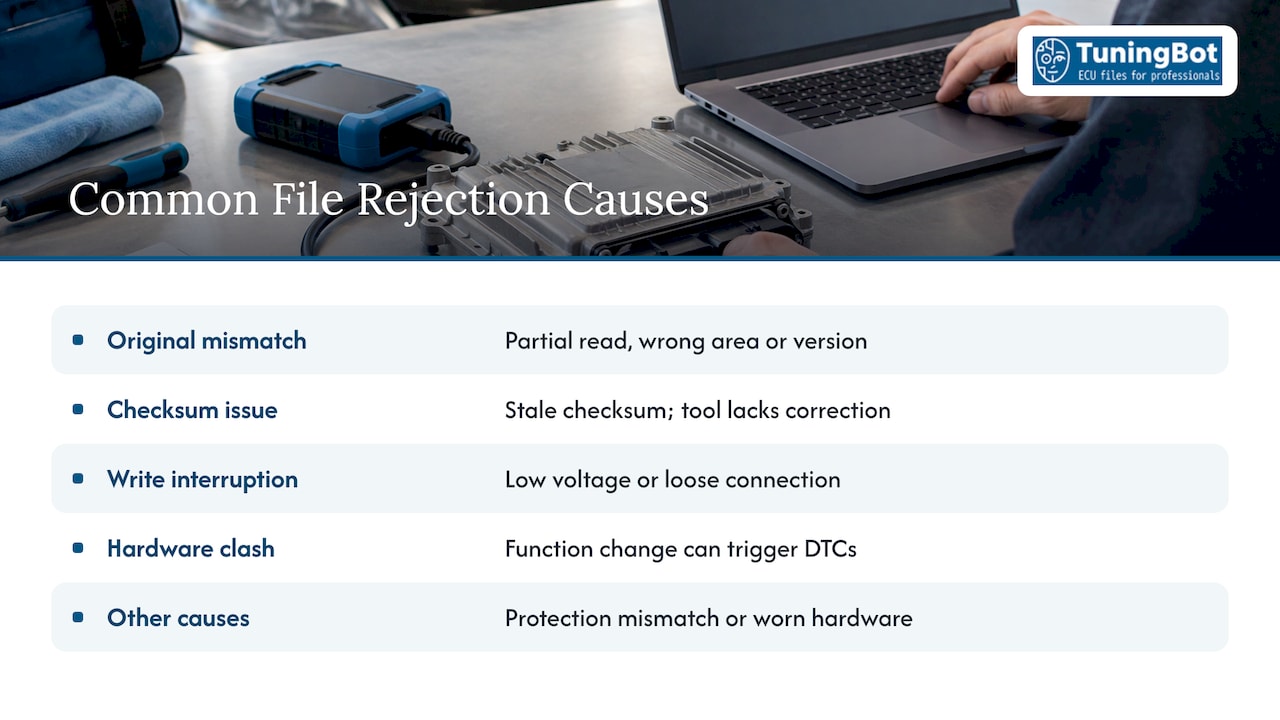
Incomplete or mismatched original. A partial read, a read from the wrong memory area, or a file saved from a different software version than the one in the car. The calibration is correct for the file it was built from and wrong for the ECU you write it to. Response: re-read with a method that captures the full content, confirm identifiers, and send the new original.
Checksum not handled. The edited file carries a stale checksum, and the tool has no correction for that ECU. Response: confirm the file is not corrupt, then correct the checksum through a plugin or service before the write.
Power or communication interruption. Low battery voltage or a loose connection ends a write midway. Response: stop, do not cycle the ignition randomly, and follow the tool’s recovery procedure, which may require a bench or boot connection.
Function changes that clash with the hardware. Disabling a function without matching the physical setup, such as removing a flap or sensor without the ECU adaptation it needs, can set DTCs or limp behavior. Response: read the fault codes, note which function they relate to, and report them with the freeze-frame data rather than clearing them repeatedly.
Immobilizer or protection mismatches. Some ECUs refuse a write or refuse to start after one when protection data is not handled. IMMO Off is a listed service at €49.99 where it applies to the ECU in question.
Unrealistic baseline. A worn turbo, clogged intake, leaking boost hose or weak fuel pump can make a correct calibration look wrong. Response: check the mechanical basics before blaming the file.
When you contact support, send the original read, the file you wrote, the tool and its log, the fault codes and what changed on the car. Our technical assistance runs through a dedicated support portal, and corrections are handled under the published service terms.
Can a professional reprogram an ECU in house?
Yes, and the remote model exists because of it. Reading and writing is a workshop skill set: knowing the access method for each ECU family, working with stable power, handling checksums, and validating results. What a file service adds is calibration engineering, the map work itself, without the workshop needing to build and maintain that capability for every platform.
If you are setting up the equipment side, we also sell tuning tools. The ECM Titanium Full and the ECM Titanium Credits Version, with a USB dongle and 1,000 credits are listed in our shop for workshops that want to handle map editing and checksum work themselves.
Emissions-related changes: keep them to permitted applications
Some calibration requests concern emissions systems: DPF, EGR, AdBlue/SCR, OPF/GPF or flap functions. These are intended only for applications where they are permitted, such as off-road or motorsport vehicles. In the United States, the EPA states that software tuning that increases emissions or keeps the on-board diagnostic system from recognizing changes counts as tampering for vehicles used on public roads. Confirm the intended use with your customer before ordering these services.
Independent access to information and tools
Independent workshops depend on access to manufacturer information and tools to repair and maintain vehicles. The European framework on this treats it as a matter for independent operators, and the wider reconditioned and replacement parts ecosystem around modern performance systems, from alternators to starters, relies on the same access. For a tuning workshop, stable electrical components matter directly: a weak alternator or battery is a leading cause of interrupted writes.
Our view as a file service
We build calibrations for workshops that read and write on their own equipment, so our work starts where yours does: with the original file. We design our process around what that file tells us. ECU family, software version, reading method and the services you select determine what can be calibrated, and we say so when a file cannot be supported.
The strongest results we can offer come from clean input. A full original read, complete vehicle data and a clear list of requested services let a calibration engineer work once rather than iterate. That is why standard orders need no mandatory registration and carry transparent per-file pricing: the time goes into the file, not into the paperwork.
Where a checksum has to be handled or a function needs adapting, we treat it as part of the calibration and offer it as a defined service rather than leaving it for the workshop to improvise. Corrections follow the published service terms, and our support portal is there for technical questions during a job.
TuningBot Technical Team
Order a file for your next job
Upload your original read, choose the services and receive a calibrated file ready to write with your compatible tool. Standard files are typically delivered in about 15 to 20 minutes during operating hours. Pricing for all 20 services, from Hotstart Fix at €19.99 to Premium Stage 2 at €129.99, is on the price list, and an overview of our ECU tuning services shows what each package covers. Optional prepaid credits are available for higher volumes.
FAQ
What information do I need to send for a remote tuning file?
Send the full original read, the ECU and TCU hardware and software identifiers, the vehicle and engine details, the tool and method used, existing modifications and the services you want. Known faults and stored DTCs should be included. The more complete the request, the less likely a revision is needed.
Does a valid checksum mean the file is safe to write?
No. A valid checksum shows the file is internally consistent, not that it fits your ECU hardware, software version or memory area. Compare file size, identifiers and structure with the original as well, as KT200 Plus’s documentation advises.
What should I do if the ECU does not accept the file?
Do not retry blindly. Check that the original was a full, correct read, that file size and identifiers match, and that the checksum was handled. Then follow your tool’s recovery procedure and contact support with the original, the written file and the tool log.
Can I use remote tuning files for any ECU?
No. Availability depends on the ECU family, software version, reading method and technical compatibility. Send the original and the details, and the file is assessed against what can be supported.
Sources
- KT200 Plus ECU Checksum Guide: Verify Files Before Writing
- MTX Tuning Editor: Checksums and detection
- EFILive Knowledgebase: Checksums
- EPA Clean Air Northeast: Tampering and Aftermarket Defeat Devices