

 ItalianoIT
 DeutschDE
 EspañolES
 PortuguêsPT
 FrançaisFR
 РусскийRU
Writing an ECU file is the process of transmitting a modified binary image into an engine control unit’s flash memory using a structured sequence of diagnostic communication protocols, checksum validation, and secure session management. Industry professionals refer to this as ECU flashing or ECU file programming. The process governs how ECU tuning translates calibration changes into permanent engine behavior. Understanding how an ECU file is written separates tuners who get consistent results from those who brick ECUs and chase fault codes.
Table of Contents
- UDS diagnostic protocols
- ECU flash data transfer sequence
- Checksums and CRCs
- Internal ECU memory structure
- Practical writing challenges
- Key takeaways
- Why procedural discipline matters
- How TuningBot supports ECU writing workflows
- FAQ
How an ECU file is written using UDS diagnostic protocols
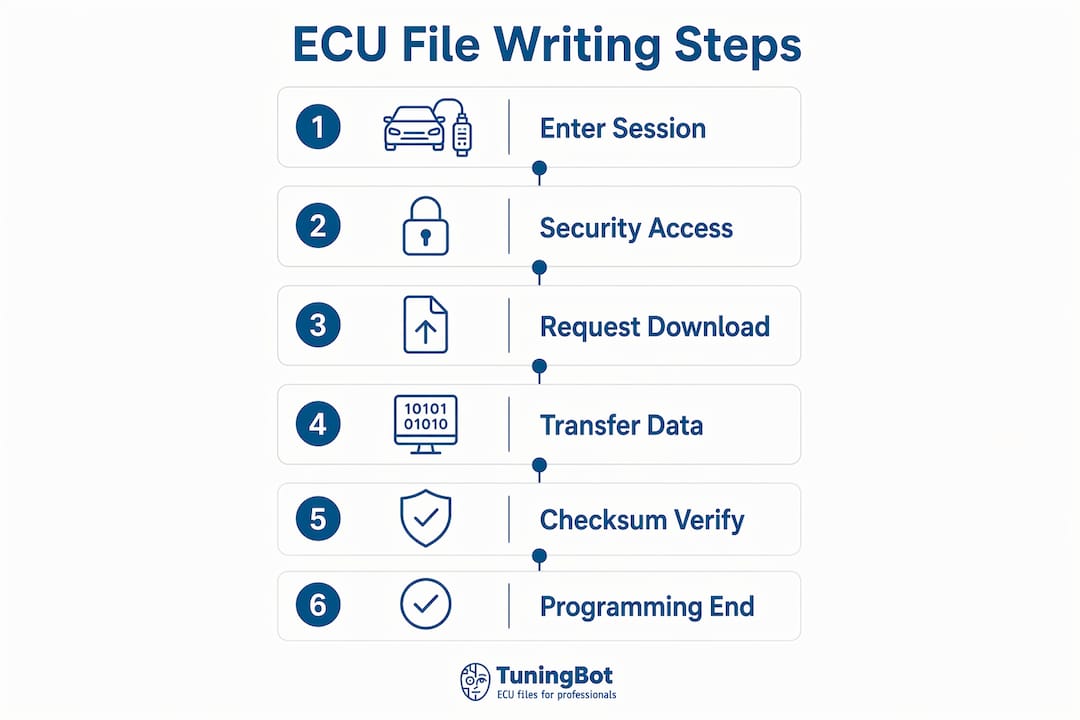
The foundation of ECU file programming is the Unified Diagnostic Services protocol, commonly called UDS. Before a single byte of calibration data transfers to the ECU, the tool must establish a valid programming session and pass a security challenge. The UDS programming sequence is a strict state machine, and skipping or misordering any step produces a negative response that aborts the entire operation.
The sequence proceeds in four mandatory stages:
- Enter programming session (service 0x10). The tool sends a DiagnosticSessionControl request with the programming sub-function. The ECU switches from its default session to a programming session, enabling services that are locked during normal operation.
- Security access challenge-response (service 0x27). The ECU issues a seed value. The tool applies a manufacturer-specific algorithm to compute the correct key and returns it. A wrong key locks the ECU for a timed delay, so the algorithm must match the specific ECU variant exactly.
- Maintain session stability with TesterPresent (service 0x3E). Long flash operations exceed the ECU’s session timeout. Sending periodic TesterPresent messages prevents the ECU from dropping back to its default session mid-transfer. Tools like Alientech KESS3 and AutoTuner handle this automatically, but custom flash scripts require explicit implementation.
- Confirm communication parameters. Baud rate, block size, and timing parameters must align between tool and ECU before data transfer begins. Mismatched parameters cause transfer errors that are difficult to diagnose without a CAN bus analyzer.
Pro Tip: Always verify the ECU variant identifier before entering the programming session. Sending the wrong security algorithm to a Bosch MED17 versus an EDC17 produces a lockout, not just a rejection.
How is the ECU flash data transfer sequence executed?
Once the programming session is active and security access is granted, the actual data transfer follows a three-phase sequence defined by UDS services 0x34, 0x36, and 0x37. Each phase has strict requirements, and the UDS transfer state machine enforces them without exception.
- RequestDownload (0x34). The tool declares the target memory address, the total image size, and the compression or encryption method. The ECU responds with the maximum block size it can accept per transfer chunk. This block size determines how many bytes each subsequent TransferData message carries.
- TransferData (0x36) with block sequence counters. The tool sends the binary data in sequential blocks. Each block carries an incrementing sequence counter starting at 0x01. The ECU validates the counter on every block. A gap, repeat, or out-of-order counter triggers a negative response and aborts the transfer. For a 512 KB calibration region, this means hundreds of sequential blocks with zero tolerance for sequencing errors.
- RequestTransferExit (0x37). After the final data block, the tool sends this service to signal transfer completion. The ECU performs an internal integrity check on the received data before acknowledging success.
Negative responses during TransferData most commonly result from three causes: incorrect block sequence counters, block sizes exceeding the ECU’s declared maximum, and session timeouts caused by missing TesterPresent messages. After writing the ECU file, a reset or routine control call triggers the ECU to reboot into the new firmware, verifying integrity and committing the update if all checks pass.
Pro Tip: Log every UDS response code during a flash session. Negative response code 0x24 (requestSequenceError) during TransferData almost always points to a block counter reset that was not expected by the ECU.
Why checksums and CRCs are critical in ECU file writing
Modifying a calibration map in a BIN file without correcting the checksum produces a file the ECU will reject outright or accept into a fault condition. Checksum and CRC recalculation is not optional post-processing. It is a mandatory step in the ECU file modification guide before any flash attempt.
Key facts about checksum protection in modern ECUs:
- Bosch MED17 and EDC17 ECUs use CRC32 block checksums that cover specific address ranges within the flash image. Each covered region has a stored checksum value that the bootloader verifies on startup.
- Some Bosch ECUs contain multiple protected flash regions with independent checksum schemes. A successful dump does not guarantee all regions are covered by one algorithm or one tool.
- Ignoring checksum correction causes the ECU to enter limp mode, throw DTC faults referencing programming errors, or refuse to start entirely.
The table below compares two approaches to checksum correction after BIN file modification:
| Approach | Method | Accuracy | Use case |
|---|---|---|---|
| Manual recalculation | Compute CRC32 over address range, write result to checksum location | High if address map is known | Experienced tuners with full A2L data |
| Solver-based tool | Model checksum as linear equations over GF(2), solve deterministically | Exact | Complex ECUs with multiple checksum regions |
Solver-style tools like the medc17-checksum-tool use mathematical modeling over GF(2) to recalibrate checksums after modifications. This approach is more accurate than trial-and-error byte patching and handles the multiple independent checksum regions found in complex Bosch ECUs. TuningBot’s checksum correction guide covers the practical implementation of this process for workshop use.
Pro Tip: After any calibration edit, run checksum validation before attempting to flash; the Checksum Correction service is the dedicated TuningBot service reference for that workflow. A rejected file mid-session is recoverable. A partially written file with a bad checksum is not.
What is the internal memory structure of an ECU?
The ECU flash image is not a single flat binary. Modern ECUs contain multiple memory types including program flash for the bootloader and main application, data flash for EEPROM emulation, and non-volatile memory storing adaptations, counters, and learned parameters. Each region has distinct protections and write rules.
| Memory region | Typical size | Write access | Tuning relevance |
|---|---|---|---|
| Bootloader | 64–128 KB | Locked, no OBD write | Contains reprogramming stack and security |
| Main application | 512 KB to 2 MB | Writable via programming session | Engine control logic and strategies |
| Calibration data | 64–512 KB | Writable via programming session | Maps, limits, torque targets, injection timing |
| Data flash / EEPROM | 16–64 KB | Separate service or bench access | Adaptations, mileage, learned values |
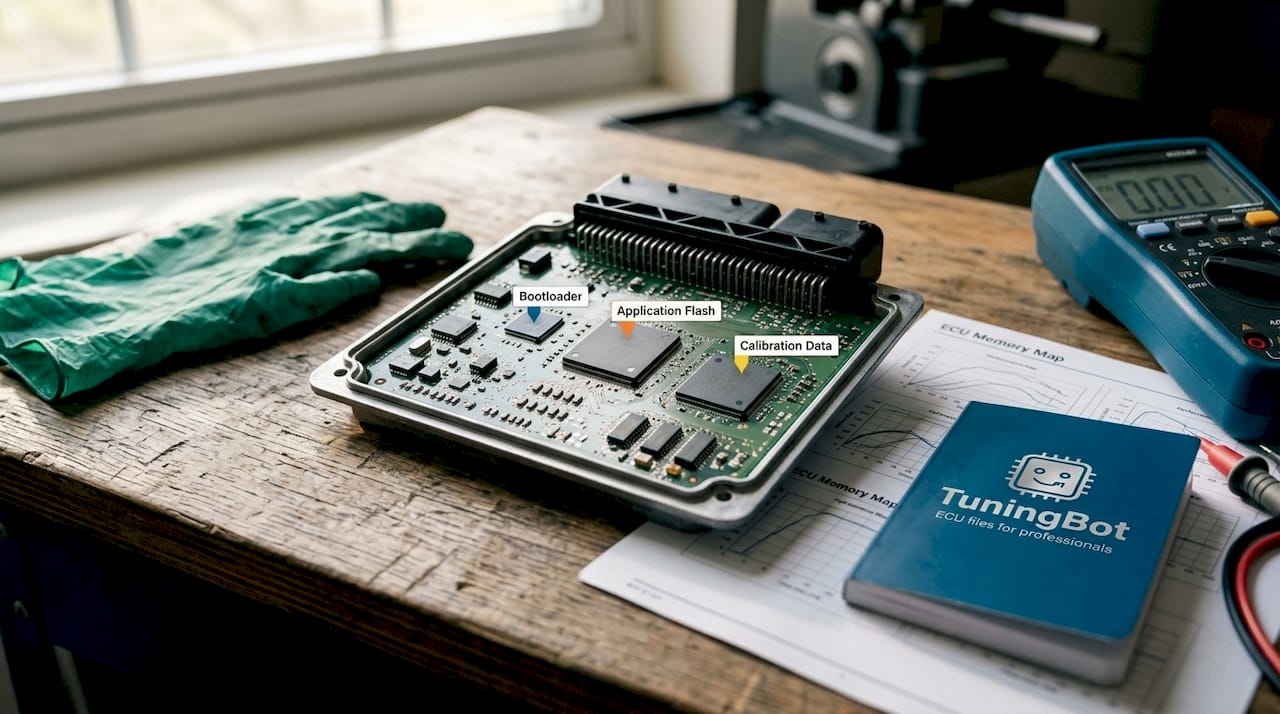
Bosch Tricore ECUs separate bootloader and application memory with distinct protections. The bootloader occupies the first 64 to 128 KB at the physical PFLASH origin and controls all flash write and erase operations. Writing to the bootloader region via OBD is blocked by design. The bootloader is the flashing gatekeeper, managing erase and write cycles and performing integrity checks before handing control to the application layer. This architecture means that a tuner writing calibration data via OBD never touches the bootloader. Bench flashing with tools like Magic Motorsport or CMD is required when the bootloader itself needs replacement or repair.
Calibration data sits in a defined region of the application flash, and its exact location is documented in the A2L file, which maps every parameter to a memory address, data type, conversion formula, and unit. Without A2L data, identifying which bytes in a BIN file correspond to a specific fuel map requires reverse engineering. With A2L data, the same task takes seconds in tools like WinOLS or TPROT.
What practical challenges do professional tuners face when writing ECU files?
ECU file writing fails most often not because of hardware faults but because of procedural errors that are entirely avoidable. The following are the most common failure points observed in professional workshop environments:
- Block counter resets during multi-region flashes. When writing separate calibration and application regions in sequence, some tools reset the block sequence counter between regions. If the ECU expects a continuous counter, this triggers a negative response on the first block of the second region.
- Unstable vehicle power during flashing. Voltage drops below 12.5V during a flash session can corrupt the write operation. A battery support unit set to 13.8V is standard practice, not optional equipment.
- Missing A2L data for calibration editing. Editing a BIN file without A2L metadata means working blind. A2L files map calibration parameters to exact memory addresses, data types, and conversion formulas, transforming binary analysis from guesswork into systematic parameter identification.
- Skipping post-flash verification. After writing, the ECU must reboot and pass its own integrity checks. Monitoring live ECU data and logs immediately after a flash confirms the ECU accepted the new file. Persistent DTC faults referencing programming errors indicate a checksum or transfer failure.
- Sector erase failures. Flash memory sectors must be erased before new data can be written. If the erase routine fails silently, the write operation overlays old data with new data at the bit level, producing unpredictable calibration behavior.
Pro Tip: After a successful flash, read the ECU file back and perform a binary comparison against the file you wrote. A byte-for-byte match confirms the write was clean; the validation checklist before delivering a tune is the right internal process reference. Any discrepancy points to a sector that did not erase correctly.
Key takeaways
Writing an ECU file requires a precise sequence of UDS session management, block-sequenced data transfer, and checksum correction before the ECU will accept and commit any modified calibration data.
| Point | Details |
|---|---|
| UDS session sequence | Enter programming session (0x10), pass security access (0x27), then transfer data in order. |
| Block sequence counters | TransferData (0x36) requires exact sequential counters; any gap aborts the flash. |
| Checksum correction | Recalculate CRC32 checksums for all modified regions before flashing or the ECU will reject the file. |
| Memory region awareness | Bootloader, application, calibration, and data flash have separate protections and write rules. |
| Post-flash verification | Read back the written file and compare it byte-for-byte to confirm a clean write. |
Why procedural discipline defines ECU tuning outcomes
After working through hundreds of ECU file writing sessions across Bosch, Continental, and Delphi platforms, the pattern is consistent. The tuners who produce reliable results are not necessarily the ones with the deepest reverse-engineering knowledge. They are the ones who treat the flash procedure as a protocol, not a shortcut opportunity.
The single most underestimated step is checksum correction. Many tuners assume their tuning software handles it automatically. Some tools do. Many do not, and the ones that partially handle it on complex ECUs with multiple independent checksum regions are the most dangerous because they fail silently. A file that passes a tool’s internal check and still gets rejected by the ECU is a checksum problem, not a communication problem.
The second pattern I see consistently is skipping the binary read-back comparison after flashing. It takes two minutes. It catches sector erase failures that would otherwise produce intermittent faults weeks after the tune. The tuners who skip it are the ones who get warranty calls.
Understanding the ECU memory architecture before touching a file is not academic. Knowing which region contains calibration data and which contains the bootloader determines whether you use OBD flashing or bench access. Getting that wrong with a customer’s ECU on the bench is an expensive lesson.
— TuningBot Technical Team
How TuningBot supports professional ECU file writing workflows
TuningBot provides professional tuners and workshops with the technical resources and calibration services needed to write ECU files correctly the first time.
The TuningBot ECU tuning file service supports all major ECU brands including Bosch, Continental, Delphi, Marelli, and Denso, with compatibility across tools like Alientech KESS3, AutoTuner, Magic Motorsport, CMD, and PCMFlash. For workshops handling checksum correction on complex ECUs, the professional checksum guide covers CRC32 recalculation workflows for MED17, EDC17, and related platforms. The ECU Service Coverage matrix lists supported ECU and service combinations for tuners working with current vehicle platforms. Upload your ECU file through Tune Your File with no registration required and receive a professionally calibrated file with real engineer support.
FAQ
What does “writing an ECU file” mean in tuning?
Writing an ECU file is the process of transmitting a modified binary calibration image into the ECU’s flash memory using UDS diagnostic protocols. The process includes session management, data transfer, checksum correction, and post-flash verification.
What UDS services are used when writing an ECU file?
The standard sequence uses service 0x10 to enter programming session, 0x27 for security access, 0x34 to request download, 0x36 to transfer data blocks, and 0x37 to exit the transfer. Each service must execute in order without gaps.
Why does checksum correction matter before flashing?
Modified BIN files with uncorrected checksums are rejected by the ECU or cause fault conditions on startup. Bosch MED17 and EDC17 ECUs use CRC32 block checksums across specific address ranges, and all affected regions must be recalculated after any calibration edit.
Can you write an ECU file via OBD without bench access?
Yes, for the application and calibration regions. The bootloader region, which occupies the first 64 to 128 KB of physical PFLASH on Bosch Tricore ECUs, is locked against OBD writes by design and requires bench access for modification.
What causes an ECU to enter limp mode after flashing?
Limp mode after flashing most commonly results from an uncorrected checksum, a failed sector erase, or a block sequence error during TransferData. Reading the ECU back after flashing and comparing it byte-for-byte against the source file identifies which failure occurred.