

 EnglishEN
 ItalianoIT
 DeutschDE
 EspañolES
 FrançaisFR
 РусскийRU
A virtual read does not read the ECU’s memory. The tool identifies the control unit, then downloads a stock file that matches the identified software from a server. The file is usually a valid base for a calibration job, but it is not a copy of what is inside the ECU, and on a car that has already been tuned the two can differ completely. Treat it as a reference original, label it as one, and use a physical read whenever the job needs the real contents of the unit.
This article covers how virtual reads work, what the tool needs to match the right file, where they fall short, and the checks that keep a workshop out of trouble before a file is written back.
TL;DR
- A virtual read returns an original file matched to the ECU’s software number. A normal (physical) read returns the data actually stored in the unit, including any existing tune.
- On a previously modified ECU, a virtual read still returns the original database file, so it cannot show you the installed calibration.
- Match on hardware number, software number, calibration number and protocol, never on vehicle model or ECU family alone.
- Save the untouched file, label its source as “Virtual Read”, and work only from copies.
- Use a physical read (OBD, bench or boot) for cloning, EEPROM or immobilizer work, and any case where you need a full backup.
Sumário
- What a virtual read actually is
- Virtual read versus physical read
- What the tool needs to match the right file
- Support is protocol-specific
- The tuned-ECU problem
- Verifying a virtual read before you modify it
- When the virtual read is not available
- Choosing the read method per job
- How we work with files from both methods
- Perspectiva
- Ordering a file from your virtual or physical read
- PERGUNTAS FREQUENTES
- Fontes
What a virtual read actually is
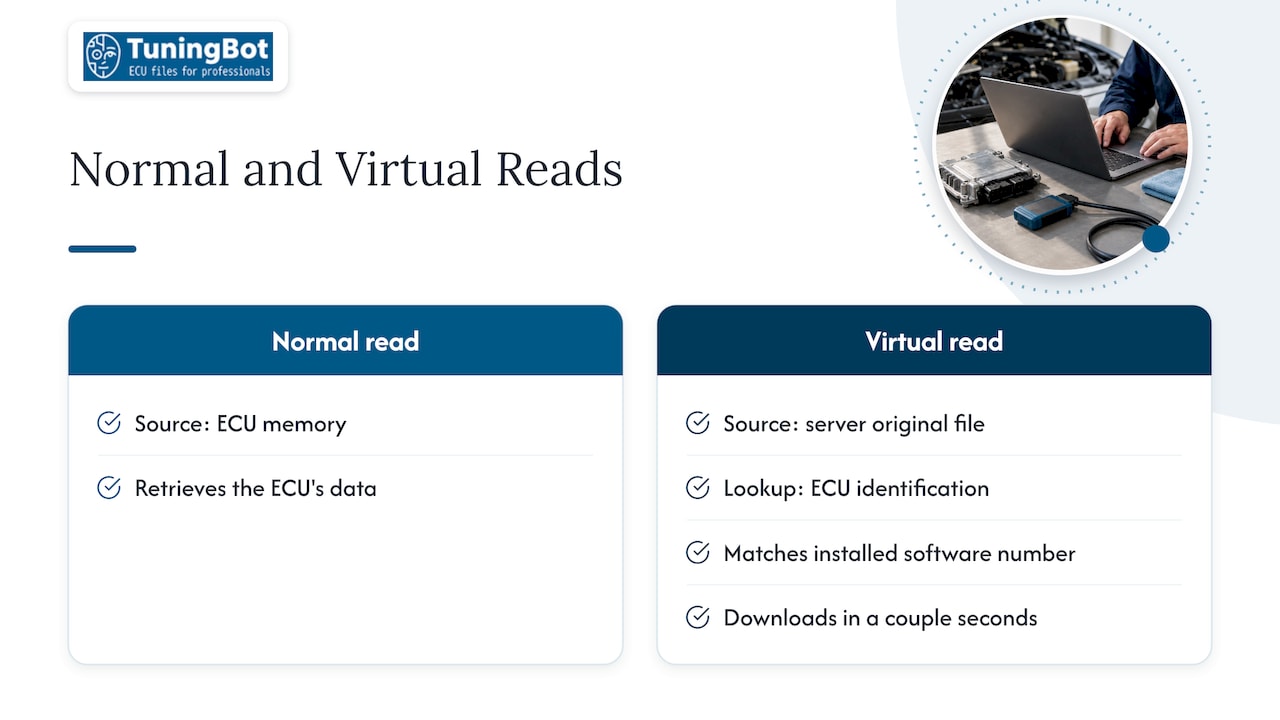
In a normal read, the tool communicates with the ECU and retrieves its memory. In a virtual read, the tool reads the ECU identification, sends it to a server and receives an original file that corresponds to that ID. According to AutoTuner’s documentation, the file is downloaded in a couple of seconds, and it is the original file for the installed software number rather than the ECU’s own data.
This exists because some control units are built so that flashing is implemented over OBD but reading is not. For those units, the same documentation says a virtual read may be the only way to get a file out over the OBD port. The button reference for the same tool describes the function as a very fast method driven by the ECU ID, and notes that the write function can also fetch the file for the connected ECU from the server and write it directly.
For a workshop, the practical meaning is simple. You get speed and, on locked units, access that would otherwise require opening the ECU. You give up the guarantee that the file in front of you is the file inside the car.
Virtual read versus physical read
Physical reads come in several forms: OBD, bench, boot, JTAG or BDM, depending on the ECU and the tool. Depending on the method, the accessible memory can include calibration, flash, EEPROM and MCU data, as ECUHELP’s comparison guide describes. A virtual read is narrower than that by design.
| Aspect | Leitura virtual | Physical read (OBD, bench, boot) |
|---|---|---|
| Source of the data | Server file matched to the ECU ID | The ECU’s own memory |
| Tuned ECU | Returns the original database file | Returns the installed, modified file |
| Velocidade | A couple of seconds for the download | Depends on method and memory size |
| Full backup | No, may omit EEPROM, MCU and configuration areas | Depends on method and areas read |
| Cloning, EEPROM or immobilizer work | Generally unsuitable | Required |
| Melhor uso | Calibration jobs on supported units where reading is not implemented | Any job that needs the real contents of the unit |
The difference matters most in what you can conclude from the file. A physical read of a tuned car shows you what the previous tuner did. A virtual read of the same car shows you the factory file, and the tool will not warn you that the car is running something else.
What the tool needs to match the right file
The server can only return the right file if the identification is exact. Matching by vehicle model or ECU family is a common source of error, because the same model can carry different ECU versions. KT200II’s reading guide lists the data to compare: ECU manufacturer, ECU family, hardware number, software number, calibration number, the vehicle or engine application and protocol-specific identification data. It warns against selecting a file manually just because the model or family looks similar.
Before any read, record:
- Vehicle brand, model, year and engine type.
- ECU manufacturer and family (for example Bosch EDC17 or MED17, Continental Simos, Delphi, Marelli, Denso).
- Hardware number and software number.
- Calibration or upgrade number where the tool shows it.
- Processor information, where available.
- The protocol and tool software version used.
O KT200II ECU reading guide makes the same point about confirming brand, engine, hardware, software and processor before reading, since one model can use several ECU versions. If you work across platforms, our pages on identifying Simos 18 ECUs and checking files and on the Bosch ECU families cover the identification details that matter for those units.
Support is protocol-specific
Virtual read is not a universal feature. It exists for particular ECU families, software versions and protocols, and it varies by tool and release. A tool release note shows how specific it gets. In a 2019 Flex release, OBD virtual-read, write and checksum-map support was listed for Bosch EDC17C10 and several VAG Temic DQ200, DQ250 and DQ400 applications. In the same release, full-read and full-write backup and restore over bench or boot was listed separately for Ford and Lincoln Bosch MED17.0. That is the point to take from it: virtual OBD support and complete backup support are different capabilities, and a given unit may offer one, the other or both.
ECUHELP adds that a supported protocol may deliver either calibration data or a larger original file, so the file description and its expected size need checking against what you were promised. Check the current support list of your own tool and firmware for the exact ECU and software version in the car. Support lists change with each update, and what applied to an older release may not apply to yours.
The tuned-ECU problem
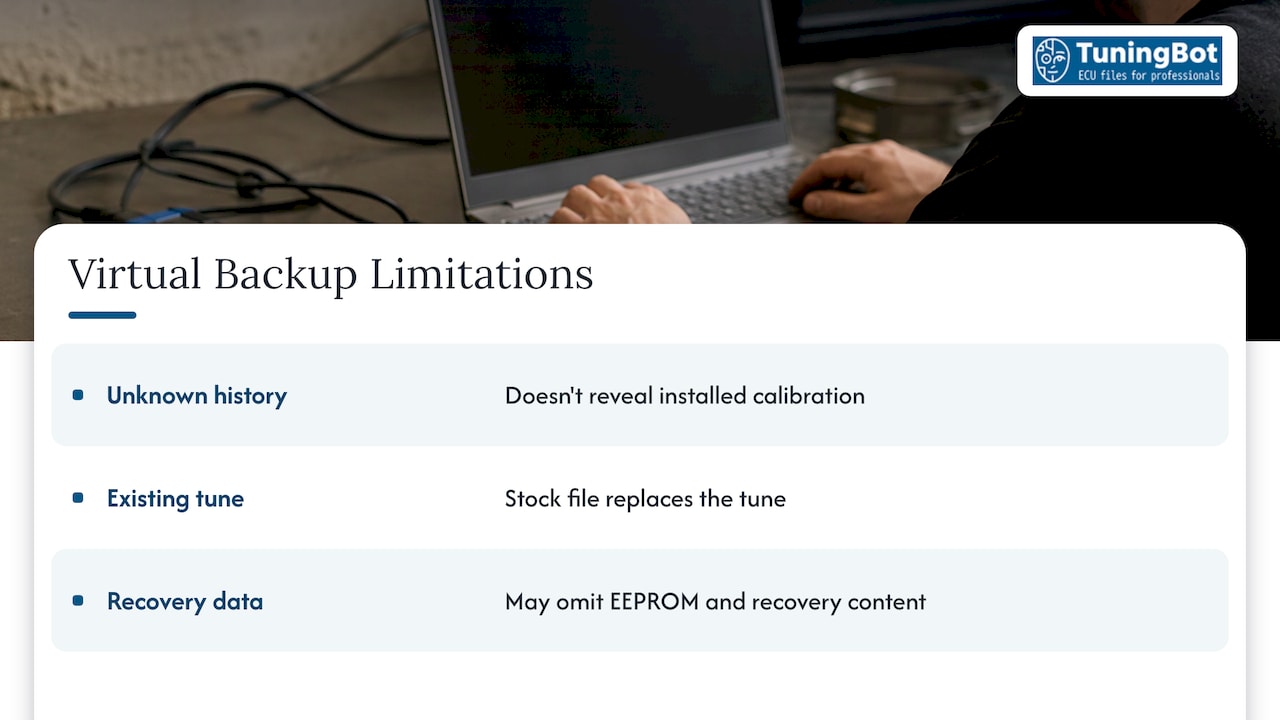
The central limitation is this: a virtual read gives you an original stock file, not a byte-for-byte copy of the connected ECU. AutoTuner states that a tuned vehicle still returns an original file. Seek-prog’s verification guidance frames the consequence well: a virtual read can be correct for a supported calibration-writing procedure, but it should not be labeled a physical backup, and on a previously tuned vehicle it returns the database file, not the installed calibration.
Three situations follow from that.
Unknown vehicle history. If you cannot establish whether the car has been remapped, the virtual file tells you nothing about it. Where the history matters, for example on a used vehicle that arrives with drivability complaints, a physical read is the way to see what is actually installed.
Re-tuning a car that already carries a tune. Writing a new calibration based on the stock file replaces what was there. That can be exactly what you want, but it should be a decision, not a side effect. If the customer’s earlier modifications (for example options such as a rev limiter change or an exhaust flap deletion) need to be preserved or analyzed, you need the physical file.
Vehicle-specific data. KT200II notes that a virtual file may omit vehicle-specific EEPROM data, immobilizer data, adaptation values and complete recovery content. ECUHELP lists cloning, EEPROM repair, configuration-data recovery and processor-level repair as jobs for which a virtual file may be unsuitable. If a write goes wrong on a unit where the only backup is a virtual file, the recovery material may be incomplete.
Verifying a virtual read before you modify it
File size alone proves little. The MHHAuto PRO OBD, bench and boot comparison states that a file’s size does not show that it is a complete backup, and that you should record which memory areas were read, the protocol, the tool and software version, and whether files are separate or combined.
A workable verification routine for a virtual read:
- Compare identifiers. Hardware number, software number, calibration number and ECU family in the tool report should agree with what the ECU reported at identification.
- Check the file size against what the file description or the tool states for that unit.
- Confirm the write protocol and checksum handling. Establish which checksums the tool corrects on write and which maps or blocks need correction when the file is modified. Our guide to how an ECU file is written covers UDS, checksums and flashing in detail.
- Label the source. Put “Virtual Read” in the filename and the job report, as opposed to “Physical OBD read”. Seek-prog recommends this explicitly, and it prevents a stock database file from being mistaken for a backup months later.
- Archive the original untouched. Save it immediately, make a second copy, and keep one outside the active working folder. The MHHAuto PRO project hygiene guide recommends recording its size and keeping the tool log as well.
- Record a hash and keep two controlled copies. Seek-prog advises verifying the backup’s size and hash and editing only from a working copy.
- Version every modified file. Note the maps changed, the expected result, the checksum status, the test result and whether the file was written.
The tool log is worth keeping because it documents how the file was obtained. When a customer later asks why a file behaved as it did, the log and the labeled original answer the question.
When the virtual read is not available
Sometimes the tool offers only a normal read, or no read at all for a given unit. AutoTuner advises checking whether another supported method, such as bench or boot, exists. Where no method exists, it says the user is notified when the server file becomes available. The Flex release mentioned earlier shows the same pattern in practice: where OBD virtual read exists for some applications, others expose bench or boot reading with full backup instead.
In practice:
- Confirm the exact identification again. A missing option often means the software number is not yet in the server database for that tool.
- Check the tool’s current support list and update the firmware and software before concluding the unit is unsupported.
- Consider a bench or boot read where the unit can be removed and the method is supported. It takes more time, but it returns real data.
- For OBD workflow steps with one common tool, see our AutoTuner read and write steps, and for the bench and boot decision, the section on bench and boot modes.
Choosing the read method per job
A simple decision frame keeps the workflow consistent across a shop:
| Job | Recommended read |
|---|---|
| Standard calibration on a supported unit, history known and clean | Virtual read is acceptable, labeled as such |
| Vehicle may already be modified | Physical read |
| Cloning or replacement ECU | Physical read, full memory |
| EEPROM, immobilizer or adaptation data involved | Physical read, including those areas |
| Unit with no OBD read implemented | Virtual read if supported, otherwise bench or boot |
| Valuable or hard-to-source ECU | Physical full backup before anything is written |
Commercial vehicle and agricultural units deserve extra attention here, since software variants are numerous and a mismatch on the identification costs more downtime. The same rules apply: identify exactly, label the source, archive the original.
How we work with files from both methods
Customers send us the file their tool produced, and the file is the starting point of the calibration. Availability of a given service depends on the ECU family, software version, reading method and technical compatibility, so the details recorded above are what let us tell you whether a job is possible and on what base. Our guide on Como um tuner profissional lê os dados da ECU covers the reading side of the workflow, and our tuning overview lists what we calibrate. Emissions-related modifications are intended only for applications permitted by applicable laws, such as off-road or motorsport use where that applies.
Perspectiva
From our side of the file exchange, the read method is one of the most useful pieces of information a customer can send with an order. A file labeled as a virtual read tells us the base is a database original matched to a software number, which is a different starting point from a physical read that may carry an earlier calibration.
We build calibrations for professional workshops, and our service is designed around that workflow: you upload the original ECU or TCU file from your own compatible tool, select the services you need and receive a calibrated file ready to write. Because we work from your file and the identification you supply, the cleaner that record is, the more precisely the result can be matched to the unit.
Our recommendation is practical. Use virtual reads where the tool supports them and the vehicle history is known. Use physical reads where the unit’s real contents matter. Either way, label the source, archive the original and keep the tool log. If a file does not behave as expected after the write, that record is what lets our support team and your workshop find the cause quickly, and we handle corrections under the published service terms.
TuningBot Technical Team
Ordering a file from your virtual or physical read
Once the original is archived and labeled, you can upload it for calibration. Per-file prices on our lista de preços include Diesel Stage 1 at €49.99, Petrol Stage 1 at €69.99, ECO tuning at €49.99, Premium Stage 2 at €129.99, Full Gearbox Tuning at €49.99 and Checksum Correction at €29.99, each per file. Standard file orders need no mandatory registration, and most are delivered in approximately 15 to 20 minutes during published operating hours, depending on complexity and workload.
PERGUNTAS FREQUENTES
Is a virtual read the same as a backup of the ECU?
No. A virtual read returns an original file matched to the software number, not a copy of the data stored in the unit. It may omit EEPROM, MCU, configuration and immobilizer data. If you need a recovery backup, use a physical read and record which memory areas were read.
What does a virtual read return on an ECU that has been tuned?
It returns the original database file, not the installed calibration. A normal physical read is the method that shows the existing modification. Label the file source so the stock original is never mistaken for what the car was running.
Can I choose a virtual file manually if the ECU family looks right?
This is not recommended. The same vehicle model can use different ECU versions, so hardware, software, calibration and protocol data must all agree. Use the identification the tool reads from the unit rather than a match by model.
What should I do if my tool offers only a normal read?
Check whether the tool supports another method for that unit, such as bench or boot, and update the tool software. If no method exists, the tool vendor may notify you when the server file is added. Recheck the identification numbers as well, since a database gap is a common reason for a missing option.
Can a virtual read file be used for cloning or EEPROM repair?
Generally not. Those jobs need vehicle-specific memory that a server original does not contain. A physical read that includes the relevant areas is the appropriate base.
Fontes
- Virtual Read vs Normal Read, AutoTuner FAQ
- Meaning of the buttons, AutoTuner FAQ
- Flex ver 3.13.0.0, smarter OBD protocols
- Virtual Read vs Physical Read ECU Guide, ECUHELP
- KT200II Virtual Read vs Physical Read
- KT200II Virtual Read vs Physical Read, ECU Reading Guide
- How to Verify an ECU Read File Before Writing
- OBD vs Bench vs Boot ECU Reading
- WinOLS Project Hygiene: Original Backup