

 EnglishEN
 ItalianoIT
 EspañolES
 PortuguêsPT
 FrançaisFR
 РусскийRU
DTC removal is a calibration edit: the diagnostic trouble code (DTC) is switched off or deleted inside the ECU file, so the control unit no longer sets that fault, lights the warning lamp or triggers a reaction such as limp mode. It is not the same as clearing a stored code with a scan tool, which only wipes memory and lets the fault return when the ECU detects it again. For workshops that write modified files, we deliver DTC Removal as a per-file service at €29.99, and the sections below cover how the edit works, where it goes wrong and what to verify before you order.
TL;DR
- DTC removal changes the ECU’s calibration so a given fault is no longer evaluated or reported. A scan-tool clear only erases what is already stored.
- Tool documentation separates two operations: Disable keeps the fault definition in the file but switches it off, Remove takes the definition out.
- Behavior depends on ECU family, software version and the read method (OBD partial file or BDM/bench full file), so no edit is universal.
- Codes are for modifications or hardware changes, not for hiding a real fault. Diagnose first, then edit.
- Emissions-related deletes are intended only for applications where the law permits them, such as off-road or motorsport use.
Inhaltsverzeichnis
- What a DTC is and how it is structured
- Clearing a code versus disabling it
- How a DTC is disabled in an ECU file
- When disabling a DTC is the right job
- When it is the wrong job
- Readiness monitors and inspection
- What to check before requesting a DTC-off file
- Where a file service fits in the workflow
- Order a DTC edit for your next file
- FAQ
- Quellen
What a DTC is and how it is structured
A DTC is a code a control module stores when it detects a malfunction. The first character shows the system: P for powertrain, B for body, C for chassis and U for network, according to a diagnostic trouble code overview. The second character separates generic codes (0) from manufacturer-specific ones (1). Most of the codes tuners deal with are P codes tied to engine and aftertreatment hardware, plus U codes after modules stop agreeing with each other.
Status matters as much as the code. Manufacturer service information distinguishes pending codes, which can be recorded before the normal drive-cycle threshold is met, from stored codes that persist in nonvolatile memory after power is removed, as shown in Mazda’s service documentation. Freeze-frame data, the snapshot of engine conditions at the moment of the fault, is what technicians compare against reproduced conditions during troubleshooting.
If you need to identify a code before touching a file, our DTC codes database lists more than 19,000 fault codes by brand and system.
Clearing a code versus disabling it
The two are often confused in forums, and the difference decides whether a job holds.
| Aktion | What it changes | Does the fault return? |
|---|---|---|
| Scan-tool clear | Erases stored codes and freeze-frame data from memory | Yes, as soon as the ECU detects the condition again |
| Battery disconnect | Resets volatile memory and monitor status | Yes, and readiness is reset |
| DTC Disable in file | Switches the fault off; the definition stays in the file | No, the ECU no longer acts on that condition |
| DTC Remove in file | Deletes the fault definition from the file | No, when supported for that ECU |
Some codes cannot be cleared by a scan tool at all. California’s Bureau of Automotive Repair states in its Smog Check OBD reference guide that the OBD system must verify the defect is gone before a permanent code is cleared. That behavior is why a permanent DTC survives a battery disconnect, and it is also why a file edit and a memory wipe are different jobs.
How a DTC is disabled in an ECU file
The workflow in calibration software follows a consistent pattern. MTX Electronics documents it as: select the control unit, open the file, enter the OBD and/or manufacturer codes, choose Disable or Remove, optionally recalculate the checksum, apply DTC OFF, review the results and save the file.
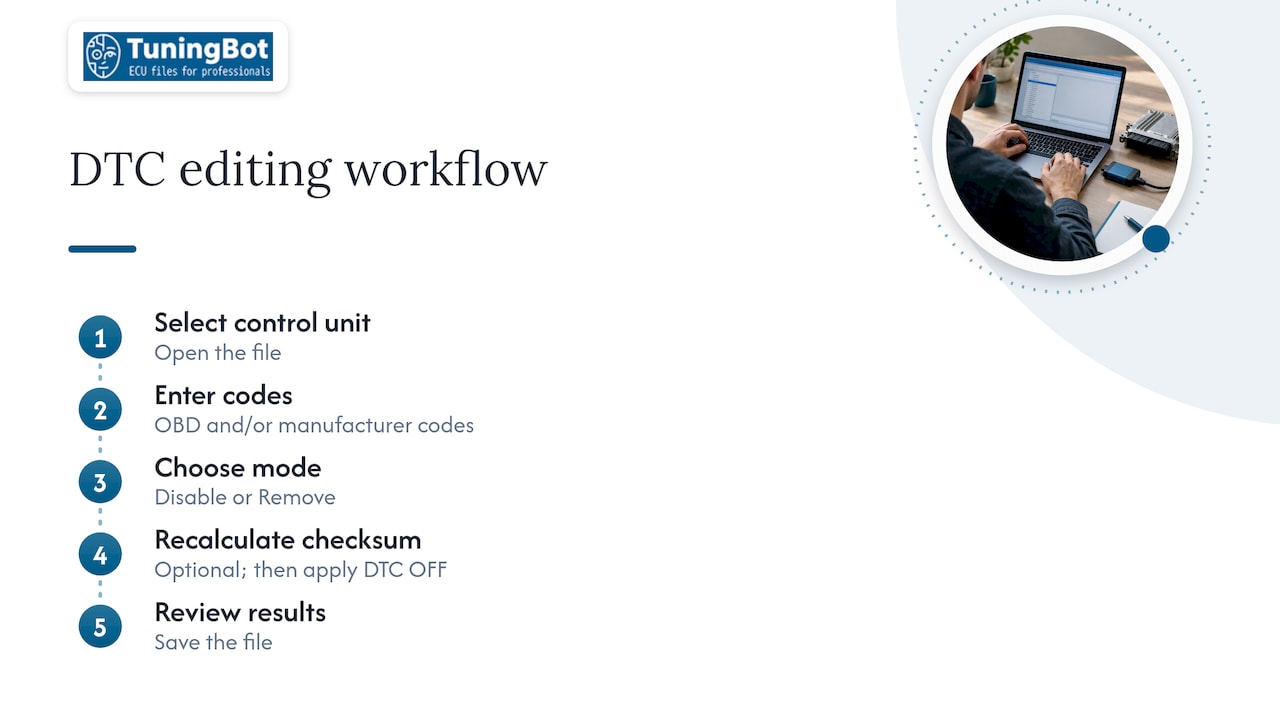
The same documentation distinguishes the two modes. Disable switches off a fault while leaving its definition in the file. Remove takes the fault out. Which one is safer depends on the ECU: some control units tolerate a missing definition, others expect the structure to remain and respond better to a disabled entry.
Why the read method changes the edit
MTX also notes in its ECU-specific notes that behavior depends on the ECU family and on how the file was read. A BDM full file can call for a different modification than an OBD partial file. In practice this means the same code number can require different handling on two units that look identical from outside. When you submit a job, the read tool, the read method and the exact software version are the data that let an engineer pick the right approach.
For workshops that want the wider picture of how a modified file is finally written, including UDS sessions, checksums and flashing, see how an ECU file is written. The scope and verification side of this kind of edit is described on our DTC table editing Seite.
Checksum after the edit
Any change to calibration data can invalidate the file’s checksum. Many tools recalculate it as an optional step in the DTC workflow, and a mismatched checksum is a common reason a write fails or an ECU refuses to start. A separate checksum correction is also available as a per-file service at €29.99 when your tool cannot handle the ECU’s algorithm.
When disabling a DTC is the right job
There are legitimate calibration reasons to remove a code, and they share one trait: the cause of the code is known and accounted for.
- Hardware that is no longer fitted or monitored. A removed flap, a deleted sensor circuit or a swapped component that the ECU keeps complaining about.
- Codes set by a modification. Changed boost, fueling or torque requests can set plausibility faults on a healthy engine.
- Post-reprogramming codes. Some manufacturers document DTCs that may be displayed after reprogramming, for example B2724, where the stored code reflects the flash event and not a fault in the vehicle.
- Limp-mode triggers on a verified-good system. When the reaction, not the fault, is the problem, and the underlying condition has been diagnosed and accepted.
- Emissions-related deletes in permitted applications. DPF, EGR and similar edits are intended only for off-road or motorsport use where the law allows them. We state this plainly because the related codes are the ones most often requested.
When it is the wrong job
A code that points to a failing component is information. Disabling it removes the warning and leaves the cause. Before any edit, diagnose the source first: confirm with live data, a circuit test or a component swap that the code is a side effect and not the symptom of damage.
Two more cases to keep separate:
- Intermittent faults you have not reproduced. If freeze-frame data shows conditions you cannot explain, the file is not the place to start.
- Safety-relevant systems. Codes for airbags, braking or steering belong to repair work, not calibration.
Readiness monitors and inspection
Two things that look similar are separate in an OBD system: whether a code is stored, and whether the emissions monitors have run. Texas DPS explains in its readiness guidance that readiness shows whether an emissions system has been evaluated, and that clearing codes or disconnecting the battery resets monitors to not ready. Ohio’s OBD readiness and drive cycle document says the same from the inspection side: after diagnostic data is erased, monitors report incomplete or not ready until the required drive cycle has been completed.
For workshops this has a practical consequence. After a file is written and codes are cleared, the vehicle needs its drive cycle before it can show complete monitors. A customer who returns the car too early to anything that reads readiness will see not-ready flags that have nothing to do with the file quality.
The California guide adds a further point: for the vehicles it covers, a stored permanent DTC can fail an inspection even if the malfunction lamp is commanded off. A dark lamp therefore does not prove that the emissions system passes. Where inspections read OBD data, the application for any emissions-related edit has to be one the rules permit.
What to check before requesting a DTC-off file
Most failed or reworked DTC jobs trace back to incomplete job data. Before you submit, work through this list.
- Record the exact codes. Note the full code, its status (pending, stored, permanent) and the freeze-frame values. The code database helps confirm what the code covers across brands.
- Identify the ECU precisely. Hardware number, software version and calibration ID. Our guide to the ECU-ID explains which identifiers matter.
- State the read method. OBD, bench or BDM, and the tool used. As the MTX notes show, this can change the modification.
- Read and save the original file. Keep an untouched backup before any write.
- Say what the car now has. Removed hardware, added parts and the reason for the request, so the edit targets the right entries and not a neighbor.
- Plan the post-write routine. Clear codes, run the drive cycle and re-read for anything the edit triggered. Codes that appear only after a flash are covered in our entries such as B274D.
- Know the application. Confirm that an emissions-related change is for use where it is allowed.
We already cover a number of related edits in the same file, so say if the DTC job comes with something else, for instance a performance calibration described on our tuning page.
Where a file service fits in the workflow
A workshop usually has the reading tool and the writing skill, and what it often lacks is calibration time on a specific ECU family. A DTC job looks small, but each entry sits inside a calibration structure, and the Disable-versus-Remove choice has to match the unit. That is the part that is delivered by calibration engineers on our side: you upload the original file, choose the service, and receive a file ready to write with your own compatible equipment.
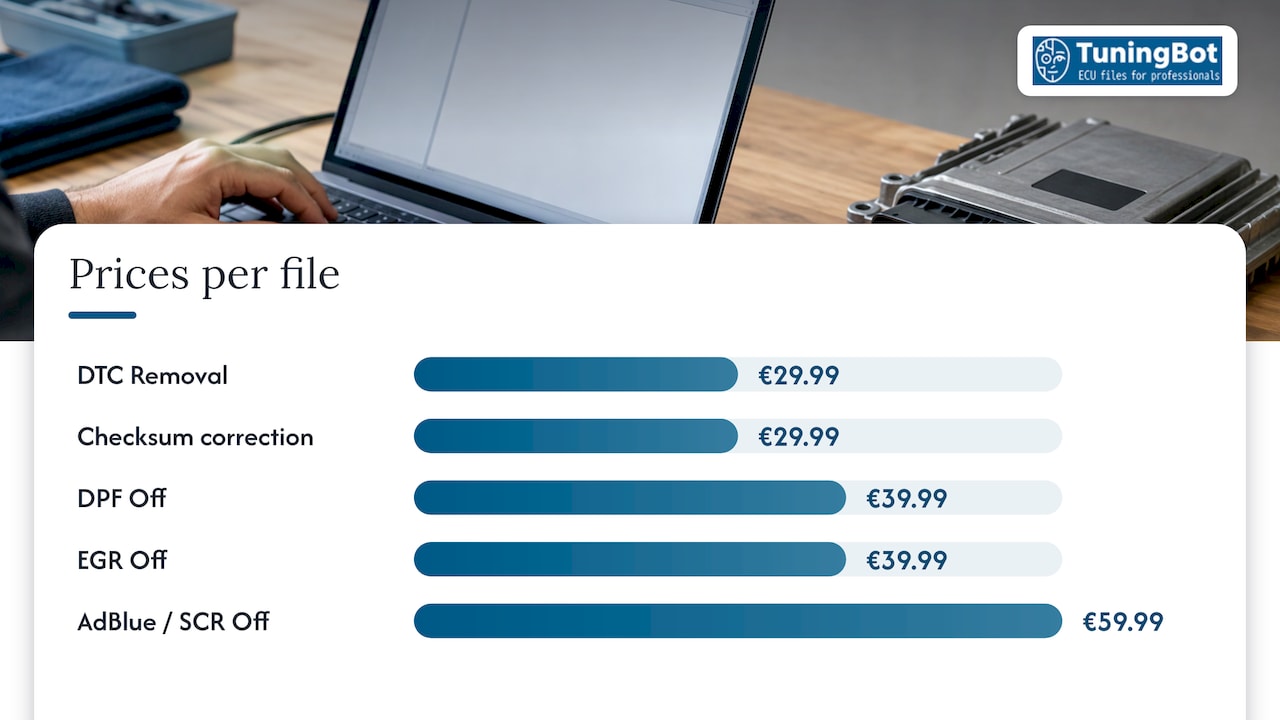
Unser Preisliste publishes each service per file. DTC Removal is €29.99 per file, checksum correction €29.99, DPF Off €39.99, EGR Off €39.99 and AdBlue / SCR Off €59.99, all one-off. Standard orders need no registration, and most standard files are delivered in approximately 15 to 20 minutes during published operating hours, depending on complexity and workload. Availability depends on ECU family, software version and reading method. No guarantee exists for every unit, a point we expand on in our piece on Zuverlässigkeit des Steuergeräts tuning.
Our view: treat the code as data first
A DTC is the ECU telling you what it saw. Our engineers approach a DTC request the way we approach any calibration: identify the unit, understand why the code is being set, then edit only what the vehicle’s current configuration justifies.
In our experience as a file service, the cleanest jobs arrive with the original file, the code list and a short note on what was changed on the car. That information lets the edit be specific, with the checksum handled in the same pass, and it keeps the result predictable when the file is written.
That is why we publish per-file pricing and support workshops through a technical portal: a DTC edit should be repeatable, documented and matched to the ECU family, not a generic switch. Emissions-related edits are intended only for applications where the law permits them.
TuningBot Technical Team
Order a DTC edit for your next file
Upload the original file, select DTC Removal and any related services, and receive the calibrated file for your own tool. Start from the ECU-Datei-Service and add the codes and read method to the order.
FAQ
What is DTC removal?
It is a calibration change in which a diagnostic trouble code is disabled or removed from the ECU file. The control unit then no longer sets that fault or reacts to it with a warning lamp or limp mode. It is also called DTC off.
Is DTC removal the same as clearing codes?
No. A scan-tool clear erases stored data, and the code returns when the ECU detects the condition again. DTC removal edits the file so the condition is no longer evaluated. Permanent codes, in addition, cannot normally be cleared by a scan tool, as the California BAR guide describes.
What is the difference between Disable and Remove?
Disable switches the fault off and leaves its definition in the file. Remove deletes the fault. Which is suitable depends on the ECU family and on whether the file came from an OBD read or a full BDM read.
Does a DTC edit make readiness monitors complete?
No. Readiness reflects whether the emissions monitors have run. After codes are cleared or the battery is disconnected, monitors reset to not ready until the required drive cycle is completed.
Can every code on every ECU be removed?
No. Support depends on ECU family, software version and read method, so each job is checked against the file you upload.
Quellen
- DTCs and ADAS calibrations: What You Need to Know
- Mazda CX-30 service information: Basic Knowledge
- Smog Check OBD Reference Guide, California BAR
- Removing fault codes from a file, MTX Electronics
- ECU-specific notes, MTX Electronics
- Ready or Not, Texas Department of Public Safety
- OBD Readiness and Drive Cycles, Ohio E-Check