

 ItalianoIT
 DeutschDE
 EspañolES
 PortuguêsPT
 FrançaisFR
 РусскийRU
Tricore boot mode guide workflows should begin with the exact Infineon TriCore/AURIX device, ECU hardware, boot-mode documentation and supported tool procedure. Boot ROM, HWCFG, reset, bootstrap-loader and memory-access behavior vary across processor families and ECU implementations. Do not assume Boot always exposes complete memory, that one reset/HWCFG sequence works across variants, or that recovery, passwords and write permissions behave the same on every ECU.
TL;DR:
- Tricore/AURIX Boot behavior is processor- and ECU-specific; verify the exact device and vendor documentation first.
- HWCFG, reset and bootstrap-loader behavior should not be generalized across TC17xx, TC2xx and TC3xx families.
- Boot, Bench and OBD are access methods with different protocol-dependent memory coverage; Boot does not automatically mean a full dump.
- BMHD/UCB and security-related regions require special caution and should not be modified without exact device documentation and a supported workflow.
- If a read/write or recovery path is unclear, stop and use the tool/vendor’s documented procedure rather than improvising.
Tricore Boot Mode Guide: What Boot ROM Access Means
On supported devices, startup logic samples hardware configuration and reset state before selecting a boot path. The exact HWCFG meaning and available bootstrap modes must be taken from the processor’s documentation.
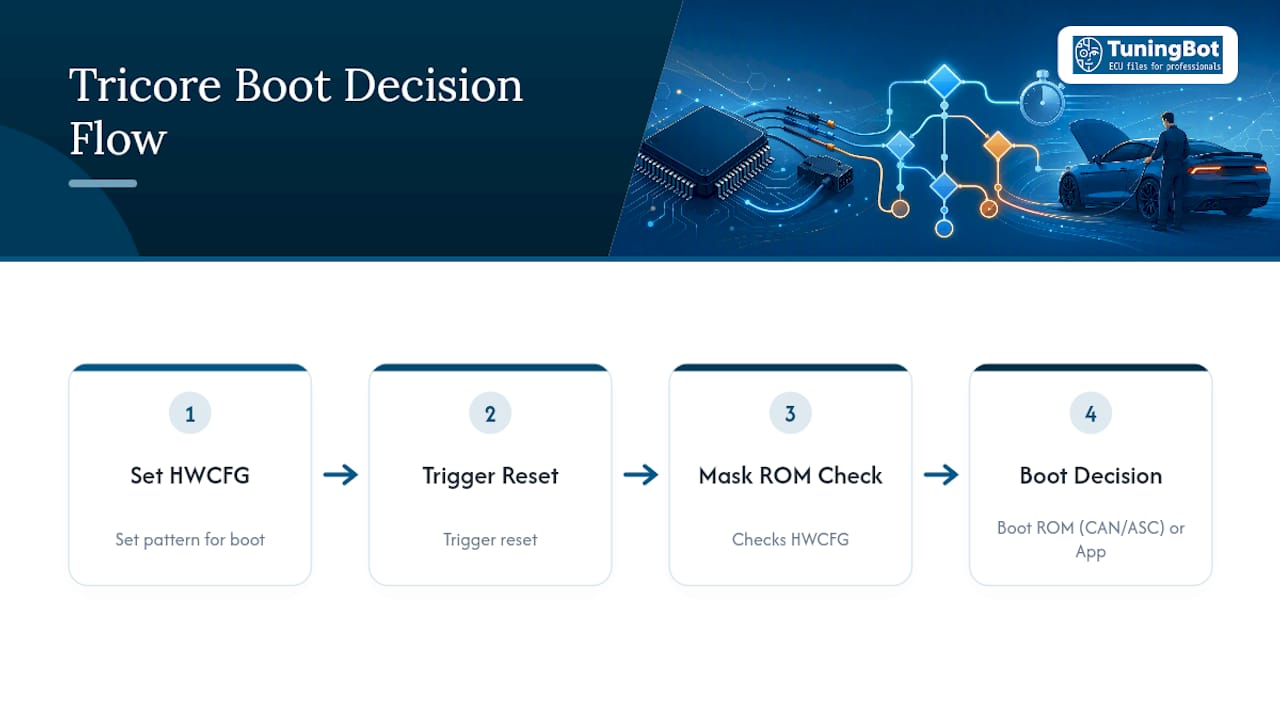
A Tricore boot mode guide should explain that Boot may be appropriate for supported low-level read/write, recovery or development workflows where OBD/Bench access is unavailable or insufficient. The exact use case depends on the ECU and tool.
Boot-related structures such as BMHD/UCB can be critical to startup and security on some AURIX families. Treat those regions as device-specific and avoid writing them unless the exact procedure explicitly requires it.
Tricore Boot Mode Guide: HWCFG, Reset and Hardware Preconditions
HWCFG and reset behavior varies by processor family and board design. Use the exact device/ECU documentation rather than one generic pin-state sequence.
A safe workflow starts from the processor/ECU-specific boot documentation and supported tool instructions.
- Identify the exact TriCore/AURIX processor and ECU hardware revision.
- Open the matching Infineon startup/boot documentation and the tuning-tool connection instructions.
- Confirm the documented HWCFG/test-point, reset and power requirements for that exact ECU.
- Use only the supported connection sequence and verify tool communication before any write operation.
- Record the exact setup for repeatability and later recovery/support.
Reset-source behavior differs across TriCore/AURIX families. If reset state matters to the workflow, use the device documentation or debugger registers appropriate to that processor.
Pro Tip: If CAN traffic never appears after what looks like a clean HWCFG and reset sequence, check transceiver power first. A CPU sitting happily in BSL still won’t talk to you if the transceiver is in standby.
Tricore Boot Mode Guide: CAN BSL, ASC BSL and Bench Workflows
Supported bootstrap loaders can use different transport mechanisms, including CAN or serial interfaces, depending on the processor and implementation.
- CAN BSL: available on some processor/ECU implementations where documented and supported.
- ASC/serial BSL: available on some families and useful where that interface is the documented bootstrap transport.
- Bench workflows: may use ECU connector access without direct PCB Boot, depending on the tool and ECU.
- Do not infer transport, memory coverage or recovery capability from the processor family name alone.
Community projects are useful for understanding concepts, but scripts, commands, bootstrap binaries and password behavior from one ECU/processor must not be copied to another without exact compatibility.
Tricore Boot Mode Guide: Bench Hardware and Tooling
Bench hardware should match the exact processor, ECU and tool procedure. Avoid generic assumptions about logic levels, GPIO, CAN queue settings or reset hardware.
Software requirements vary by toolchain. Use the vendor or project documentation for the exact target instead of assuming one set of scripts or Linux commands applies universally.
- Use a regulated power source that matches the ECU/tool specification.
- Use the exact adapter/interface and wiring specified for the target ECU.
- Verify common ground, polarity and communication before attempting a read.
- Start with ECU identification or the smallest supported non-destructive operation.
- Preserve the original source/read package unchanged before calibration work.
Pro Tip: Always verify common ground between your bench PSU, CAN interface, and the ECU before powering anything up. A floating reference is one of the most common reasons a bench session looks correct but produces garbage data.
Tricore Boot Mode Guide: Boot vs OBD vs Bench Reads
OBD usually relies on application-level diagnostic services, while Boot/BSL can operate below the application layer. The exact regions available through each method depend on the ECU, tool and protocol.
- OBD: application-level access whose read/write scope depends on the ECU diagnostic protocol.
- Bench: connector-level off-vehicle access whose scope depends on the tool/ECU protocol.
- Boot/BSL: low-level access on supported devices, potentially exposing different memory regions.
- Virtual/server reads can also be valid calibration sources where the tool/vendor supports them.
- File size alone does not prove a read is complete or suitable for the intended write/recovery workflow.
Boot can provide useful low-level data on some supported ECUs, but it should not be treated as automatically superior to a valid OBD/Bench/virtual read for calibration work.
Tricore Boot Mode Guide: Troubleshooting and Safety
Security/password handling is device- and ECU-specific. Do not attempt password extraction or bypass procedures without a documented, authorized workflow for the exact target.
- Do not write BMHD/UCB or security-related regions unless the exact supported procedure requires it.
- Use the tool log and processor/ECU documentation to diagnose communication or reset failures.
- Do not generalize CAN-transceiver enable voltage, reset timing or HWCFG states across processor families.
- Do not perform password-extraction, erase or bypass attempts by trial and error.
- If recovery status is unclear, stop and escalate to the tool/vendor or an ECU-recovery specialist.
Pro Tip: Placing hardware breakpoints in startup code and watching SWRSTCON or RCU_RSTSTAT, as Tasking recommends, tells you whether a reset came from software, an external source, or LBIST, before you waste time chasing the wrong cause.
Do not use generic erase/recovery tactics on TriCore/AURIX ECUs. Recovery actions can affect critical protected regions and should follow the exact tool/vendor procedure.
Tricore Boot Mode Guide: Pre-Upload File Checks
Before uploading a TriCore/AURIX Boot-origin file, record the exact ECU ID, processor/ECU family, reading tool, access method and source-file type.
For related technical context, use the verified ECU File Writing Guide and Checksum Correction Guide.
Before ordering, check ECU Service Coverage and the public Price List.
The workshop remains responsible for the physical Boot/Bench/OBD read and any recovery/programming procedure.
Tricore Boot Mode Guide: When Boot Is Appropriate
Boot is appropriate when the exact ECU/tool workflow calls for low-level access or recovery. OBD or Bench may be preferable when they already provide the data and write capability required for the job.
— TuningBot Technical Team
How TuningBot Fits Into Tricore Boot Workflows
TuningBot can process supported TriCore/AURIX source files once the exact ECU, source-file type and requested calibration service are confirmed.
For a supported file-service job, submit the source file through Tune Your File after checking coverage.
This article stays technical and informational so commercial ECU-file/service keywords remain concentrated on TuningBot’s service and order pages.
Sources and Further Reading
- Infineon — AURIX TC3xx Startup and Initialization — authoritative processor startup reference.
- TASKING — TriCore Reset Diagnostics — authoritative tooling/debug reference.
- GitHub — TC1791 CAN BSL Project — external community implementation reference.
- TuningBot — ECU File Writing Guide — verified internal programming reference.
- TuningBot — ECU File Checksum Correction — verified internal integrity reference.
- TuningBot — ECU Service Coverage — verified internal coverage reference.
FAQ
How Do I Switch a Tricore ECU Into Boot Mode?
Use the HWCFG/reset procedure documented for the exact TriCore/AURIX processor and ECU/tool combination. There is no universal pin-state sequence for all variants.
What Is Boot Mode on a Tricore Processor?
It is a low-level startup/bootstrap path executed before the normal application. Exact transport, memory access and permissions depend on the processor and ECU implementation.
How Do I Enable a Boot Menu on a Locked ECU?
TriCore ECUs do not have a conventional boot menu. Supported Boot/BSL entry is controlled by processor/ECU-specific startup conditions and tool procedures.
Why Doesn’t CAN Communication Work Even Though the ECU Is in BSL?
Possible causes include the wrong protocol, wiring, transceiver state, power/ground, reset/HWCFG conditions or unsupported interface. Diagnose from the exact documentation and tool log.
Is a Boot-Mode Dump Always Larger Than an OBD Read?
No. File size and memory coverage depend on the ECU and tool protocol. Boot can expose additional regions, but it does not guarantee a universally larger or complete dump.