

 EnglishEN
 ItalianoIT
 DeutschDE
 PortuguêsPT
 FrançaisFR
 РусскийRU

A Stage 1 remap file is a modified calibration for an ECU or TCU running stock hardware. The program code stays as the factory wrote it. The maps and constants that govern boost, torque limits, fuelling, timing and speed or rev limiters are reworked, and the checksums are corrected so the control unit accepts the result. Whether the file does what you intended depends on the original read, the identification match, the torque model and your validation after the write. We cover each of those below, from the workshop side.
TL;DR
- A Stage 1 file edits the calibration region of the original file only: maps and constants, not the program code. Checksums must be corrected after any edit.
- The file is only as good as the original read: identify hardware and software numbers, keep an untouched backup, and match the file to that exact software version.
- A Stage 1 torque limit is rarely one number. Driver demand, torque request limits, boost and air-mass limits and transmission limits interact, and the lowest one wins.
- Validate by data logging and drivability checks after writing, and keep the original file ready for rollback.
- Our Diesel Stage 1 is 49.99 EUR per file and Petrol Stage 1 is 69.99 EUR per file, with no mandatory registration for standard orders.
Tabla de contenido
- What a Stage 1 remap file actually contains
- What a Stage 1 edit typically touches
- The Stage 1 torque limit, explained for the calibrator
- Handling the file: a workshop routine
- Platform notes that change the workflow
- Combining Stage 1 with related modifications
- Where you can see the full range
- Our view: why the file matters more than the label
- PREGUNTAS FRECUENTES
- Fuentes
What a Stage 1 remap file actually contains
The term “Stage 1” has no technical standard behind it. In workshop use it means a calibration for an otherwise stock engine: no larger turbo, no intake or exhaust hardware beyond what the vehicle left the factory with. The label describes the scope of the hardware, not a fixed list of edits, and that is why “Stage 1 remap files”, “Stage 1 tuning files” and “Stage 1 ECU files” all refer to the same kind of deliverable: a modified version of the customer’s own original file.
It helps to be clear about the structure of what you are editing. An ECU flash file holds three things: an identification block, the program code and the calibration. The identification block carries hardware and software part numbers and the software version. The program code is the engine-management software itself, which a tune does not change. The calibration is the set of maps and constants for boost, torque limits, timing, fuelling and rev limit. That calibration is the part a tune edits, and it is the part checksums protect.
This structure explains several practical points:
- A Stage 1 file is never generic. It is derived from a specific original file, so a file built for one software version cannot be assumed valid for another, even on the same engine code.
- The map addresses, scaling and layout differ between ECU families and between software versions within a family. Calibration work is done against the actual file, not a vehicle description.
- Because the program code is untouched, a Stage 1 edit works within the limits and logic the factory software already has. The calibration decides how far into those limits the engine is allowed to go.
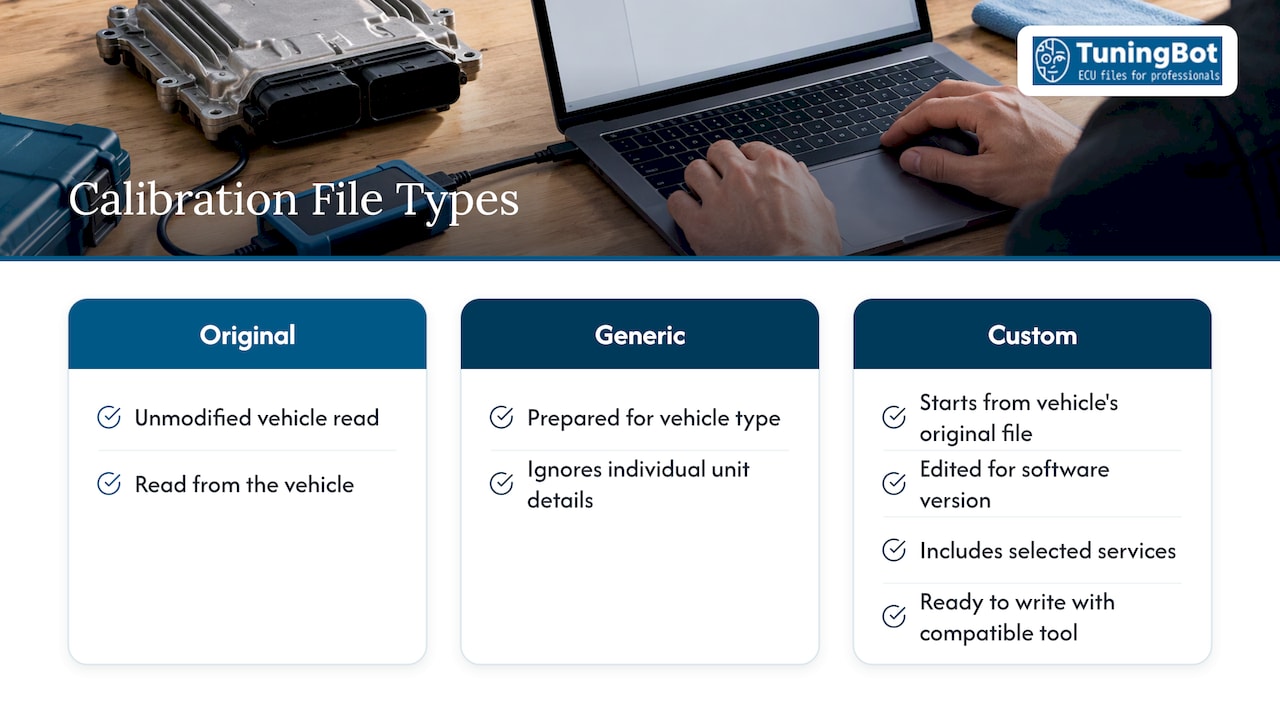
Original file, generic file, custom calibration
The original file is the unmodified read from the vehicle. A generic file is one prepared for a vehicle type and sent without regard to the individual unit’s details. A custom calibration starts from the original file you read from the car in front of you and is edited for that software version, with the services you selected. Professional file services work in the custom manner: you upload the original, select the services, and receive a file ready to write with your own compatible tool. The practical reason is simple: any mismatch in software version or calibration revision between the file and the ECU is a source of failed writes, limp modes or poor drivability.
What a Stage 1 edit typically touches
The exact list depends on the ECU family, software version and fuel type, and not every ECU exposes every parameter. Within those limits, a Stage 1 calibration normally works across these areas.
| Área | What is adjusted | What to watch |
|---|---|---|
| Torque request and limiters | Driver demand, torque limits, and the limiter maps that cap requested torque | Limits upstream and downstream of the one you edit |
| Boost control | Boost target and wastegate or VGT duty on turbo engines | Turbo speed and air-mass limits, boost deviation faults |
| Fuelling | Injection quantity and rail pressure on diesel; lambda targets and enrichment on petrol | Smoke limiters on diesel, mixture and knock margins on petrol |
| Encendido | Timing maps on petrol engines | Knock control response, fuel quality sensitivity |
| Limitadores | Rev limit and, where the application requires it, speed limiter | Mechanical limits of the stock hardware |
| Transmisión | TCU torque limits and shift behavior on supported gearboxes | Clutch capacity and gearbox torque ceiling |
This is a description of where calibration work happens, not a promise about results. Availability of any modification depends on ECU family, software version, reading method and technical compatibility, and we do not treat any platform as universally supported.
The Stage 1 torque limit, explained for the calibrator
The query “Stage 1 torque limit” usually comes from one of two situations: a tuner whose file raised power but the car still pulls back at a certain point, or a tuner wondering how much torque the stock engine and gearbox will tolerate. Both come down to the same fact: torque in a modern ECU is not governed by one map.
In a torque-based architecture, the driver’s pedal input is converted into a requested torque. That request passes through a chain of limiters, each protecting something: the engine’s mechanical and thermal capacity, the air path, smoke or knock behavior, the turbocharger, and on automatics the gearbox. The delivered torque is bounded by the most restrictive limit in the chain. Raising one limiter while leaving another untouched is a classic cause of a file that appears to make no difference, or that produces power in one gear and not another.
In practice, check these in order:
- Driver demand and requested torque maps. These shape how pedal position maps to torque across rpm.
- Engine torque limiters. Absolute caps, often with gear, temperature or altitude dependency.
- Air and boost limits. Even if torque is requested, the air path has to supply it: boost target, air-mass limits and turbo protection.
- Fuel-side limits. On diesel, quantity and smoke limiters; on petrol, lambda and knock-related corrections.
- Torque monitoring. The ECU compares actual torque to the requested value and can intervene or log a fault if they diverge. A calibration that ignores this function can end in power reductions or error entries. A dedicated Torque Monitoring OFF service exists for applications where the function must be handled, priced at 29.99 EUR per file.
- Transmission limits. On vehicles with DSG or other automatic gearboxes, the TCU holds its own torque ceiling. If the engine file asks for more than the gearbox file allows, the gearbox side decides.
The working method is to log first. Read the requested and actual torque, boost target and actual, and the limiter outputs on a stock vehicle where your tool and logging setup allow it, so you can see which limit is binding before you change anything. Then edit the binding limits together rather than one at a time.
Handling the file: a workshop routine
The research on file structure points to one lesson: the quality of the whole job is set at the read. These are the steps, with what each takes and where it goes wrong.
1. Identify the ECU and software
Record the hardware number, software number and software version from the identification block, and note the vehicle, engine code, model year and gearbox. Do this from the read file, not from memory or from the vehicle’s registration data alone, because the same engine code can be fitted with different control-unit variants across production runs. Where this goes wrong: ordering a file against a description of the car, then discovering the unit is a different variant.
2. Read with a tool that supports the method
Choose the reading method your tool supports for that unit: OBD, bench or boot. The files we work with are read using professional tools such as Alientech KESS3, AutoTuner, FLEX, CMD and Dimsport. The reading method affects what the file contains, and some methods produce a full flash while others read only part of the memory. Where this goes wrong: a partial or corrupt read that looks complete. Confirm the file size matches what your tool expects for that ECU, and that the identification block reads sensibly.
3. Back up before anything else
Save the original file, unmodified, with the vehicle and ECU details in the file name. If the unit has more than one memory area, such as flash and EEPROM, back up each area your tool exposes. This is the file you return to if the write fails or the customer wants the car back to stock. Where this goes wrong: overwriting the original name, or storing the modified file under the same name as the backup.
4. Upload and select services
Upload the original file and select what the application needs. For a straightforward Stage 1, that is the Stage 1 service for the fuel type. Related options such as checksum correction, DTC handling or Start & Stop Off are selected separately where the vehicle and the customer’s request call for them. Be specific in the order notes about hardware changes, gearbox type and anything unusual on the vehicle. Our calibration engineers work from your file and the services you select, and standard orders need no registration.
5. Check the returned file before writing
Compare the modified file against the original in your tool or a hex comparison. Confirm the identification block is unchanged, the file size is identical to the original, and the differences sit in the expected calibration areas. Confirm the checksum status your tool reports. Where this goes wrong: assuming a file is valid because it opened. A calibration edit without checksum correction produces a file the ECU may reject or that fails on write. Our guide to Corrección del archivo ECU checksum covers how this works in detail, and checksum correction is available as a separate service at 29.99 EUR per file.
6. Write, with stable power
Connect a stabilized power supply for the write. Voltage drops during a flash are a leading cause of failed writes. Follow your tool’s procedure for the ECU, including any cycle of ignition after writing, and do not interrupt it. Where this goes wrong: interrupting the process because it appears stuck. Many units take several minutes and give little feedback.
7. Validate on the road or on the dyno
Clear stored fault codes, then check for new ones. Log the relevant channels under load: requested and actual torque, boost, fuel quantity or lambda, timing correction, coolant and intake temperature. Compare against your stock log. Check cold start, idle, part-throttle behavior and gear changes on automatics. Where this goes wrong: judging by feel alone. A car that feels strong can be running with high exhaust gas temperature, knock correction or boost deviation that only the logs show.
Platform notes that change the workflow
Control units differ in how they protect their calibration and in what they expect from a modified file. The platforms we support include Bosch, Continental, Siemens, Delphi, Marelli, Denso and ZF, but support for any individual unit depends on the family, software version and the way it was read.
For Bosch diesel in the EDC17 family, the calibration checks are specific enough that we have written them up separately in our EDC17 Stage 1 tuning guide. For a broader view of how the approach has developed, see our overview of professional remapping techniques.
On automatics, treat engine and gearbox as one system. If a vehicle has a DSG or other automatic, decide at the order stage whether the transmission file also needs work, since the gearbox torque ceiling can cap what the engine calibration delivers. Full Gearbox Tuning is available at 49.99 EUR per file.
Combining Stage 1 with related modifications
A Stage 1 file is often one line on a larger order. These are common pairings and their listed prices per file:
| Servicio | Price per file |
|---|---|
| Diesel Stage 1 Tuning | 49.99 EUR |
| Petrol Stage 1 Tuning | 69.99 EUR |
| ECO Tuning (consumo y conducción) | 49.99 EUR |
| Stage 2 Premium | 129.99 EUR |
| Corrección de checksum | 29.99 EUR |
| DTC Off | 29.99 EUR |
| Start & Stop Off | 29.99 EUR |
| Hotstart Fix | 19.99 EUR |
| Monitor de par Off (TMoff) | 29.99 EUR |
Emissions-related modifications, such as DPF, EGR, SCR or OPF/GPF changes, are intended only for applications where applicable law permits them, such as off-road or motorsport use. They are separate services from Stage 1 and are not part of a standard Stage 1 file.
Where you can see the full range
The full tuning range, by vehicle and service, is on our tuning page. If you have an original file ready, you can see every service and price on the Lista de precios ECU tuning and upload it there: you select the services, and we return a calibrated file you write with your own tool. Most standard files are delivered in approximately 15 to 20 minutes during published operating hours, depending on complexity and workload. Optional prepaid credits are available if your volume makes them useful, and technical assistance runs through our support portal.
Our view: why the file matters more than the label
Stage 1 is the most requested job in most workshops, which makes it the easiest one to treat as routine. We see it differently. The label tells you the hardware is stock. It tells you nothing about whether the calibration respects the torque chain, the air path and the gearbox that the original engineers built around.
That is why we work from the customer’s own original file and the services selected, with calibration engineers handling the edit and checksum correction as part of a technical workflow. A file derived from your read, for your software version, is the starting point for any result you can stand behind.
Our pricing is per file and published, with no mandatory registration for standard orders. For a workshop, that means you can add a Stage 1 order to a job without a commitment, and use prepaid credits only if the volume warrants it. If a file needs a correction under our published service terms, our support portal is where we handle it.
TuningBot Technical Team
PREGUNTAS FRECUENTES
What is the difference between Stage 1 remap files, Stage 1 tuning files and Stage 1 ECU files?
In workshop use they describe the same deliverable: a calibration file for a stock-hardware vehicle, derived from the original ECU read. The difference that matters is whether the file is custom, built from your original and software version, or generic.
Does a Stage 1 file change the ECU software?
No. The program code stays as the manufacturer wrote it, and the edit is made in the calibration region: the maps and constants. Checksums protecting that region are then corrected so the ECU accepts the file.
Why does the car still limit torque after a Stage 1 write?
Torque is bounded by a chain of limiters, and the most restrictive one wins. Common causes are an untouched air or boost limit, a torque monitoring intervention, or a gearbox ceiling on automatics. Logging requested and actual torque shows which limit is binding.
Do I need to correct the checksum myself?
A calibration edit requires the checksums to be recalculated before the ECU will accept the file. Checksum correction can be ordered as a separate service, and you should confirm the checksum status in your tool before writing.
Is every ECU supported for Stage 1?
No. Availability depends on the ECU family, software version, reading method and technical compatibility. Upload the original file and the service selection reflects what is available for it.