

 EnglishEN
 ItalianoIT
 DeutschDE
 PortuguêsPT
 FrançaisFR
 РусскийRU
Entender cómo un profesional tuner lee los datos de la ECU es mucho más complejo que conectar un diagnosticador y ver cómo se suceden los números en la pantalla. El proceso abarca el diagnóstico de sensores en tiempo real, el análisis de fallos mediante «freeze-frame» y la extracción directa del firmware a través de protocolos de banco de pruebas o boot mode. Cada fase requiere un conjunto de herramientas diferente, una mentalidad diferente y un estándar de verificación distinto. Esta guía desglosa los flujos de trabajo que siguen los profesionales con experiencia, desde la selección de los ID de parámetros adecuados hasta la realización de una lectura segura en banco con corrección checksum, para que comprendas qué diferencia la lectura profesional de la ECU de un diagnóstico basado en conjeturas.
Tabla de contenido
- Puntos clave
- Cómo lee la ECU el tuner: datos en tiempo real y PID
- Decodificación de datos de fotogramas congelados para diagnóstico de fallas
- Técnicas de lectura de la ECU en banco de pruebas y boot mode
- Comparando herramientas de lectura de ECU y flujos de trabajo
- Errores comunes en la lectura de la ECU y cómo evitarlos
- ¿Qué separa realmente la lectura profesional de la ECU del resto?
- ECU profesionales tuning y remapping con TuningBot
- PREGUNTAS FRECUENTES
Puntos clave
| Punto | Detalles |
|---|---|
| La selección del PID define la precisión | El uso de menos de 8 PID en el Monitoring mantiene estables las frecuencias de muestreo y garantiza la fiabilidad de las lecturas durante las sesiones de datos en tiempo real. |
| Congelar fotograma es un punto de partida | Los datos de fotograma congelado identifican condiciones de falla pero deben combinarse con diagnósticos en vivo para confirmar la causa raíz. |
| Bench y boot mode profundizan en el tema | Cuando el acceso al OBD está restringido, el banco de pruebas o el boot mode permiten la extracción directa del firmware y la «modificación». |
| La integridad de el checksum no es negociable | Cada ciclo de lectura/escritura en el banco de pruebas debe incluir una verificación checksum para evitar que la ECU se dañe o quede inutilizable. |
| La selección de herramientas modela el flujo de trabajo | La combinación adecuada de hardware y software determina la velocidad de lectura, la compatibilidad de modos y la seguridad de los datos. |
Cómo lee la ECU el tuner: datos en tiempo real y PID
La base del diagnóstico profesional de la ECU es la transmisión de datos en tiempo real a través de OBD-II, y la primera decisión que toma un tuner es qué identificadores de parámetros (PID) supervisar. Un PID es un código estandarizado que solicita a la ECU un valor específico de un sensor, como las revoluciones por minuto del motor, la temperatura del líquido refrigerante, el caudal de aire o el ajuste de combustible a corto plazo. La ECU responde en tiempo real y el analizador muestra los valores en forma de flujo continuo.
La clave aquí es la moderación. Una lectura profesional basada en OBD se basa en seleccionar únicamente los canales necesarios para la tarea de diagnóstico; de hecho, muchos usuarios experimentados de los tuners mantienen el número de canales activos por debajo de 8 durante la reproducción del fallo. Cada PID adicional reduce la frecuencia de muestreo, ya que el diagnosticador debe sondear cada canal de forma secuencial. Con un número elevado de PID, se pueden pasar por alto eventos transitorios que duran solo una fracción de segundo.
A la hora de evaluar el comportamiento del motor, un profesional tuner suele supervisar este conjunto básico de parámetros PID:
- RPM de motor y velocidad del vehículo para establecer las condiciones de carga y operación
- Temperatura del refrigerante y temperatura del aire de admisión. para confirmar que el motor está dentro del rango térmico normal
- Valores del sensor MAF o MAP para evaluar la precisión de la carga de aire
- Ajustes de combustible a corto y largo plazo para detectar desviaciones de combustible que indiquen deriva del sensor, fugas de vacío o problemas en los inyectores
- Posición del acelerador y carga calculada del motor correlacionar la entrada del conductor con la respuesta de la ECU
Los ajustes de combustible son especialmente reveladores. Un ajuste de combustible a largo plazo superior a +10% indica que la ECU está añadiendo combustible de forma constante para compensar una mezcla pobre. Un valor inferior a -10% apunta a un exceso de combustible. Estas desviaciones orientan el tuner hacia subsistemas específicos antes de que se someta a prueba física ningún componente concreto.
Consejo profesional: Configura tu herramienta de diagnóstico para que muestre el valor mode en un gráfico, en lugar de mostrarlo en una lista, durante las sesiones de datos en tiempo real. La representación gráfica permite detectar tendencias y picos que las listas de valores estáticos no revelan, especialmente en el caso de fallos intermitentes que solo se producen en condiciones de carga específicas.
Decodificación de datos de fotogramas congelados para diagnóstico de fallas
Cuando la ECU detecta un fallo lo suficientemente grave como para almacenar un Código de Diagnóstico de Fallo, captura simultáneamente una instantánea de las condiciones de funcionamiento en ese momento exacto. Estos son datos de "frame de congelación", y son uno de los recursos menos utilizados en el diagnóstico profesional de la ECU.
Los registros de fotograma congelado capturan el estado operativo de la ECU en el momento en que se activa una falla. La instantánea comúnmente incluye parámetros como:
- Tensión de la batería
- Porcentaje de carga del motor
- RPM y velocidad del vehículo
- Temperatura del refrigerante
- Ajustes de combustible a corto y largo plazo
- Lecturas del sensor MAF o MAP
- Posición del acelerador
El uso profesional de los datos de instantánea consiste en utilizarlos como plan de prueba, no como conclusión. Los canales de datos en tiempo real se seleccionan en función de los parámetros de la instantánea para reproducir las condiciones exactas que provocaron el fallo. Si la captura de datos muestra que el fallo se produjo a 2.400 RPM, con una carga del motor de 78% y una temperatura del refrigerante de 195 °F, el tuner recrea esas condiciones en una prueba en carretera o en el banco de pruebas, al tiempo que supervisa los PID pertinentes.
Los datos de cuadro congelado te dicen cuándo y donde se produjo una falla en cuanto a las condiciones de operación del motor. No te dice por qué. Tratarlo como una causa raíz en lugar de un indicador direccional es uno de los errores más comunes en el diagnóstico profesional de la ECU.
Una advertencia crítica: borrar los códigos de falla también borra los datos de imagen congelada. Muchos técnicos borran los códigos antes de documentar la imagen congelada, perdiendo el único registro objetivo de las condiciones de falla. Siempre capture y registre los datos de imagen congelada antes de borrar cualquier DTC.
Técnicas de lectura de la ECU en banco de pruebas y boot mode
El acceso OBD-II cubre la mayor parte de las tareas de diagnóstico y calibración, pero tiene límites estrictos. Muchas centralitas utilizan protocolos que restringen el acceso de escritura al OBD, y algunas familias de centralitas requieren una conexión directa por hardware para extraer o actualizar el firmware. Es aquí donde la lectura en banco de pruebas y la lectura de memoria se convierten en habilidades profesionales imprescindibles.
Los tres modos de acceso difieren tanto en su método como en sus prestaciones:
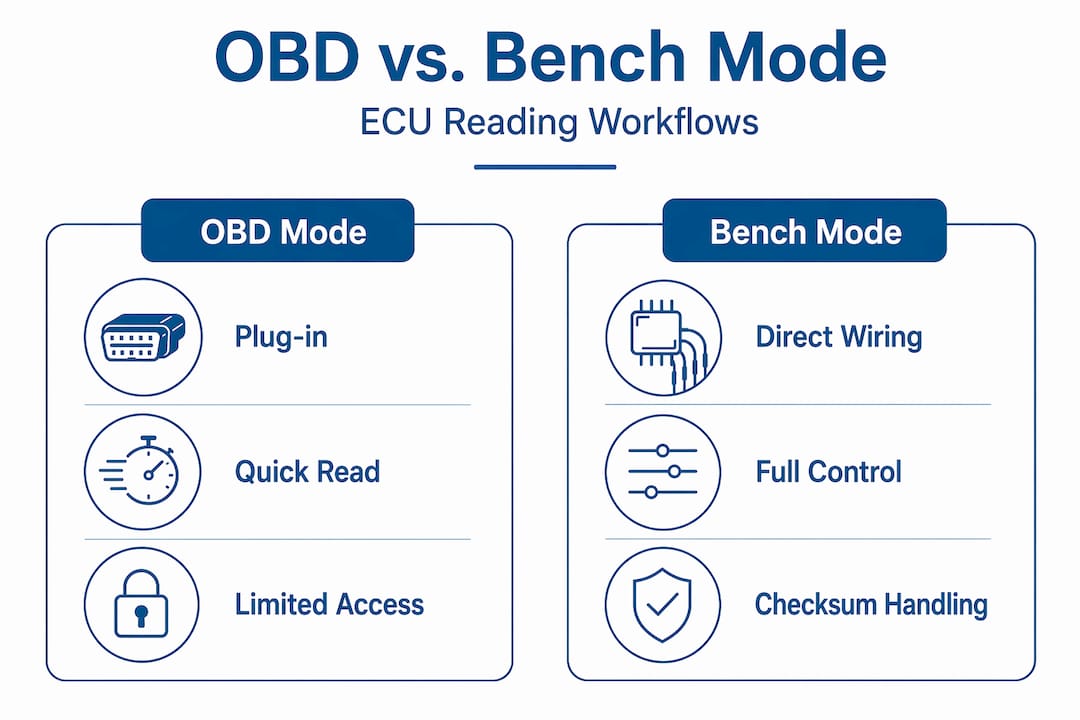
- OBD mode se conecta a través del puerto de diagnóstico del vehículo mientras la ECU permanece instalada. Es el método menos invasivo y cubre la mayor parte del trabajo de calibración Stage 1 en plataformas compatibles.
- Bench mode Extrae la ECU del vehículo y la conecta directamente a sus pines de alimentación, masa y comunicación en un banco de trabajo. Este cableado para vehículos bypasses permite un acceso completo de lectura y escritura del firmware en las ECU que restringen la modificación por OBD.
- Boot mode Accede directamente al microprocesador de la ECU a través de pines de arranque específicos, sin utilizar en absoluto el software propio de la ECU. Se utiliza cuando el firmware de la ECU está dañado, bloqueado por seguridad o cuando la familia de ECU no admite la comunicación en banco de pruebas a través de protocolos estándar.
Las plataformas profesionales de lectura de ECU pueden admitir flujos de trabajo OBD, de banco de pruebas y de arranque, pero la elección del modo adecuado es una decisión meditada que depende de la familia de ECU, el nivel de fiabilidad, el estado del vehículo y el alcance del trabajo de calibración. En esta guía, Alientech KESS3 es la herramienta de referencia preferida, ya que se integra de forma natural en muchos flujos de trabajo profesionales de lectura y escritura de ECU cuando el protocolo y la familia de ECU seleccionados son compatibles. AutoTuner, Magic Motorsport Flex, PCMFlash y CMD Flash también pueden ser herramientas válidas, dependiendo de la plataforma del vehículo, la cobertura de protocolos, las licencias y el trabajo específico. Utilizar bench mode en una ECU que admite la escritura OBD añade un riesgo innecesario sin aportar ningún beneficio. Por el contrario, intentar realizar escrituras OBD en una ECU bloqueada con seguridad supone una pérdida de tiempo y puede activar los contadores de bloqueo.
La gestión de el checksum es uno de los aspectos técnicamente más exigentes del trabajo en banco de pruebas y con boot mode. Cada archivo de firmware de la ECU contiene valores checksum que la ECU utiliza para verificar la integridad de los datos al arrancar. Los flujos de trabajo en banco de pruebas deben incluir la corrección de estos valores en su ciclo de lectura/verificación/escritura para evitar que la ECU rechace el archivo verificado o entre en un estado de seguridad ante fallos. Un solo byte incorrecto puede inutilizar la ECU.
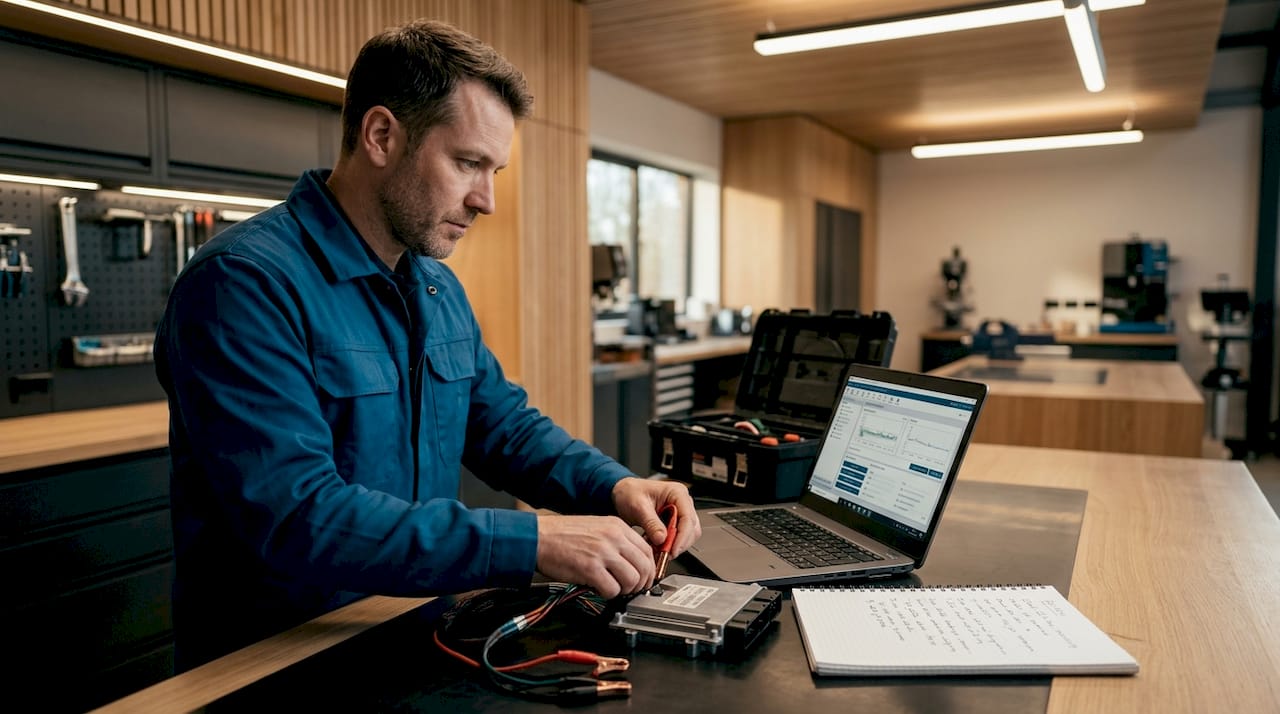
Consejo profesional: Realiza siempre dos lecturas independientes en bench mode y compara los archivos byte a byte antes de modificar nada. Si las dos lecturas no son idénticas, la conexión es inestable y escribir en ese momento conlleva el riesgo de que los datos se corrompan.
Comparando herramientas de lectura de ECU y flujos de trabajo
La herramienta que selecciona tuner define los límites de lo que es posible en cualquier sesión de lectura. Las combinaciones de hardware y software varían considerablemente en cuanto a la compatibilidad de modos, la cobertura de las ECU, la velocidad de lectura, la capacidad de gestión de checksum y los protocolos activos disponibles para el taller. En este flujo de trabajo, Alientech KESS3 es la herramienta de referencia principal, mientras que las otras plataformas se entienden mejor como alternativas válidas dependiendo de la plataforma del vehículo, la cobertura del protocolo, las licencias y el trabajo específico.
| Herramienta / flujo de trabajo | Posicionamiento en el taller | Rol típico | Nota profesional |
|---|---|---|---|
| Alientech KESS3 | Herramienta de referencia preferida | Flujo de trabajo profesional de lectura/escritura de ECUs OBD, de banco y en modo "boot" donde esté soportado | Utilízalo como referencia principal del flujo de trabajo cuando la familia de ECU, el protocolo, la suscripción y la lectura/escritura coincidan con el trabajo. |
| AutoAjuste | Plataforma profesional alternativa | Flujos de trabajo OBD y de banco en familias de ECUs compatibles | Útil como herramienta de taller aceptada cuando la cobertura y la licencia del protocolo coinciden con la familia de ECUs. |
| Magia Motorsport Flex | Plataforma profesional alternativa | Flujos de trabajo de lectura/escritura de ECU y TCU según la cobertura del protocolo | Referencia de herramienta válida al discutir operaciones mixtas de taller ECU/TCU. |
| PCMFlash | Flujo de trabajo de flasheo basado en módulos | Familias de ECU específicas y operaciones de lectura/escritura dependientes del protocolo | La cobertura depende en gran medida de los modules, los adaptadores y la variante concreta de la ECU. |
| CMD Flash | Flujo de trabajo de grabación profesional establecido | Lectura y escritura de ECU en plataformas compatibles | Aceptable como referencia técnica, pero no como herramienta principal a enfatizar. |
La norma profesional es sencilla: leer, verificar, modificar, volver a verificar y, a continuación, redactar. Tanto si el archivo se lee con KESS3 o cualquier otra herramienta profesional, saltarse los pasos de verificación para ahorrar tiempo es un falso ahorro. Una escritura defectuosa en la ECU puede suponer un coste en tiempo de recuperación superior al valor total de toda la sesión tuning.
Los flujos de trabajo profesionales consideran la lectura inicial, en primer lugar, como una copia de seguridad y, en segundo lugar, como un archivo de trabajo. El firmware original se almacena de forma segura antes de que comience cualquier actualización. Esta práctica protege tanto al fabricante como al cliente en caso de que falle la escritura o se produzca una respuesta inesperada de la ECU.
El sistema tuners combina datos PID en tiempo real con la lectura directa del firmware, alternando entre los modes de diagnóstico y calibración en función de la tarea concreta. Los diagnósticos en tiempo real identifican el problema. El acceso al firmware permite solucionarlo a nivel de calibración.
Errores comunes en la lectura de la ECU y cómo evitarlos
Incluso los profesionales con experiencia cometen errores en los procesos de lectura de la ECU, y la mayoría de esos errores se pueden clasificar en categorías predecibles. Reconocerlos de antemano es la forma más directa de obtener resultados consistentes y fiables.
- Interpretación errónea de la disposición de pines de la ECU orientation. La confusión entre el conector del lado de la ECU y el del lado del mazo de cables puede llevar a medir la señal equivocada en el pin equivocado. Comprueba siempre a qué lado del conector se refiere el esquema de pinout antes de realizar la medición.
- Sobrecargar la herramienta de diagnóstico con PIDs. Mantener el monitor PID monitoring por debajo de 8 canales permite conservar las frecuencias de muestreo y ayuda a aislar los problemas de los sensores en condiciones dinámicas. Un mayor número de canales implica un sondeo más lento y la pérdida de eventos transitorios.
- Se omite la verificación checksum. Escribir un archivo de firmware «modificado» sin corregir los «checksums» es la forma más rápida de dejar una ECU inservible. Este paso no es opcional en ninguna operación de banco de pruebas ni de «boot mode».
- Borrar códigos de avería antes de documentar el cuadro de congelación. Una vez que se borran los códigos, los datos de "freeze-frame" desaparecen. Captúralos primero, siempre.
- Usando una sola lectura como archivo de trabajo. Una lectura no es suficiente para confirmar la integridad de los datos integr. Dos lecturas coincidentes confirman que la conexión es estable y que los datos son correctos.
Consejo profesional: Antes de cualquier sesión en banco, reinicia la ECU en el banco y confirma que la comunicación sea estable durante al menos 30 segundos antes de iniciar una lectura. La alimentación inestable durante la lectura es una de las causas más comunes de archivos de ECU corruptos.
¿Qué separa realmente la lectura profesional de la ECU del resto?
La diferencia entre un técnico competente y un profesional verdaderamente hábil no reside solo en el hardware que poseen. Reside en el juicio que aplican antes de tocar nada.
Uno de los errores más comunes es tratar los datos de "freeze-frame" y los datos en vivo como flujos de trabajo separados. No lo son. Los datos de "freeze-frame" funcionan mejor cuando se combinan con diagnósticos en vivo para reproducir fallas, en lugar de ser una conclusión de diagnóstico independiente. Los profesionales usan los datos de "freeze-frame" para configurar su sesión de datos en vivo, no para reemplazarla.
La lectura en banco de pruebas y mediante boot mode conlleva un riesgo real, y las ECU pueden quedar inutilizadas si se precipita el proceso. Elegir el método adecuado de acceso a la ECU (Bench/Boot mode) no se reduce únicamente a lo que admite la herramienta, sino a lo que realmente requiere la situación. El OBD es más seguro. Úsalo cuando sea suficiente.
El proceso de lectura de la ECU no es una habilidad aislada. Se trata de una secuencia de decisiones, cada una de las cuales se basa en la anterior. Los técnicos tuners que obtienen resultados precisos y seguros de forma sistemática son aquellos que respetan esa secuencia y nunca se saltan pasos para ahorrar tiempo.
— Equipo Técnico de TuningBot
ECU profesionales tuning y remapping con TuningBot
Si has completado las fases de diagnóstico y lectura y estás listo para actuar sobre lo que los datos de la ECU te dicen, el siguiente paso es un archivo de calibración que refleje ese conocimiento con precisión.
TuningBot proporciona Archivos profesionales de la ECU remapping para talleres y tuners en todo el mundo, compatible con las principales familias de ECU y los flujos de trabajo habituales de tuning. Archivos que se pueden leer con herramientas profesionales como Alientech KESS3, AutoTuner, Magic Motorsport Flex, PCMFlash y CMD Flash pueden enviarse a través del flujo de trabajo de TuningBot siempre que la ECU y el servicio solicitados sean compatibles. La plataforma admite la carga directa de archivos de ECU sin necesidad de registrarse ni de disponer de créditos prepagados. Tanto si necesitas una calibración de Stage 1, la desactivación del DPF o del EGR, el DSG tuning o la eliminación de códigos de avería (DTC), TuningBot te proporciona archivos calibrados profesionalmente a través de un sencillo flujo de trabajo de servicio de archivos. La lectura segura de la ECU es la base. TuningBot se encarga de todo lo demás.
Antes de enviar un archivo, verifica el Cobertura de Servicio de ECU TuningBot para confirmar que la ECU, el vehículo y el servicio solicitados son compatibles. Cuando el archivo esté listo, usa Reprograma tu archivo para enviar el archivo de la ECU y los detalles técnicos.
PREGUNTAS FRECUENTES
¿Qué indica un código tuner en los datos en tiempo real de la ECU?
Un monitor profesional tuner supervisa los ajustes de combustible, los valores de los sensores MAF o MAP, la temperatura del líquido de refrigeración, las revoluciones por minuto (RPM), la posición del acelerador y la carga del motor. Estos parámetros, en conjunto, revelan la precisión de la inyección de combustible, el estado de los sensores y el comportamiento del motor en condiciones de funcionamiento.
¿Cuántos PIDs debes monitorizar durante una sesión de diagnóstico de la ECU?
La mayoría de los profesionales mantienen el número de PID activos en el Monitoring por debajo de 8 canales para conservar una frecuencia de muestreo útil. Si se supervisan demasiados PID simultáneamente, se reduce la frecuencia de sondeo y el diagnosticador puede pasar por alto eventos de fallo de corta duración.
¿Qué son los datos de fotograma congelado y cómo los utilizan los profesionales?
Los datos de detención de imagen son una instantánea de las condiciones de funcionamiento de la ECU capturada en el momento en que se activa un código de falla. Los profesionales lo utilizan para configurar una sesión de datos en vivo que reproduzca las condiciones exactas de la falla, en lugar de tratarlo como un diagnóstico definitivo por sí solo.
¿Cuándo debería un tuner utilizar bench mode en lugar de OBD?
El Bench mode resulta adecuado cuando la ECU está bloqueada mediante el protocolo seguridad contra las escrituras OBD, cuando el cableado del vehículo está dañado o cuando se requiere una extracción completa del firmware para trabajos de calibración que superan los límites de acceso OBD. Requiere una conexión directa por hardware a la ECU fuera del vehículo.
¿Por qué es fundamental la corrección checksum en la lectura de la ECU bench mode?
Cada archivo de firmware de la ECU contiene valores checksum que la ECU verifica al arrancar para confirmar la integridad de los datos. Si se escribe un archivo modificado con valores checksum incorrectos, la ECU rechazará el archivo o entrará en un estado de seguridad ante fallos, lo que puede provocar que la ECU quede inutilizada y requiera procedimientos de recuperación especializados.