

 ItalianoIT
 DeutschDE
 EspañolES
 PortuguêsPT
 FrançaisFR
 РусскийRU

A Dimsport file service is an arrangement in which you read the original ECU file with a Dimsport tool, send it to a calibration provider, and receive a modified file to write back to the vehicle. Dimsport supplies the hardware and software for reading, exchanging and programming. The calibration itself comes from a tuner or a file service, because Dimsport does not provide ready-to-use modified files. This guide explains how the workflow runs, which file formats matter, and which checks to complete before every write.
TL;DR
- Dimsport tools read and write ECU data. The modified calibration is produced by a tuner or file service, not by Dimsport.
- A typical job is: read the original file, check size and ID, send it, receive the modified file, verify the checksum, write it, and keep the original as a backup.
- Most tools exchange free-form binary (.bin) files, but encrypted slave or master-slave containers can restrict what a file service can process.
- Checksum handling differs by ECU family and tool, so know which step in your chain recalculates it before you flash.
- Our file service accepts uploads with no registration or prepaid credits. Prices for each service are on our price list.
Table of Contents
- What a Dimsport file service is and is not
- The workflow, step by step
- Dimsport tools and what each one does
- ECU file formats and what decides compatibility
- Dimsport files compared with other read tools
- Checks before you write a modified file
- Our perspective on file service work
- Order a Dimsport-read file from us
- Responsibility after the file is delivered
- FAQ
- Sources
What a Dimsport file service is and is not
The phrase covers two different things, and it helps to separate them.
The first is Dimsport’s own ecosystem: hardware such as New Genius and New Trasdata, and software such as Race EVO and DSManager. These are the tools that connect to the ECU, read its content, and program it back. The Race platform covers vehicle ranges including car, bike, LCV, truck, agricultural and marine, and Dimsport states that it does not provide modified files ready to use and is not responsible for the tuned files its customers create.
The second is the file service: an external calibration provider that receives your original read, applies the requested modifications, and returns a file your tool can write. That is the service we provide. Our platform supports Dimsport alongside KESS3, Autotuner, Magic Motorsport, CMD and PCMFlash, and works with Bosch, Continental, Delphi, Marelli, Denso, Siemens, Keihin and ZF control units.
This division of responsibility matters in practice. The tool maker is responsible for communication and programming. The calibration provider is responsible for the content of the modified file. The workshop is responsible for verifying the vehicle, the read and the write.
The workflow, step by step
The sequence below applies to most file service jobs, whatever the read tool.
- Feasibility check. Confirm the vehicle, ECU family and software version are supported by your tool for reading and writing. Dimsport’s Flash Point e-training lists the vehicle feasibility check as the first topic for a reason: a job that cannot be written back should not be started.
- Read the original. Use your tool in the mode the ECU requires (OBD, bench, or boot/BDM type access) and save the complete original file.
- Verify the read. Check file size against the ECU family, the identification block against the label, and the checksums. A read of 512 KB from a 2 MB ECU is a failed read, as VAGPULSE’s backup guide puts it.
- Send the file with the request. State the vehicle, engine, ECU type, software number, and the exact modifications required.
- Receive the modified file. We state typical turnaround at 15 to 20 minutes, and an engineer is available if the file or the request needs clarification.
- Check before writing. Confirm the returned file matches the original in size and identification, and confirm how the checksum will be handled.
- Write and test. Program the vehicle, clear and read fault memory, and road test according to your workshop procedure.
Keep the original file with the job record. If anything goes wrong, a clean original is the fastest route back to a known state.
How the master/slave exchange works
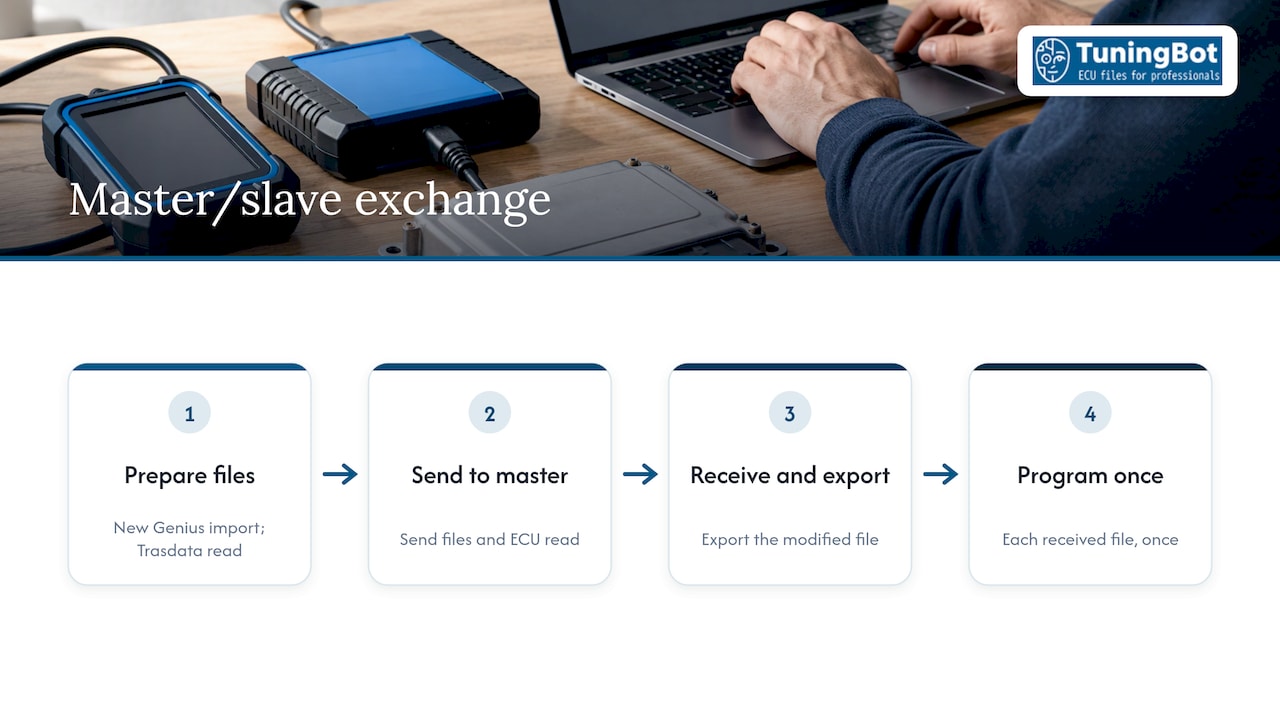
Some Dimsport workflows route files through a controlled exchange. In Flash Point, the dealer (slave) can only send and receive files to and from the tuner (master). The software also prevents a file from being found, accessed and reused on another vehicle, and each received file can be programmed only once.
The e-training for this system covers how to import and send New Genius files, receive and export a modified file, and read an ECU with New Trasdata before sending it to the master. If you are a dealer-side workshop using this system, your tuner must be the master in the chain, so confirm that arrangement with your provider before ordering.
Dimsport tools and what each one does
Knowing which Dimsport product handles which step avoids most beginner mistakes.
| Product | Role | Notable details |
|---|---|---|
| New Genius | Stand-alone OBDII device for serial communication with the ECU | Verifies file size and checksum integrity before programming; if programming is interrupted it recovers communication and completes it automatically |
| New Trasdata | Reads and programs the whole ECU content | BENCH mode and OPEN mode (BDM, BOOT, JTAG, NBD, BAM and others) without soldering; covers CPU, flash Eprom and serial Eeprom; performs autonomous checksum recalculation |
| Race EVO | Remapping software for engine parameters | Recalculates the checksum automatically at the end of tuning operations |
| DSManager | File decryption, encryption and resizing | Handles files received from New Genius so they can be used with other tuning software; no editing features, and a separate tool for checksum recalculation is provided |
| Flash Point | Master/slave file exchange | One-time programming per received file |
For a file service customer, the practical points are these. If you read with New Genius, the file may be encrypted, and DSManager is the route to a format a calibration provider can open. If you read with New Trasdata in bench or boot mode, you capture the full ECU content, which gives the most complete original for modification and backup.
Our own Dimsport ECU tuning guide covering read, write and recovery goes deeper on the tool-side procedure.
ECU file formats and what decides compatibility
The most common format in chip tuning is the free-form binary, .bin: a byte-for-byte sequence representing an ECU memory dump or a specific area saved as is. Almost all multicar flashers work with it, and a file made by one tool can generally be written by another. Some tools use other extensions, for example .fls and .mpc for K-Tag.
Other formats you will meet:
- Container files such as .vbf. The Volvo binary file is a dealer format used by several manufacturers, including Volvo, Ford, Mazda, Jaguar and Land Rover. It holds metadata at the start for the flasher and the firmware binary itself.
- Encrypted slave formats such as .mmf and .slave. These are tool-specific protected containers. Software that processes standard raw binaries cannot process or decrypt these formats, which is why an unencrypted original is the safest thing to send to any file service.
- Definition files such as XDF, A2L and DAMOS. These do not hold the calibration data. An XDF file tells the software how to interpret the raw data inside the ECU so it appears as tables and maps instead of hexadecimal, and without one you cannot meaningfully or safely modify the calibration. In OEM and professional environments, A2L or DAMOS files serve the same purpose.
Why a file may be rejected
Whether a tool can read or write a file depends on several variables: ECU or TCM software version, manufacturer software updates, file format, file size, file structure, calibration layout, read method and read tool output. In practice, most rejections come from one of four causes: an incomplete read, an encrypted container, a mismatch between the file and the ECU variant, or a software version the provider has no calibration data for.
If you are unsure, send the file with the tool name and read mode noted. That allows the engineer to tell you quickly whether the file is usable.
Dimsport files compared with other read tools
A workshop rarely uses only one tool. The table shows how the same file service job looks across the tools we support.
| Tool | Typical file we receive | What to confirm before ordering |
|---|---|---|
| Dimsport (New Genius, New Trasdata) | Binary read, sometimes decoded through DSManager | Whether the file is encrypted; whether the read is complete |
| KESS3 | Binary read from the tool’s own read function | ECU family, read method and size |
| Magic Motorsport (Flex) | Open binary or protected slave file | Slave files cannot be processed by every software; use an open read where available |
| CMD | Binary read in bench, boot or OBD mode | Matching of the file to the ECU hardware variant |
| PCMFlash | Binary read, often through bootloader access | Access method; see our PCMflash bootloader tuning guide |
| Autotuner | Binary read | Mode used and completeness of the read |
The common thread is that a file service needs a complete, unencrypted original that matches the ECU. The brand on the tool matters less than the quality of the read. For ECU families with specific identification routines, such as the Simos 18 identification and file checks, check the family-specific notes before sending.
Checks before you write a modified file
The most expensive failures happen at write time. A short checklist prevents most of them.
- File size. The modified file must be the same size as the original read, matching the ECU family.
- Identification block. The ECU ID in the file should match the ECU label and the original read.
- Checksum status. Checksums should come out valid. VAGPULSE runs these three checks, size, ID and checksum, when it loads a file, and the same logic applies whatever tool you use.
- Power supply. Use a stabilized supply during programming. A voltage drop mid-write is a common cause of a dead ECU. Tools such as New Genius can recover communication and complete an interrupted programming procedure, but prevention is better.
- Backup. Store the original read before anything is written, and label it with the VIN and ECU software number.
- Fault memory. Read and note stored DTCs before the job so you can separate existing faults from new ones.
Checksums, in practice
Checksum handling is where file service workflows differ most. According to a WinOLS checksum guide, correction through WinOLS works only with the correct plugins or definitions for the ECU family. Some flashing tools calculate or patch the checksum while writing, depending on the protocol and ECU, and some ECUs verify on boot or at runtime. The safe working assumption is that you must know which of these your chain relies on.
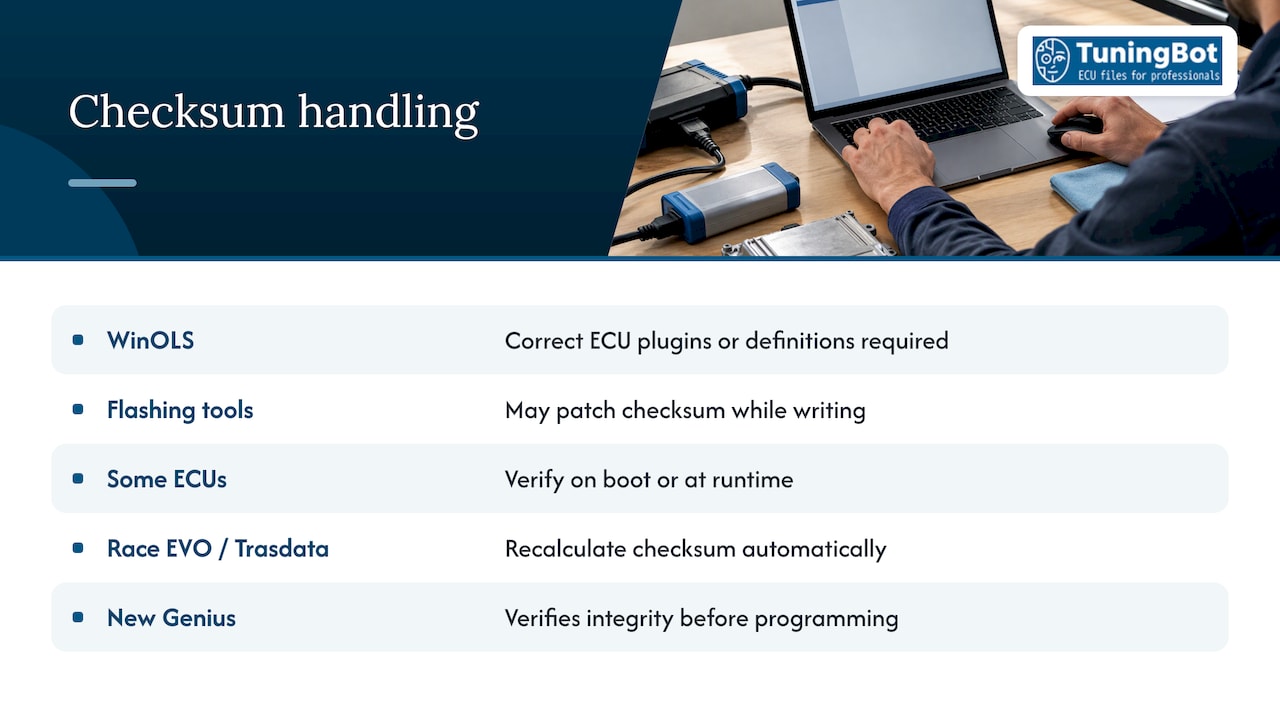
With Dimsport tools, part of that is built in: Race EVO recalculates the checksum at the end of tuning, New Trasdata performs autonomous recalculation, and New Genius verifies integrity before programming. Where a file is processed outside those tools, checksum correction has to be done explicitly. We offer Checksum Correction as a separate service at €29.99 per file, and we explain the principles in our professional guide to ECU file checksum correction.
Our perspective on file service work
We handle files from every major read tool, and the pattern is consistent: the quality of the original read determines the quality of the result. A complete, correctly identified, unencrypted file lets an engineer work on the calibration itself instead of troubleshooting the input.
We built our workflow around that reality. You upload the file online with no registration and no prepaid credits, you describe the vehicle and the modifications, and an engineer prepares the calibration. Our typical turnaround is 15 to 20 minutes, and real engineer support is available when a file or a request needs a second look.
Pricing is per file and published, so a workshop can quote its own customer before the file is ordered. If a file does not work, our credit-back guarantee applies. We designed the service for workshops and tuners that need a dependable calibration partner behind their Dimsport, KESS3, Magic Motorsport, CMD, PCMFlash or Autotuner equipment.
TuningBot Technical Team
Order a Dimsport-read file from us
We process files read with Dimsport tools and with the other major platforms. The services most workshops request, with our published per-file prices, include:
- Stage 1 Tuning (Performance): €49.99, and Stage 1 Tuning: €69.99
- ECO Tuning (Fuel Economy & Drivability): €49.99
- Premium Stage 2: €129.99
- Full Gearbox Tuning: €49.99
- DPF Off and EGR Off: €39.99 each
- AdBlue / SCR Off: €59.99
- DTC Removal: €29.99
- IMMO Off: €49.99
The complete list, including Pop & Bang, Hardcut, Vmax Off, Start & Stop Off and others, is on the ECU tuning price list. Emission-related modifications are subject to the law where the vehicle is registered, so confirm what is permitted for your market and use before ordering.

Upload your original file at TuningBot and Tune Now: no registration, no prepaid credits, and a full credit-back guarantee if the file does not work.
Responsibility after the file is delivered
Because Dimsport does not supply modified files and does not take responsibility for files its customers create, the chain of responsibility is clear: whoever produces and whoever installs a calibration owns the result. For a workshop, that means documenting the original file, the modification requested, the file version written and the test results.
Post-write diagnostics belong in that record. If a vehicle returns with an engine malfunction indicator lamp concern, the first step is to read the fault memory and compare it with the DTCs recorded before the job. Work out whether the code relates to the calibration, a sensor, or a mechanical fault before changing anything. Our engineers can review the modification request and the file versions with you if that comparison points to the calibration.
FAQ
Does Dimsport provide modified tuning files?
No. Dimsport supplies the tools and the Race platform for reading, remapping and programming, but it does not provide ready-to-use modified files. Workshops obtain the calibration from a tuner or a file service such as ours.
Can a file service work with a file read by New Genius?
Often yes, provided the file is in a format the provider can open. New Genius files may need to be decrypted and resized with DSManager, which is designed for managing them with other tuning software. Send the file with the tool and read mode noted so our engineers can confirm.
Which file format should I send?
Send an unencrypted raw binary (.bin) read of the full ECU or the relevant area. Encrypted containers such as .mmf and .slave may not be processable. If your tool outputs another extension, tell us which one when you upload.
Do I need to correct the checksum myself?
That depends on your chain. Dimsport’s Race EVO and New Trasdata recalculate checksums, while other tools and ECU families may need a separate correction step. Confirm it before writing, and order Checksum Correction from us if your tool does not handle it.
Do I need an account to order from TuningBot?
No. You upload your ECU file online without registration or prepaid credits, and pay per order.
Sources
- Dimsport Race platform (United States)
- Dimsport Flash Point e-training course
- Dimsport Flash Point
- Dimsport New Genius
- Dimsport New Trasdata
- Dimsport Race EVO software
- What format can a firmware file have?
- Softechpro FAQ on ECU tuning software
- What Is An XDF File?
- DTC Toolbox product page
- How to Read & Back Up Your ECU Before Tuning
- WinOLS checksums guide