

 ItalianoIT
 DeutschDE
 EspañolES
 PortuguêsPT
 FrançaisFR
 РусскийRU
Engine ECU Programming Guide: Tools, Steps and Troubleshooting
- What tools and software are required for engine ECU programming?
- How to program an engine ECU step by step
- What makes programming different ECU types so complex?
- Common mistakes and how to troubleshoot failed ECU programming
- Key takeaways
- What I’ve learned from years of ECU calibration work
- Professional ECU programming support from TuningBot
- FAQ
- Recommended
Engine ECU programming is the process of reading, modifying, and rewriting the software inside an engine control unit to alter how a vehicle manages fuel delivery, ignition timing, torque output, and emissions controls. The industry term for this practice is ECU remapping or ECU calibration, and it sits at the core of every performance tuning workflow. Tools like Alientech KESS3, AutoTuner, and software platforms such as ECM Titanium and WinOLS have made professional-grade car ECU programming accessible to workshops worldwide. This guide covers the full process: required hardware and software, step-by-step programming procedures, ECU-specific challenges, and the troubleshooting practices that separate clean flashes from costly failures.
What tools and software are required for engine ECU programming?
laptop-based ECU tuning workflow using OBD2, CAN protocol, and advanced programmers allows reading, modifying, and writing ECU files with software like ECM Titanium and WinOLS. This means a professional workshop no longer needs a chip-burning station. A modern laptop, a quality interface cable, and the right software are the core of any programming setup.
The hardware layer starts with the flashing tool itself. Alientech KESS3, AutoTuner, Magic Motorsport Flex, CMD Flash, and Dimsport MyGenius are the most widely used in professional environments. Each supports a range of ECU brands including Bosch, Continental, Delphi, Marelli, Denso, and Siemens. The choice of tool determines which ECUs you can access via OBD port and which require bench or boot-mode connections.

On the software side, ECM Titanium provides a map-based interface suited for technicians learning calibration, while WinOLS is the industry standard for binary-level editing with full checksum correction support. PCMFlash covers a wide range of Asian and European platforms. For checksum handling specifically, ECU file checksum correction is a non-negotiable step. Checksums are safety algorithms embedded in ECU files that must be corrected after any modification to prevent corrupted programming. Most professional tools handle this automatically, but manual verification in WinOLS remains best practice.
| Tool | Type | Primary Use |
|---|---|---|
| Alientech KESS3 | Hardware flasher | OBD, bench, and boot reading/writing |
| AutoTuner | Hardware flasher | OBD and bench, wide ECU coverage |
| WinOLS | Tuning software | Binary editing, checksum correction |
| ECM Titanium | Tuning software | Map identification, beginner-friendly calibration |
| PCMFlash | Software/interface | Asian and European ECU flashing |
| Autel MaxiSYS Ultra S2 | Diagnostic/programming tool | OEM-level coding and adaptation |
- OBD2 or CAN interface cable matched to your flashing tool
- Stable laptop running Windows 10 or 11 with sufficient RAM for binary files
- Battery stabilizer or bench power supply (minimum 13.5V during flashing)
- Backup storage for original and modified ECU files
Pro Tip: Always verify your flashing tool’s firmware is current before starting a session. Outdated tool firmware is a leading cause of incomplete reads on newer ECU variants, particularly Bosch MG1 and Continental Simos 18 platforms.
How to program an engine ECU step by step
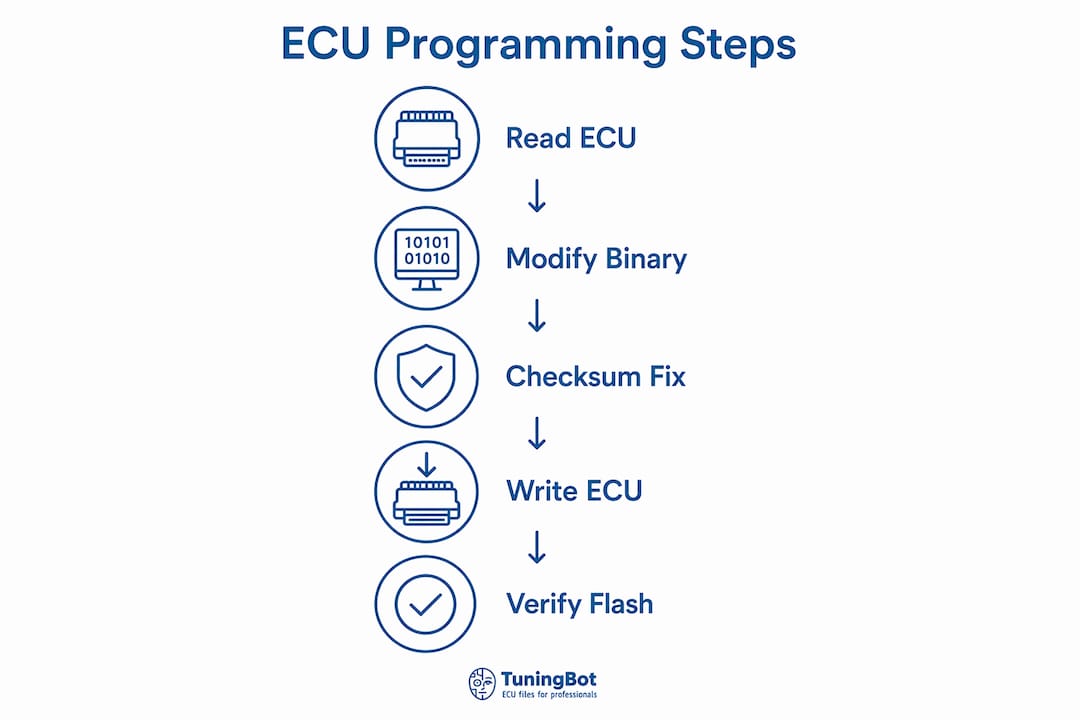
Programming an ECU follows a defined sequence. Deviating from that sequence, even partially, introduces risk of ECU lockout or corrupted firmware. The following steps apply to OBD-based flashing on a standard passenger vehicle. Bench programming follows the same logic but requires physical ECU removal and direct pin connections.
- Diagnose the vehicle. Connect a diagnostic tool such as Autel MaxiSYS Ultra S2 and read all stored DTCs. Resolve any active faults before programming. An ECU with active errors may refuse to enter programming mode.
- Connect the flashing tool. Plug your programmer (KESS3, AutoTuner, or equivalent) into the OBD2 port. Confirm the vehicle’s battery voltage is stable at 13.5V or above using a battery stabilizer.
- Read the original ECU file. Use your tool’s software to identify the ECU variant and read the full binary. This is the original file. Save it immediately to at least two separate locations before touching anything else.
- Open the file in tuning software. Load the binary into WinOLS or ECM Titanium. Identify the relevant maps: fuel injection quantity, ignition advance, boost pressure (on turbocharged engines), torque limiters, and rev limiters.
- Modify the calibration data. Adjust target maps according to the vehicle’s hardware configuration. A BMW with a Siemens MS43 ECU, for example, requires coordinated changes across the load-based fuel maps and the torque model to avoid drivetrain protection interventions.
- Correct checksums. After saving your modified file, run checksum correction in WinOLS or your tool’s built-in corrector. Writing a file with an invalid checksum will cause the ECU to reject the flash or enter a fault state.
- Write the modified file to the ECU. Use your flashing tool to write the corrected file back. Do not interrupt this process under any circumstances. Disconnecting power during the flash can damage the ECU and render it unrecoverable without specialized recovery tools.
- Verify and test. After writing, read the ECU again and compare the file against your modified version to confirm a successful write. Clear DTCs, perform any required adaptations, and road test the vehicle.
For a concrete example: on a BMW with a Siemens MS43 ECU, the tuner reads the binary via OBD, modifies the load-based injection maps and the torque limitation tables in WinOLS, corrects the checksum, and writes back. The process takes under 20 minutes when the setup is correct. You can find a deeper breakdown of the write process, including UDS protocol handling, in this ECU file writing guide.
Pro Tip: Always perform a second read after writing and use a binary comparison tool to verify that the written file matches your intended modified file exactly. A byte-level mismatch indicates a partial write and requires immediate attention before the vehicle is started.
What makes programming different ECU types so complex?
Not all ECUs respond to the same programming approach. The complexity scales directly with the security architecture the manufacturer has built into the firmware. ECU programming-mode requirements where the bootloader prioritizes memory-write operations over vehicle functions before any flash operation can proceed. This transition is not automatic. The flashing tool must trigger it through a specific protocol sequence.
The Continental Simos 18 ECU illustrates the upper end of this complexity. It features a three-layer boot architecture: SBOOT (startup bootloader), CBOOT (calibration bootloader), and ASW (application software). Each layer has its own security checks, including RSA signature verification and CVN integrity validation. Modifying this ECU without platform-specific knowledge risks permanent lockout. The same principle applies to Bosch MG1 and MD1 units used in modern VAG and BMW applications.
Seed-key authentication is a security challenge that tuning tools must pass before the ECU will allow erase or write commands. The tool sends a seed request, the ECU responds with a random seed value, and the tool must return the correct key calculated from that seed. Without the correct algorithm for a specific ECU variant, the flash session terminates. This is why tool coverage lists matter: a tool that supports a Bosch EDC17 on one vehicle may not support the same ECU variant on a different platform.
“Comprehensive understanding of the ECU architecture and security protocols is vital to successful tuning, especially on complex platforms like Continental Simos 18.” Source: Continental Simos 18 ECU: Reverse Engineering
The distinction between OBD flashing and bench programming is also platform-dependent. OBD flashing works when the ECU accepts UDS or KWP2000 flash commands through the diagnostic port. Bench programming bypasses the vehicle entirely by connecting directly to the ECU’s circuit board pins, which is required for ECUs that block OBD write access or have corrupted firmware. Boot-mode programming goes one step further, forcing the ECU’s processor into a low-level recovery state to allow direct memory writes. For Continental-based platforms, TuningBot’s Continental ECU file guide covers the specific security layers and recommended tool approaches in detail.
Common mistakes and how to troubleshoot failed ECU programming
The majority of failed programming sessions trace back to a small set of repeatable errors. Identifying them before they occur is more productive than recovering from them after the fact.
- Incorrect checksum handling. Writing a modified file without correcting the checksum is the most common cause of ECU rejection. The ECU’s internal validation routine detects the mismatch and refuses to execute the new software. Always run checksum correction as a discrete step, not an afterthought.
- Interrupting the flash process. A power drop, a disconnected cable, or a tool crash mid-write can leave the ECU in a partially written state. In most cases, the ECU will not start the vehicle and requires bench recovery. Use a dedicated battery stabilizer set to 13.5V for the entire session.
- Skipping security access. Some technicians attempt to write files without completing the seed-key exchange, particularly when using third-party scripts. The ECU will block the write command and may log a security violation that requires dealer-level reset tools to clear.
- Ignoring coding and adaptation after programming. post-programming coding and adaptation issues due to overlooked coding and adaptation after ECU software updates. Pete Meier at Autel identifies this as a primary driver of costly comebacks. After writing a new file, the ECU must be coded to the vehicle’s specific configuration and adaptations must be reset to allow the engine management system to relearn operating parameters.
- Using the wrong file for the ECU variant. An ECU file built for one hardware revision will not write correctly to a different revision, even if the part number appears similar. Always verify the ECU ID before selecting a file.
Proper ECU coding after hardware replacement resolves drivability failures and prevents repeated shop visits. This step is not optional on modern vehicles where the ECU communicates with the body control module, transmission control unit, and instrument cluster. Skipping it produces fault codes across multiple systems. For a detailed look at how professional tuners approach the initial data extraction step, the guide on reading ECU data provides a practical reference.
Pro Tip: If a flash fails and the ECU is unresponsive, do not attempt a second write immediately. Disconnect the tool, restore battery voltage, wait 60 seconds, and attempt a bench connection to read the current ECU state before deciding on a recovery path.
Key takeaways
Successful engine ECU programming depends on matching the right tools and protocols to the specific ECU platform, correcting checksums on every modified file, and completing coding and adaptation after every write operation.
| Point | Details |
|---|---|
| Tool selection is platform-specific | Match your flashing tool (KESS3, AutoTuner, Flex) to the ECU brand and access method required. |
| Checksum correction is mandatory | Every modified binary must pass checksum validation before writing to avoid ECU rejection. |
| Security access must be completed | Seed-key authentication is required before any erase or write command will be accepted. |
| Coding and adaptation prevent comebacks | Skipping post-flash coding causes drivability faults and repeat shop visits on modern vehicles. |
| Power stability protects the ECU | A battery stabilizer at 13.5V throughout the flash session prevents partial writes and ECU damage. |
What I’ve learned from years of ECU calibration work
The most consistent mistake I see from workshops moving into ECU calibration is treating the flash as the finish line. Writing the file is the middle of the process, not the end. The preparation work, specifically reading the original file, verifying the ECU ID, and confirming tool firmware, determines whether the session succeeds. The post-flash work, coding, adaptation, and a verified second read, determines whether the vehicle stays fixed.
ECU security has evolved faster than most tuners anticipated. Three years ago, OBD access on a Bosch EDC17 was straightforward on most platforms. Today, Bosch MG1 and Continental Simos 18 units require bench or boot-mode approaches on an increasing number of variants, and the seed-key algorithms are platform-specific enough that generic scripts fail regularly. The tuners who stay ahead of this are the ones who invest in platform-specific knowledge, not just broader tool coverage.
One area that still gets underestimated is the value of aftermarket ECU programming documentation. Keeping a structured log of every ECU variant you’ve worked on, including the tool version, file version, and any anomalies during the session, builds a reference library that pays back over time. When a similar ECU comes in six months later, that log is faster than any forum search.
The Hyundai performance segment is a good example of how engine-specific calibration knowledge translates directly into better calibration outcomes. Understanding the engine’s physical limits informs every map change you make in the binary. Tuners who treat ECU calibration as pure software work, disconnected from mechanical reality, produce files that perform poorly on the dyno and worse on the road.
— TuningBot Technical Team
Professional ECU programming support from TuningBot
TuningBot provides professional ECU remapping files and calibration services for workshops and tuners working across all major ECU platforms, including Bosch, Continental, Delphi, Marelli, Denso, and Siemens. Whether you need a Stage 1 remap, checksum-corrected file, DPF Off solution, or IMMO Off service, the platform supports direct file upload with no registration or prepaid credits required.
The ECU Service Coverage matrix helps workshops check current support for Bosch MG1, Continental Simos 18, ZF TCU and other modern platforms before submitting a file. For high-volume ECU work, TuningBot’s professional remapping services deliver calibrated files through a structured workflow compatible with Alientech KESS3, AutoTuner, Magic Motorsport, CMD, Dimsport and PCMFlash. Submit your ECU file and receive a professionally calibrated result without maintaining in-house expertise for every ECU family.
FAQ
What is engine ECU programming?
Engine ECU programming is the process of reading, modifying, and rewriting the software inside an engine control unit to change how the vehicle manages fuel, ignition timing, torque, and emissions. It is also called ECU remapping or ECU calibration.
What software is used for programming an ECU?
The most widely used software platforms are WinOLS for binary-level editing and checksum correction, ECM Titanium for map-based calibration, and PCMFlash for a broad range of European and Asian ECUs. Hardware tools like Alientech KESS3 and AutoTuner handle the physical read and write operations.
Why does checksum correction matter in ECU tuning?
Checksums are validation algorithms built into ECU files that confirm data integrity. Writing a modified file with an incorrect checksum causes the ECU to reject the flash or enter a fault state, making checksum correction a required step after every calibration change.
What causes ECU programming to fail?
The most common causes are power interruption during flashing, incorrect checksum handling, failed seed-key authentication, and writing a file built for the wrong ECU hardware revision. Using a battery stabilizer and verifying the ECU ID before writing eliminates most of these failure points.
Is coding required after ECU programming?
Yes. Coding and adaptation after ECU updates are required to configure the ECU to the vehicle’s specific hardware and allow the engine management system to relearn operating parameters. Skipping this step produces drivability faults and repeat failures across multiple vehicle systems.