

 ItalianoIT
 DeutschDE
 EspañolES
 PortuguêsPT
 FrançaisFR
 РусскийRU
BMW ECU stage tuning is a structured remapping process that upgrades engine output by modifying calibration parameters inside the engine control unit (ECU) according to defined hardware stages. The BMW ECU stage tuning steps follow a clear sequence: identify your target stage, prepare the correct tools, verify ECU compatibility, execute the flash, and confirm results. Tools like Bootmod3 and AutoTuner are the standard for this process in 2026. Stage 1 delivers 20–50 HP gains without touching hardware, while Stage 2 and Stage 3 require progressively more aggressive hardware changes. Getting the sequence right protects your engine and your investment.
What are the different stages of BMW ECU tuning?
BMW ECU tuning is divided into three stages, each defined by the level of hardware support the tune requires. Choosing the wrong stage for your current hardware configuration is the most common and most costly mistake in the ECU tuning process.
Stage 1 is a software-only modification. No hardware changes are needed, making it the correct starting point for daily-driven BMWs. Stage 1 tuning is safe when performed with professional-grade software and proper procedures. Power gains typically fall in the 20–50 HP range depending on the engine platform, with N55, B58, and S58 engines responding particularly well.

Stage 2 requires supporting hardware upgrades before the tune is applied. A downpipe, upgraded intake, and front-mount intercooler are the minimum requirements. Stage 2 provides 50–100 HP gains over stock, but only when the hardware is in place first. Flashing a Stage 2 map onto a stock hardware car will create dangerous conditions including knock, overboost, and thermal stress.
Stage 3 is a full-build territory. Turbo upgrades, port injection, upgraded fueling, and reinforced internals are all expected. Stage 3 yields 100–300+ HP gains and is not appropriate for street use without careful planning. This stage is primarily for track builds and dedicated performance vehicles.
| Stage | Power Gain | Required Hardware | Ideal Use Case |
|---|---|---|---|
| Stage 1 | 20–50 HP | None (software only) | Daily driver, stock hardware |
| Stage 2 | 50–100 HP | Downpipe, intake, intercooler | Modified street car |
| Stage 3 | 100–300+ HP | Turbo, fueling, internals | Track build, full performance build |
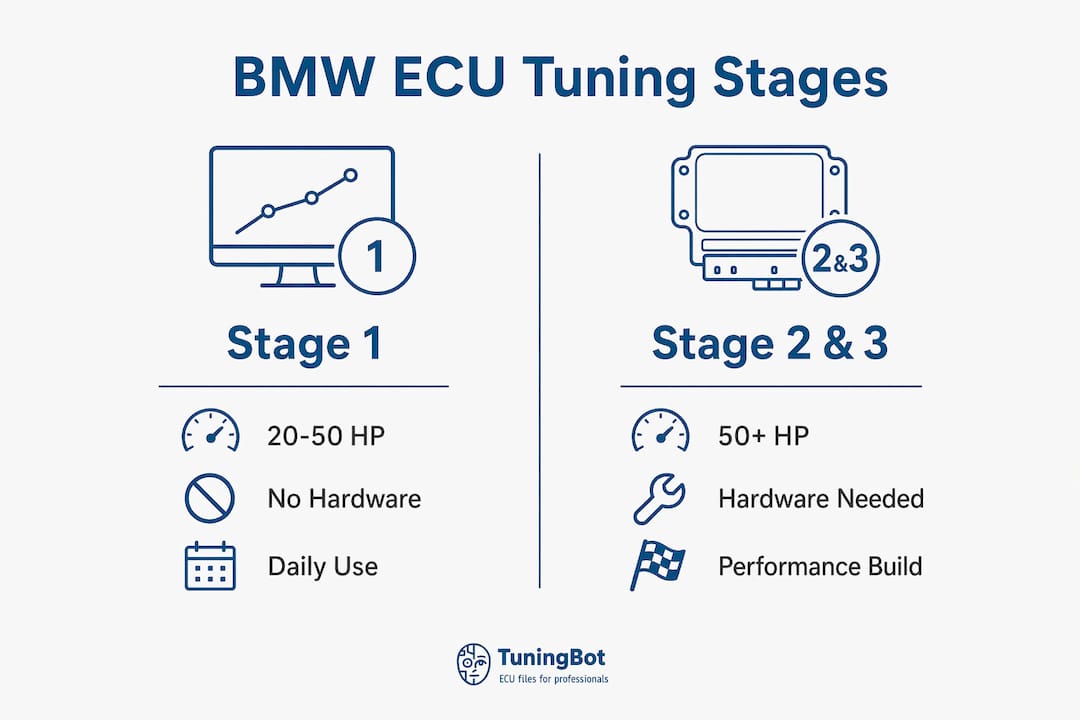
For BMW performance upgrades, matching the tune stage to your actual hardware configuration is non-negotiable. Reviewing real remapping results before committing to a stage gives you a concrete baseline for what to expect on your specific platform.
What tools and preparations are needed before flashing?
Preparation determines whether a flash succeeds or bricks your ECU. Typical tools for BMW ECU tuning include a compatible OBD-II adapter, the Bootmod3 app on iOS or Android, a laptop with tuning software, and a stable internet connection. Hardware must be compatible with your specific ECU model and unlock status before you begin.
The following checklist covers the minimum requirements for a safe flash:
- OBD-II adapter: Must be compatible with your ECU variant (Bosch MG1, MD1, N20, N55 DME, etc.)
- Bootmod3 app or equivalent: Installed and updated on a smartphone or tablet
- Stable internet connection: Required for license verification and tune file delivery
- Laptop with tuning software: Needed for advanced configurations and file management
- Fully charged battery or battery charger: Voltage drop during flash causes corruption
- Verified ECU compatibility: Confirm your ECU model and unlock status before proceeding
| Requirement | Details |
|---|---|
| OBD-II Adapter | Compatible with your specific BMW ECU model |
| Tuning App | Bootmod3 (iOS/Android) or equivalent platform |
| Internet Access | Stable connection for license and file delivery |
| Power Supply | Battery charger or conditioner to maintain stable voltage |
| ECU Unlock Status | Confirmed compatible or unlocked for post-2020 models |
Most BMWs made after 2001 support OBD flashing, but post-2020 models introduce additional unlock requirements. Identifying your ECU model before purchasing any tuning license saves time and prevents incompatibility issues.
Pro Tip: Check your ECU part number in the vehicle’s iDrive system under “Vehicle Information” or use an OBD diagnostic tool before purchasing a tuning license. MG1 and MD1 DMEs in post-2020 BMWs require bench unlock before OBD flashing is possible.
How to execute the BMW ECU stage tuning process step by step
The step-by-step ECU tuning sequence below applies to OBD-based flashing using Bootmod3 or a comparable platform. Follow each step in order. Skipping steps or rushing the process is the primary cause of failed flashes and ECU lockouts.
Connect the OBD-II adapter to the vehicle’s OBD port (located under the dashboard on the driver’s side). Confirm the adapter is recognized by the tuning app before proceeding.
Launch the tuning app and select your vehicle profile. In Bootmod3, this means selecting your exact engine code and ECU variant. An incorrect vehicle profile will load the wrong calibration map.
Load and verify the custom tune file. If you are using a file from a tuning service like TuningBot, confirm the file matches your ECU ID and hardware stage. Cross-reference the ECU ID details before loading.
Prepare the vehicle for flashing. Keep doors closed, seatbelt on, and headlights off to prevent electrical load fluctuations during the flash. Connect a battery charger to maintain stable voltage throughout.
Start the flash process and monitor progress. The OBD flashing process typically takes 5 to 30 minutes. Do not disconnect the adapter, close the app, or allow the device to sleep during this window.
Restart the engine after the flash completes. Allow the ECU to complete its initialization cycle. Some platforms require two key cycles before the new calibration is fully active.
Run a diagnostic scan. Check for any new DTCs (diagnostic trouble codes) that appeared after the flash. A clean scan confirms the tune loaded correctly.
Perform a controlled test drive. Start with light throttle inputs and monitor boost pressure, fuel trims, and knock counts if your platform supports live data logging.
A failed flash caused by power interruption or app crash is recoverable in most cases using the stock file backup. Always save the OEM file before writing any new calibration. This single step has saved countless ECUs from permanent damage.
Pro Tip: Use a dedicated battery conditioner rather than a standard charger during the flash. A conditioner holds voltage at a stable 13.8V without cycling, which is the exact condition the ECU expects during a write operation.
Common mistakes at this stage include using an incompatible adapter, flashing a Stage 2 map without the required hardware, and failing to back up the stock file. The safe tuning workflow from stock to Stage 1 covers these failure points in detail.
How to handle ECU unlocking for post-2020 BMW models
Post-2020 BMW ECUs present a distinct challenge for tuners. Modern BMWs use MG1/MD1 DMEs with advanced security that blocks standard OBD flashing entirely. Attempting to flash a locked MG1 or MD1 DME via OBD will result in a rejected write or a full ECU lockout.
The standard solution is a bench unlock service. This process requires:
- Physical ECU removal from the vehicle
- Shipment to an unlock service such as AutoTuner’s mail-in unlock program
- Bench-level access to the ECU’s internal memory to disable the security layer
- Return and reinstallation before OBD tuning can proceed
Mail-in ECU unlocking services like AutoTuner require physical ECU removal, shipment, and return, causing vehicle downtime. That downtime is typically several days to a week depending on the service provider’s location and workload. Plan accordingly if the vehicle is your daily driver.
For tuners who cannot tolerate that downtime, plug-and-play tuning boxes offer a faster alternative. These devices intercept sensor signals to simulate performance gains without touching the ECU. The trade-off is significant: tuning boxes deliver less precise calibration, cannot modify torque management tables, and do not access the ECU’s core fuel and ignition maps. They are a temporary workaround, not a replacement for proper ECU remapping.
To identify whether your BMW requires a bench unlock, check the ECU part number against the AutoTuner compatibility database or the TuningBot platform’s ECU Service Coverage. The part number is accessible via the iDrive system or a standard OBD diagnostic scan.
Key takeaways
BMW ECU stage tuning requires matching the tune stage to existing hardware, verifying ECU compatibility before flashing, and following a strict step-by-step process to avoid ECU damage or lockout.
| Point | Details |
|---|---|
| Stage selection is hardware-dependent | Never flash a Stage 2 or Stage 3 map without the required supporting hardware in place. |
| ECU compatibility check is mandatory | Confirm your ECU model and unlock status before purchasing any tuning license or file. |
| Post-2020 BMWs need bench unlock | MG1 and MD1 DMEs require physical removal and mail-in unlock before OBD flashing works. |
| Power stability prevents corruption | Use a battery conditioner during the flash to hold voltage at 13.8V and avoid write errors. |
| Always back up the stock file | Saving the OEM calibration before any flash gives you a recovery path if something goes wrong. |
Why stage selection is the decision that actually matters
I’ve reviewed enough failed BMW tuning projects to say this clearly: most problems trace back to stage selection, not execution. Tuners spend hours researching flashing tools and software, then load a Stage 2 map onto a car with a stock downpipe and wonder why they’re seeing knock events at 4,500 RPM.
The ECU tuning process is technically straightforward once you understand it. The Bootmod3 flashing sequence, for example, is well-documented and reliable. What is not straightforward is honestly assessing your car’s hardware state before you commit to a calibration. A B58-powered BMW M340i on a Stage 1 tune with a quality file from a verified source will feel dramatically different from the same car running a Stage 2 map it is not equipped to support.
My recommendation for anyone starting out: run Stage 1 for at least 3,000 miles before considering Stage 2. That period gives you real data on how your specific engine responds to increased boost and adjusted ignition timing. It also surfaces any pre-existing issues like worn spark plugs or marginal injectors before they become expensive failures under a more aggressive calibration.
The other habit worth building early is keeping a library of your ECU files. Stock file, Stage 1 file, and any intermediate calibrations should all be stored off-device. I have seen tuners lose their only copy of a stock file when a phone dies mid-flash. That situation is avoidable and entirely self-inflicted.
Professional flash services exist for good reason. When you are uncertain about file compatibility or ECU unlock requirements, the cost of a verified professional calibration from a platform like TuningBot is a fraction of what an ECU replacement costs.
Get professional BMW tuning files from TuningBot
TuningBot provides professionally calibrated ECU remapping files for BMW Stage 1, Stage 2, and Stage 3 applications, covering Bosch, Continental, and Marelli ECU platforms. Files are delivered quickly with real engineer support and no prepaid credits required.
Whether you are flashing a stock B58 for the first time or building a full Stage 3 S58 track car, TuningBot gives you access to verified calibration files matched to your ECU ID and hardware configuration. The platform integrates with Alientech KESS3, AutoTuner, Magic Motorsport and PCMFlash workflows. Check current support in the ECU Service Coverage, then upload your file through Tune Your File for engineer-backed calibration without prepaid credits or account registration.
FAQ
What is BMW ECU stage tuning?
BMW ECU stage tuning is a calibration process that modifies the engine control unit’s fuel, ignition, and boost parameters to increase performance output. Stages 1, 2, and 3 define the level of hardware support the tune requires.
How long does an OBD flash take on a BMW?
The OBD flashing process typically takes 5 to 30 minutes depending on the ECU platform and tune file size. Do not interrupt the connection or allow the device to sleep during this window.
Do post-2020 BMWs require special unlocking before tuning?
Yes. Post-2020 BMW ECUs use MG1/MD1 DMEs with security layers that block standard OBD flashing. A physical bench unlock service is required before any calibration can be written.
Is stage 1 tuning safe for a daily-driven BMW?
Stage 1 tuning is safe for daily use when performed with professional-grade software and verified calibration files. No hardware modifications are required, and the tune operates within the engine’s thermal and mechanical limits.
What happens if the flash fails mid-process?
A failed flash caused by power interruption or connection loss is recoverable in most cases using the backed-up stock file. Always save the OEM calibration before writing any new file to the ECU.